


Studio Editor: About Studio Branches of Wix Editor Sites
5 min
In this article
- Utilize advanced layout and design options
- Keep your clients online
- Maintain site exposure
- Site pages
- Site content
- Build an interactive experience
- Important information about apps and site data
- Important information about the Wix Editor branch
Creating a Studio branch of a Wix Editor site allows you to provide clients with advanced site designs and capabilities, and promote their online presence.
There are some things to keep in mind when creating and publishing a Studio Editor branch. This article suggests ways you can optimize the process—ensuring you and your clients have the smoothest experience possible.
Important:
It's only possible to create a Wix Studio version of a Wix Editor site with a Premium plan.
Utilize advanced layout and design options
The design of the Wix Editor site is not carried over to the Studio branch, meaning you have full freedom to build the design you want. New to the Studio Editor? Here are some ideas to get you started:
- Site structure: Get started by adding and managing site pages. You can then use sections and cells to organize the content of each page.
- Responsive design: Studio Editor sites are fully responsive, so they look great on every screen size. Apply scaling to text, set automatic resizing, and customize each breakpoint to create a smooth experience for every device.
- Site Styles: The Site Styles panel is your one-stop shop to set up and manage the site's design. Define the site's width, text styles, and colors to create a consistent look for your clients.
How do I open my Studio branch?
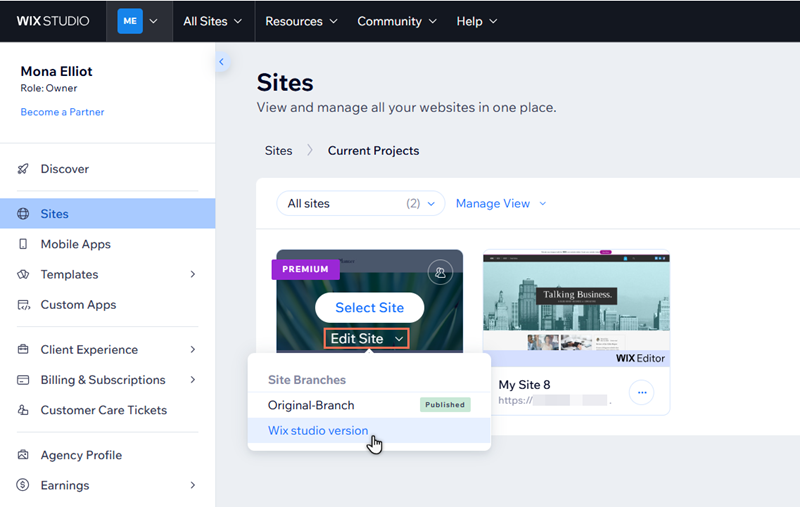
Keep your clients online
Branches share most apps and data, meaning you can move from one site branch to the next without needing to worry about downtime for your clients and their customers.
Ready to publish the Wix Studio branch? This automatically unpublishes the Wix Editor version, so you don't need to do anything else to complete the transfer. Learn how to publish the Studio branch.
Note:
Some data and apps aren't carried over from Wix Editor to Wix Studio.
Maintain site exposure
Branches share data and information, meaning the site's domain is assigned to whichever branch you have published. When publishing your Studio Editor branch for the first time, it's therefore important to keep the site's pages and content in mind.
Let's imagine we've created a Wix Studio branch of a Wix Editor site. The original Wix Editor version is Branch 1, and is already live with the domain plantergardencenter.com. The new Studio version is Branch 2.
Site pages
The site's visibility in search engine results is based on Branch 1. If we publish Branch 2, changes to content like page titles and URL slugs can affect this visibility.
We therefore advise aligning site pages between branches as much as possible to minimize the impact. Ways of doing this include:
- Page titles: Give pages the same titles on different branches. For example, if we've named the page that lists community events 'Workshops' on Branch 1, it should also be titled 'Workshops' on Branch 2. Learn how to change page titles.
- Site menus: Differences in menus between branches may affect the discoverability of site pages on search engine results. If the site menu on Branch 1 displays the 'Workshops' page, we should also add it to the menu on Branch 2 to make sure visitors can access it.
- URL slugs (for older branches): The URL slugs of corresponding pages should also match between branches. This has become automatic with our most recent updates. However, if you created a Studio branch of a Wix Editor site before mid-February 2026, you may need to manually update the slug on Branch 2 to ensure it matches Branch 1.
Site content
Written content on the original published branch has been crawled by search engines, and therefore contributes to the site's discoverability on search result pages. This can be affected if a newly published branch has different written content (or if the content is placed on a different page).
We recommend using the same text content on the new branch, and adding it to the corresponding page. For example, if we have an 'About Us' paragraph on the homepage of Branch 1, that same paragraph should also be on the homepage of Branch 2.
Build an interactive experience
The Studio Editor is truly state of the art. There are hundreds of ways to elevate your client's site, and create an online brand that is both unique and true to their vision.
Your Studio Editor has elements for every need. For example, you can add forms to capture inquiries or customer information, and use media to showcase galleries and promotional material.
You can also build eye-catching pages with animation and effects. Add custom cursors to bring interactive branding to the site, or highlight elements with mouse effects. You can even use the Rive element to build and integrate a custom animation.
Ready to get started?
Important information about apps and site data
While most of the site's apps and data are shared with your new Wix Studio branch, the site's design and content (pages, elements etc.) are not carried over. Additionally, submissions to old Wix Forms are not transferred to the Studio branch.
When you first open the Studio Editor, you may see that not all of the site apps have been carried over. This can be due to a technical issue on our end. Don't worry – you can manually add it to the branch from your editor.
However, certain apps are not supported in the Studio Editor and cannot be transferred or installed to your Wix Studio branch.
Show me unsupported apps
Important information about the Wix Editor branch
Once you publish the Studio branch, it is not possible to go back and republish the original Wix Editor branch. However, it is still available in your site's dashboard to access and edit.
If you think you may want to republish the original Wix Editor site in the future, we recommend duplicating it before you publish the Studio branch.
Note:
Site duplicates are new sites, meaning they don't share the original site's dashboard or data.
