


Wix Editor: Elements Available in the Editor
In this article
- Element categories
- Essential elements in the editor
- Decorative and interactive elements in the editor
- Advanced elements and apps in the editor
- FAQs
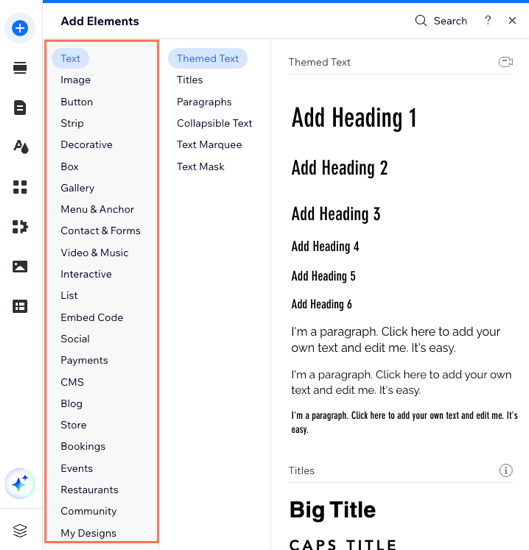
There are hundreds of elements in the Wix Editor to help you build, design, and manage your site. You can choose from a range of categories and types to ensure you have everything you need to expand your business or brand.
Element categories
There are three main categories which cover all of the different element types in the editor:
- Essential elements: These are used to display most of the content on your site. They include text, menus, images, and buttons. Use essential elements to set up your site, and showcase your services and information.
- Decorative elements: We have a ton of elements that can be used for both functional and decorative purposes. They include shapes, vector art, and galleries.
- Advanced elements: You can add advanced elements to capture leads and further expand your business. Popular advanced elements include repeaters, forms, and embeds.
Essential elements in the editor
Begin building your site with essential elements. They make up the most important parts of your site's content, so you have everything you need to display information and keep visitors informed.
Element types are divided by tabs in the Add Elements panel, so you can easily find what you're looking for. Check out the list below to see the available essential element types to add in the editor.
Text
Image
Button
Strip
Box
Menu & Anchor
Social
Decorative and interactive elements in the editor
Use decorative and interactive elements to make your site appealing for visitors. You can use them for design purposes, or to encourage your visitors to keep clicking.
See below all the decorative and interactive elements available in the Add Elements panel.
Decorative
Gallery
Video & Music
Interactive
My Designs
Advanced elements and apps in the editor
Advanced elements allow you to keep growing and expanding your business, as well as further upgrade the design of your site. You can add elements like forms and lists that connect to a dataset, or even custom elements with your own code.
Check out our list below to see all of the advanced elements and apps you can add to your site from the panel.
Contact & Forms
List
Embed Code
Input
CMS
Blog
Store
Bookings
Events
Restaurants
Community
FAQs
Click a question to learn more about elements in the Wix Editor.
What are themed elements?
Why are some elements missing from the Add Elements panel?
Are there elements that require extra steps to set up?
Where can I learn more about each element type?
 at the top of the
Add Elements panel.
at the top of the
Add Elements panel.

