


Wixel: About AI Credits
8 min
In this article
- Understanding what your AI credits cover
- Checking your AI credit balance
- Renewing your AI credits
- Adding top-up credits
- Tips for saving AI credits
- FAQs
This article refers to the new Wixel, released in December 2025. If you're unsure whether you’re using the new or previous Wixel, view more information here.
AI credits give you a certain amount of usage for Wixel's AI-powered design features, such as generating or editing images, videos, logos, docs, and forms. The number of credits each action uses depends on how complex your request is and which tool you use.
While Wixel’s AI is designed to deliver the best possible results, outcomes may vary and we can’t guarantee AI-generated outputs to meet a specific level of quality, accuracy, or relevance. Make sure to review all outputs before using or publishing them. For more information and other terms applicable to AI Services, please review the full Wix Terms of Service.
Important:
- When you purchase AI credits through the Wixel paid plans, you are pre-paying for the use of certain designated AI features. AI credits are not a digital currency, security, commodity, or any other kind of financial instrument and are not redeemable for any cash value. AI credits are only redeemable for the specified AI features within Wixel or the Wix ecosystem.
- Wix reserves the right to change the credit cost and the number of credits required for using AI features at any time.
- You have no right or title in AI credits except as expressly stated by Wix.
- You may not sell or transfer AI credits to another user or account.
Understanding what your AI credits cover
While the exact number of designs you can create with your AI credit balance is not guaranteed, the table below gives an estimate for each feature. The provided numbers are based on standard models and the average complexity of a request, and are provided as examples only.
This table shows what you could create if you used all of your credits on that feature alone. For example, on the Max plan you could generate up to 330 images if you only spend your credits on images.
Feature | Examples | Estimated number of designs per plan |
|---|---|---|
Make a social post, product photo, or illustration. | Max: Up to 330 images Pro: Up to 140 images Basic: Up to 40 images Free: Up to 5 images | |
Create a new logo for a business or brand. | Max: Up to 440 logos Pro: Up to 180 logos Basic: Up to 50 logos Free: Up to 5 logos | |
Generate a promo video, animation, or video ad. | Max: Up to 80 videos Pro: Up to 35 videos Basic: Up to 10 videos Free: Up to 2 videos | |
Build a feedback or registration form. | Max: Up to 300 forms Pro: Up to 170 forms Basic: Up to 50 forms Free: Up to 6 forms | |
Write a report, resume, or proposal. | Max: Up to 280 docs Pro: Up to 130 docs Basic: Up to 40 docs Free: Up to 6 docs | |
Make an online invitation where guests can RSVP. | Max: Up to 120 RSVP pages Pro: Up to 40 RSVP pages Basic: Up to 15 RSVP pages Free: Up to 3 RSVP pages |
Your actual credit usage may be higher or lower, depending on what you create and how you use Wixel. The credit cost will be calculated once you perform an action, and your remaining credit balance will be displayed at the top of your project.
Checking your AI credit balance
You can check your current AI credit balance from your Wixel home page or while working on your project.
To check your AI credit balance:
Desktop browser
Mobile browser
Wixel app
- Go to Wixel.
- View your AI credit balance at the top.

Tip:
While designing, you can check your AI credit balance at the top right corner of your project. 
Renewing your AI credits
Your credits automatically reset each month. Unused AI credits do not roll over to the next credit cycle.
- Free plan: You can use up to 30 credits per day, up to a maximum of 120 credits per month. Credits renew each day until you have used a total of 120 credits in a single month.
- Wixel paid plans: Credits renew monthly based on your renewal date. For example, if you purchased a plan on January 10, your credits renew on the 10th of every month.
You can see when credits will renew by hovering over the Information icon  in the AI credit balance window at the top of the Wixel home page and at the top of your project.
in the AI credit balance window at the top of the Wixel home page and at the top of your project.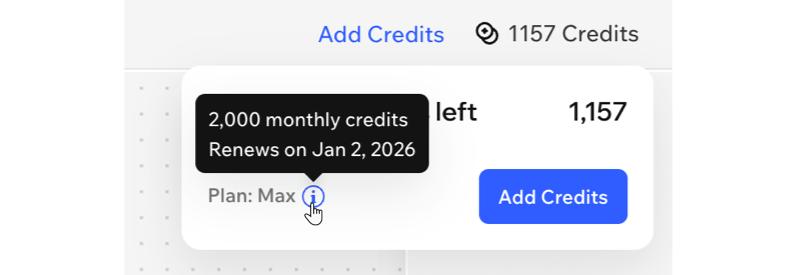
Need more AI credits?
If you're on the Max plan, you can purchase top-up credits to keep creating with Wixel's AI features after you use up your monthly credits.
Adding top-up credits
Top-up credits are booster AI credits you can purchase if you are on the Max plan, to keep creating with Wixel's AI features after you use up your monthly credit allowance. They can be purchased several times per account. Any unused top-up credits will expire 2 years after purchase.
Wixel always deducts credits from your monthly plan first, and then from your top-up credits when your regular credits run out. Learn how to purchase top-up credits.
Tips for saving AI credits
With a few smart habits, you can stretch your credits further and keep building in Wixel without hitting your AI credit limit too soon. Below are some easy tips to help you save credits and make every AI action count, so you can save them for unique requests and complex edits.
Plan your designs before making changes
Be specific with your requests
 in the chat to connect Aria to the right design or element so that it knows what to update.
Use templates to jumpstart designs
Make small edits manually
Keep an eye on your credits
FAQs
Click a question below to learn more about AI credits in Wixel.
What actions require AI credits?
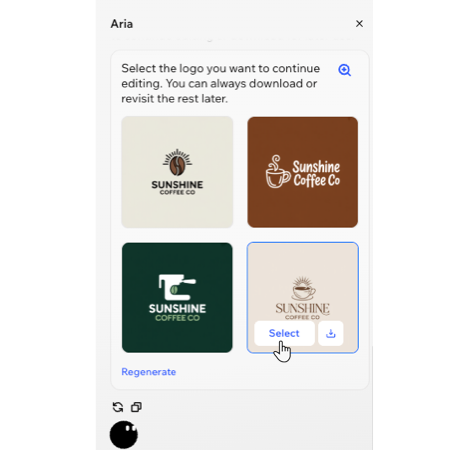
Aria generated 4 options for images and logos, how are AI credits deducted for them?
Do my credits expire?
Can I buy more AI credits without upgrading?
Can I get my AI credits back if I'm not satisfied with the result?
When is my next billing or renewal date?
