


Connecting Stripe as a Payment Provider
In this article
- Connecting Stripe
- Managing your Stripe payment methods
- FAQs
Connect Stripe to your site to accept payments from customers. This integration supports a variety of payment methods, including credit card / debit card, iDEAL | Wero, Bancontact and AliPay. With Stripe, you can also set up
recurring payments for repeating services or subscriptions. Your customers can pay you online, or you can
enter the details for them manually.
| General Info | |
|---|---|
Supported countries
|
Austria, Australia, Belgium, Bulgaria, Canada, Croatia, Cyprus, Czech Republic, Denmark, Finland, France, Germany, Gibraltar, Hong Kong, Hungary, Ireland, Italy, Japan, Latvia, Liechtenstein, Lithuania, Luxembourg, Malaysia, Malta, Mexico, Netherlands, Norway, New Zealand, Poland, Portugal, Romania, Singapore, Slovenia, Slovakia, Spain, Sweden, Switzerland, Thailand, United Arab Emirates, United Kingdom and United States
|
Supported payment methods
|
Credit card / debit card, iDEAL | Wero, Bancontact, Google Pay, Apple Pay and AliPay.
Note: Not all payment methods are available in all supported countries. The payment method availability depends on your country. |
Accepted currencies
|
View the
accepted currencies per country.
The currency used in your Wix account must match the currency in your Stripe account. If the currencies do not match, the transactions may be declined. Learn how to change your currency. |
Processing fees
|
2.9% + $0.30 per transaction. Fees may vary by country. For more information,
visit Stripe.
|
Minimum charge
|
$0.50 (USD) For more information and minimum amounts for other countries,
visit Stripe.
|
Additional benefits
|
Supports recurring payments (e.g. for Wix Video subscriptions, etc).
|
Managing your account
|
For information on topics such as payout schedules, refunding a customer, chargeback disputes, and more, please
visit the Stripe Help Center.
Your Stripe account is subject to Stripe's applicable terms, policies, and fees. |
Connecting Stripe
- Go to Accept Payments on your site's dashboard.
Tip: Check your business location at the top right. If incorrect, click the drop-down menu to change it. - Click See More Payment Options.
- Click See Options next to Third-Party Credit / Debit Card Providers.
- Click Connect next to Stripe.

- Depending on whether you need to create a new Stripe account or have an existing account, follow the instructions:
Have an account
Don't have an account
Managing your Stripe payment methods
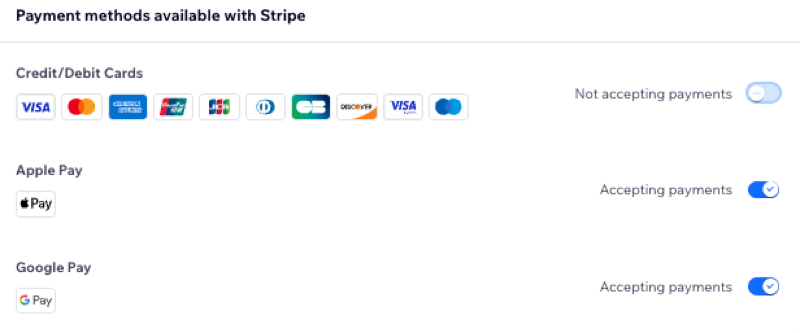
Once you've connected Stripe as your payment provider, you can enable or disable your payment methods (credit card, iDEAL | Wero, Bancontact, etc) as you need them.
Payment method availability depends on your country. The options you see may vary based on where you are located.
To manage your payment methods:
- Go to Accept Payments in your site's dashboard.
- Click Manage next to Stripe.
- Use the toggles to enable or disable your Stripe payment methods.
FAQs
Click a question below to learn more about accepting payments.
Who is eligible to accept European payment methods using Stripe?
Why are my ACH payments in 'Pending' status?
How can I tell if a payment method is active?

How do I enable multiple payment methods?
Is my currency supported?
What is a minimum payment amount?
How do I get my payouts?
My customers' payments are being declined. What can I do?
Why can’t I connect my desired payment provider?
Do I need to upgrade my site to accept payments?