


Adding Structured Data Markup to Your Site's Pages
7 min
In this article
- Using AI-generated structured data for blog posts
- Adding manual structured data to your site pages
- Default manual structured data markup options for your Wix site
- Adding manual structured data markup to pages using SEO Settings
- FAQs
Important:
- Structured data markup is an advanced topic. Wix Customer Care cannot help you with any changes to your markup. However, if you experience any errors, you can check out our structured data markup troubleshooting help.
- Need help from an expert? You can hire an SEO professional from the Wix Marketplace.
Structured data markup is a standardized format for giving search engines detailed information about your page. You can use AI-generated structured data for blog posts, or add manual structured data markup to other page types. Search engines like Google can also use markup to create rich results like article previews, product previews, and FAQs for your page's search results.
Note:
Adding structured data markup to your site's pages does not guarantee that search engines will create rich results for them.

Using AI-generated structured data for blog posts
Important:
AI-generated structured data currently works only for Wix Blog posts. To add structured data to other page types, use manual structured data markup.
AI-generated structured data scans your blog post content and creates relevant schema markup for you. This is useful if you want Wix to generate and refresh markup automatically for your published blog posts.
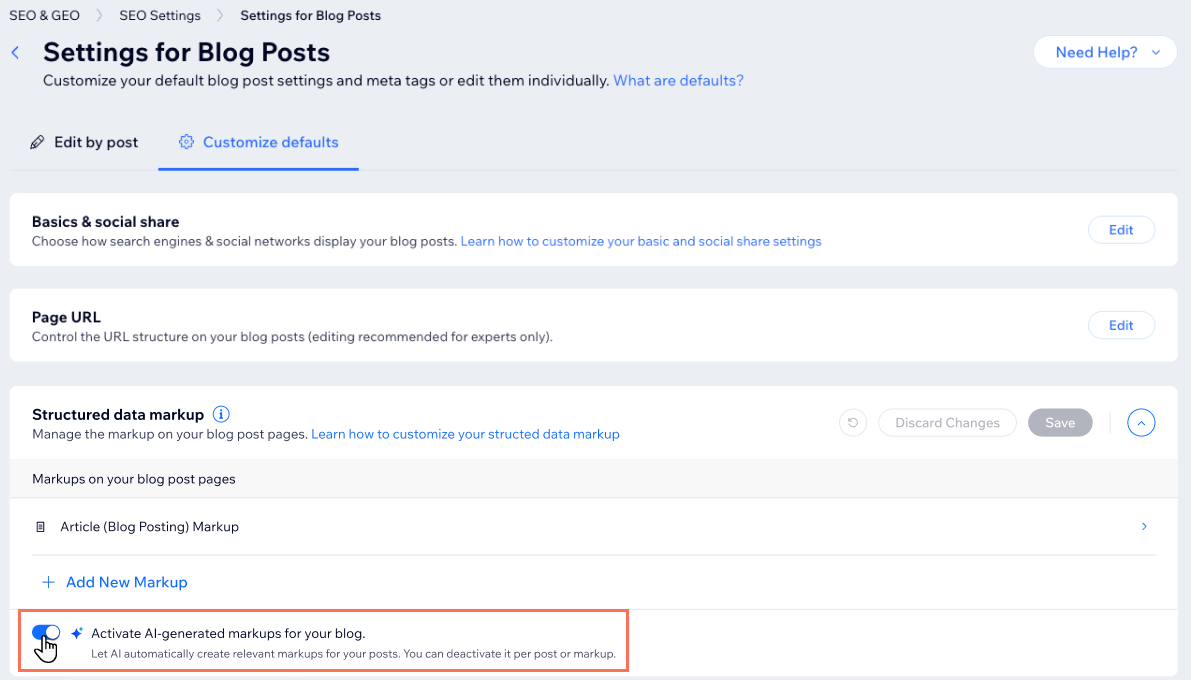
To enable AI-generated structured data for blog posts:
- Go to SEO & GEO in your site's dashboard.
- Scroll down to Tools and settings.
- Click SEO Settings.
- Click Blog posts under Edit by page type.
- Click the Customize defaults tab.
- Click Edit next to Structured data markup.
- Click the toggle next to Activate AI-generated markups for your blog.
- Click Save.
Tip:
Learn more about using AI-generated structured data for blog posts, including how to view generated markups, exclude specific markups, and create custom markups.
Adding manual structured data to your site pages
Manual structured data gives you full control over the markup added to a page. Use this option if AI-generated structured data is not available for the page type you need, or if you want to create and manage custom JSON-LD markup yourself.
Before adding your markup, create the JSON-LD code you want to use. You can try using a tool like this markup generator tool. Select a markup type from the dropdown menu and customize it for your content.
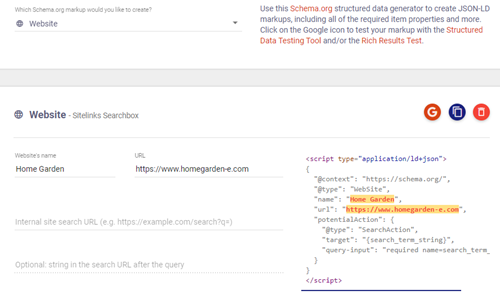
Alternatively, you can get markup models from Schema.org and customize them for your page's content. These markup models are known as "types" and correspond to different types of content like articles, products, and FAQs. Each type has its own specific set of properties. For example, an "Article" type markup includes properties for the author, publishing date, and publisher.
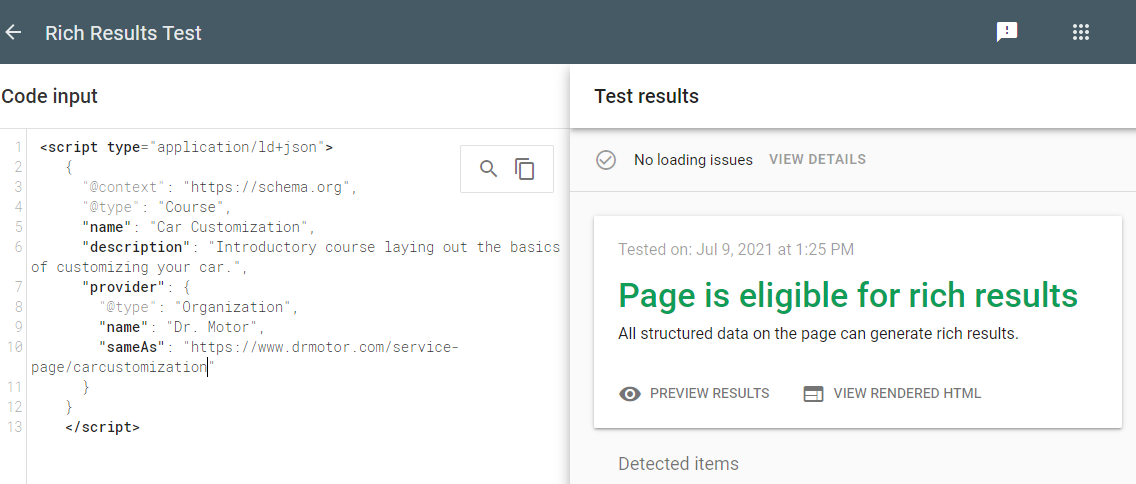
After you've created your markup, you can then check if it's eligible for rich results using the Google Rich Result Tests tool. Below is an example of a Rich Results Test of the markup for a course on a Wix site.
Some of your site's pages like Wix Stores product pages already come with preset markup when you create them. You can customize the markup for these pages in your site's SEO Settings.
Important:
- Wix only accepts structured data using JSON-LD markups.
- Structured Data must be less than 7,000 characters to be added.
- Google guidelines require the information in the markup to be part of your page. If some of the information included in your markup doesn't appear in the page, it might not show as a rich result. Learn more about Google's structured data guidelines.
To add manual structured data to a page:
Wix Editor
Studio Editor
- Go to your editor.
- Click Pages & Menu
 on the left side of the editor.
 - Click the More Actions icon
 next to the relevant page.
 - Click SEO basics.
- Click the Advanced SEO tab.
- Click Structured Data Markup.
- Click +Add New Markup.
- Add your new markup under Write your markup in JSON-LD format.
- Click Apply.
Note:
- You can add up to five markups per page.
- After you've added your markup, click the More Actions icon
 to edit, test, or delete it.
Default manual structured data markup options for your Wix site
Wix offers a range of default structured data markup options for your site. For some page types, Wix automatically adds these markups when you create the page. For other page types, you can choose to enable or disable the markup.
- Wix adds preset markups to some of your site's pages by default when you create them. These are Wix Stores product pages, Wix Bookings services pages, Wix Blog posts, and Wix Events pages. Learn more about preset markups
- When you add a business name and location to your site, Wix automatically creates Local Business markup for your homepage. Local Business markup can help improve your website's search results and ranking. Learn more about local business markup
- Wix automatically adds Sitelinks search box structured data markup to your site's pages when you add the Wix Site Search app to your site. Google uses this markup to add a search box when your pages appear as search results. Learn more about Wix Site Search
- By default, when AI-generated structured data is enabled, AI analyzes each eligible published blog post, generates relevant schema types, and adds the valid markups to that post. Learn more about using AI-generated structured data for blog posts
- You can also choose to enable FAQ structured data markup for collapsible lists in your Wix Blog posts. Search engines like Google can use FAQ markup to display a list of questions and answers for your page in search results. Learn how to add an FAQ to a post
Note: Due to a Google update, FAQ and How-To structured data will only appear for large government sites and health websites. Learn more about this update. If you already have FAQ structured data markup, you do not need to remove it as unused structured data has no effects on Google Search.
Adding manual structured data markup to pages using SEO Settings
SEO Settings let you apply the same SEO logic to multiple pages at the same time. Instead of editing each page's individual settings, you can customize the settings that apply to entire page types for your site.
Some of your site's pages come with preset markup when you create them. These are Wix Stores product pages, Wix Bookings services, Wix Blog posts, and Wix Events pages.
You can customize the structured data markup for these pages in SEO Settings. You can also add variables to your markup to create dynamic code.
For Wix Blog posts, you can combine manual structured data in SEO Settings with AI-generated structured data that updates automatically. Learn more about using AI-generated structured data for blog posts
FAQs
Click a question below to learn more about adding structured data markup to your site's pages.
What is the difference between AI-generated and manual structured data?
Can I use AI-generated structured data on pages other than blog posts?
Will AI-generated structured data replace my manual markups?
What happens to my AI-generated structured data after I edit a blog post?
What page types can I add manual structured data markup to?
Get help with your SEO from a
professional.
Hire an Expert
