


Using Your Free 1 Year Domain Voucher
In this article
- Using your voucher
- FAQs
You receive the 1 year
free domain voucher with the initial purchase of selected yearly or multi-year
Premium or
Studio site plans.
After you explore and
compare domain prices, the voucher allows you to register a domain for free for
1 year. Your domain will then renew the following year at the
regular price.
Using your voucher
Head over to the Domains page in your Wix account to claim your voucher. You'll need to enter your payment information but you won't be charged – this allows us to process your renewal after the first year, ensuring your domain stays live.
Important:
Your voucher must be redeemed within 2 months of purchasing your plan. You can check the expiration date of your voucher in the
Premium Vouchers section of your account.
To use your voucher:
- Go to Domains in your Wix account.
- Click Buy a Domain or Get a New Domain.
- Type the domain you'd like to claim, including the domain extensions (e.g. .com) and click Search.
- Click Get It if the domain is available.
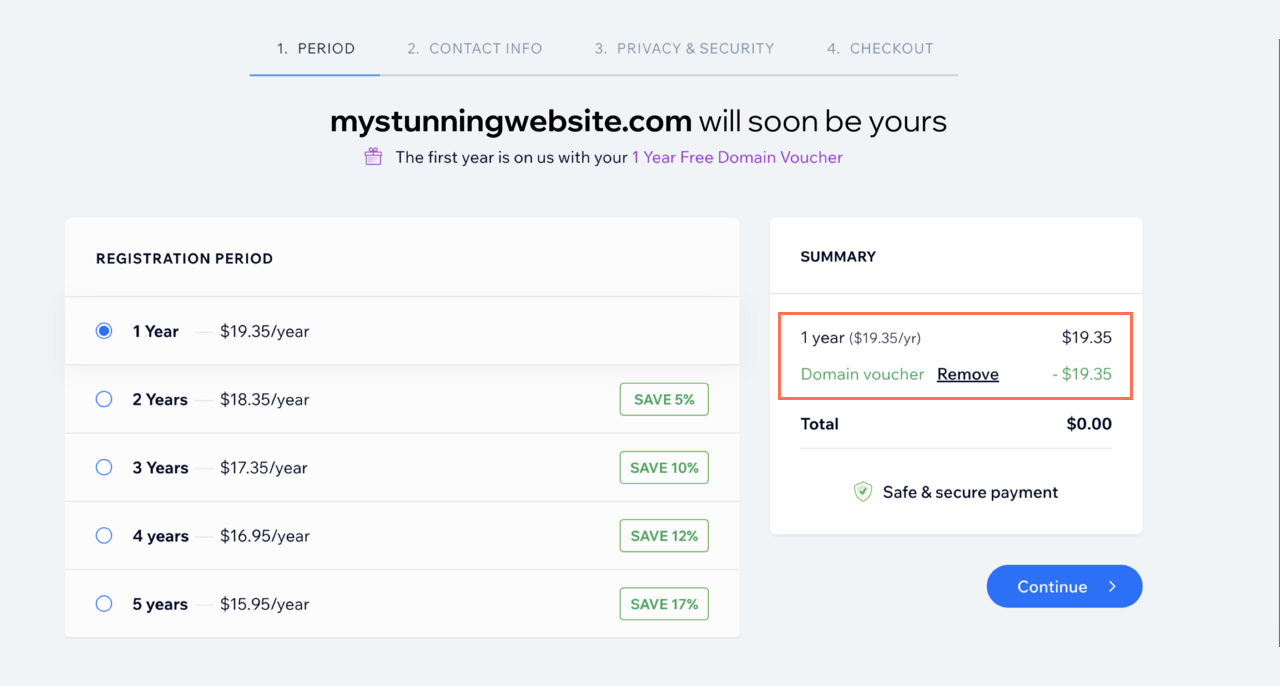
Tip: if your domain is not available, you can claim one of the recommended alternatives or try searching for a different domain. - Choose a registration period and click Continue.
Note: Make sure the domain voucher is applied in the summary section at this point.
- Enter (or edit) your contact information and click Continue.
- Select a privacy option:
- Full privacy protection: Your contact details won't appear in the WHOIS domain information records. The voucher does not cover the cost of Private Registration.
- Basic Protection: Some personal information will be public, but your name, address, phone number and email will be kept private. If someone wishes to contact you, they are redirected to a contact form that protects you from receiving spam. You can only change this option to full privacy protection when manually extending a domain subscription.
- Click Continue.
- Select your payment method.
Note: You'll see the voucher discount applied before submitting your purchase. - Click Submit Purchase.
- Assign the domain to your site.
FAQs
Click a question below to learn more about your domain voucher.
What domain extensions can I use my voucher for?
Can I apply this voucher to a domain I've already purchased?
Can I use the voucher to renew a Wix domain?
Can I apply this voucher to a domain I want to transfer to Wix?
Does this voucher include privacy protection?
I'm a collaborator on someone else's site and I need to purchase a domain. Can I apply a voucher?
