


Wix Editor: Formatting Your Text
5 min
Formatting helps you organize your text for clearer communication. There are thousands of possible combinations. You can align, bullet, or number your text to keep it neat. Add italics, underlining, highlighting or bold your text to make it stand out.
Upload your own fonts, and choose language fonts that are compatible with the language(s) of your site to get your message across exactly as you intended.
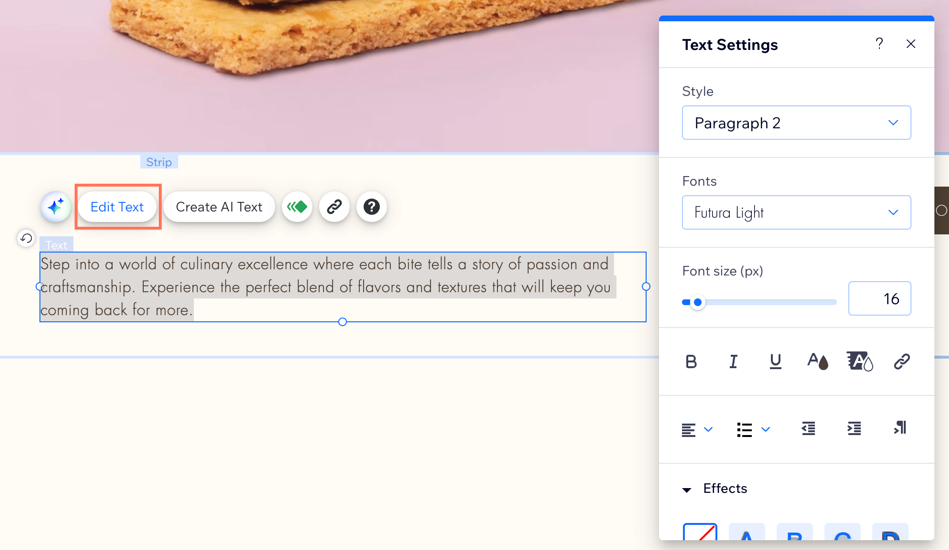
To format your text:
- Go to your editor.
- Highlight the text you want to format.
- Click Edit Text.
- Format your text using the following tools:
Style
Fonts
Font size
Bold, italicize, and underline text
 , Italics icon
  , and/or Underline icon
  .
.Color
 and select a color.
Highlight
 .
.Link text
 to choose the link destination and enter the link details.
 Align
 and select an alignment.
Bullets & numbering
 to choose the list type.
Indent
 or the Increase indent icon
  to change the size of the indent.
Text direction
 .
.Effects
Character & line spacing
Vertical text
SEO & accessibility
FAQs
Click a question to learn more about formatting text.
Can I link text that spans over two paragraphs?
How can I remove the underline from hyperlinked text?
What are the usage restrictions for fonts in Wix?
