


HIPAA Compliance for Your Wix Site
In this article
- Activating PHI protection
- Signing a Business Associate Agreement
- Completing data requests
- FAQs
The Health Insurance Portability and Accountability Act (HIPAA), is a US federal law that protects the privacy and security of patient health information. As a healthcare provider, it's your responsibility to ensure the security of your clients' protected health information (PHI).
Activate PHI protection for your Wix site to protect your client information. Being HIPAA-compliant builds trust and reputation for your healthcare business.
Before you begin:
- Wix sites built on the Wix Editor or Wix Studio Editor can be HIPAA compliant. However, you must have a supported Premium or Studio site plan to activate PHI protection. HIPAA compliance is available with Business, Plus, Elite, Business Elite and Enterprise plans.
- While Wix provides tools and HIPAA-compliant hosting to help you comply with HIPAA, you are responsible for how you use and configure your site.
Some features, apps, or tools on Wix may not be compatible with HIPAA and activating PHI protection could disable, restrict, or remove some functionalities of your site. HIPAA compliance depends on your own setup, chosen apps, and how you manage sensitive health data.
Activating PHI protection
The
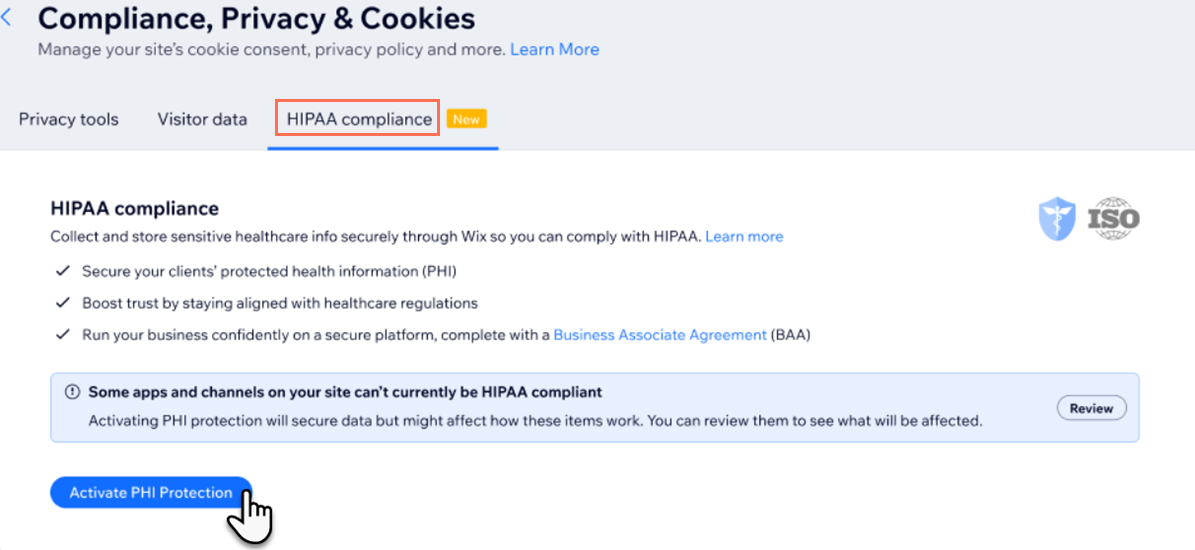
Compliance, Privacy & Cookies page of your site allows you to manage privacy tools, data requests and HIPAA compliance. Activate PHI protection to help secure your site's data to HIPAA standards.
To activate PHI protection:
- Log in to your Wix account on desktop.
- Go to HIPAA Compliance in the Compliance, Privacy & Cookies page of your site's dashboard.
- Review the list of HIPAA-compliant apps provided by Wix.
- Click Activate PHI Protection.
Note: If you don't have a requisite site plan, you'll be prompted to upgrade before activating PHI protection.
Signing a Business Associate Agreement
A
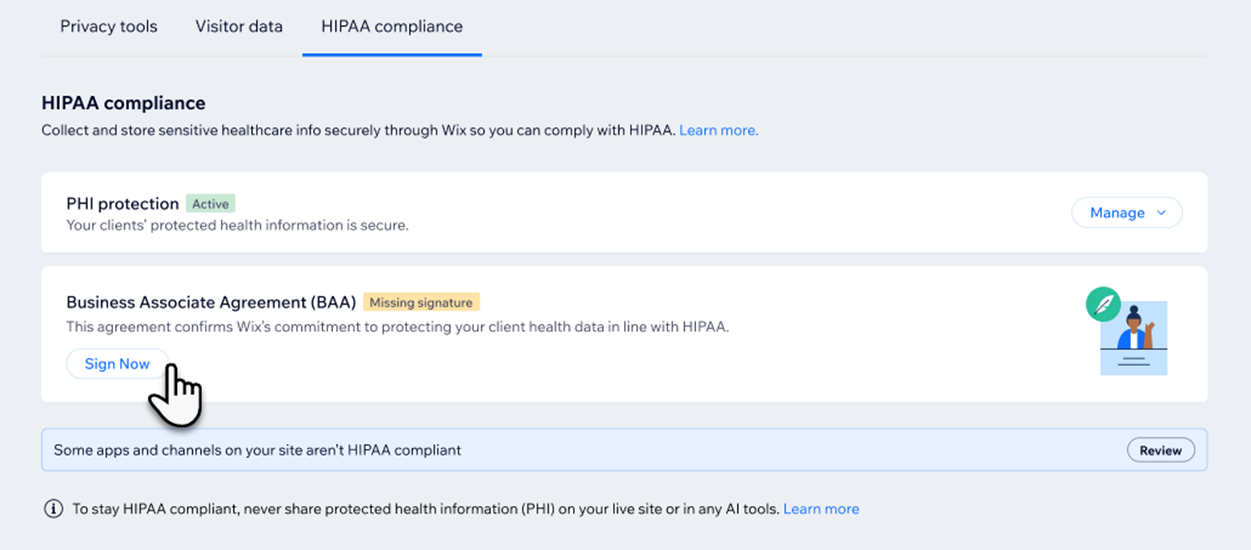
Business Associate Agreement (BAA) is a contract between you and Wix that sets out the conditions under which we will handle your clients' protected health information. Once you’ve activated PHI protection, you can sign the BAA.
The BAA includes such details as:
- What information is protected
- The special security measures Wix takes to safeguard your health data
- The rules and limits on how Wix can use or share your health information
- Your responsibilities as a user, including making sure you don’t add health data to non-HIPAA services and managing your account settings appropriately
- What happens if there’s a security incident, and how notifications work
- What to do when your PHI protection ends, including removal of your health data
Signing a BAA is required for HIPAA-compliant businesses in the United States. Wix provides you with a record of the agreement which you can refer to anytime if needed.
We recommend that you do not collect, store, or process any PHI on your Wix site until you have activated PHI protection and completed the BAA signing process. If you've already processed PHI through your site, be aware that this data may not have been handled to HIPAA standards.
To sign a BAA:
- Log in to your Wix account on desktop.
- Go to HIPAA Compliance in the Compliance, Privacy & Cookies page of your site's dashboard.
- Click Sign Now next to Business Associate Agreement (BAA).
- Review the agreement.
- Click the checkbox to indicate that you're authorized to sign on behalf of your company.
- Enter your name, date and signature and click Submit.
- (Optional) Click View to review your signed BAA at any time from the HIPAA compliance tab of your site's Privacy & Compliance page.
Completing data requests
Users of PHI-protected sites may request a copy of that site's PHI data, or have it permanently deleted, if required.
To complete a data request:
- Log in to your Wix account on desktop.
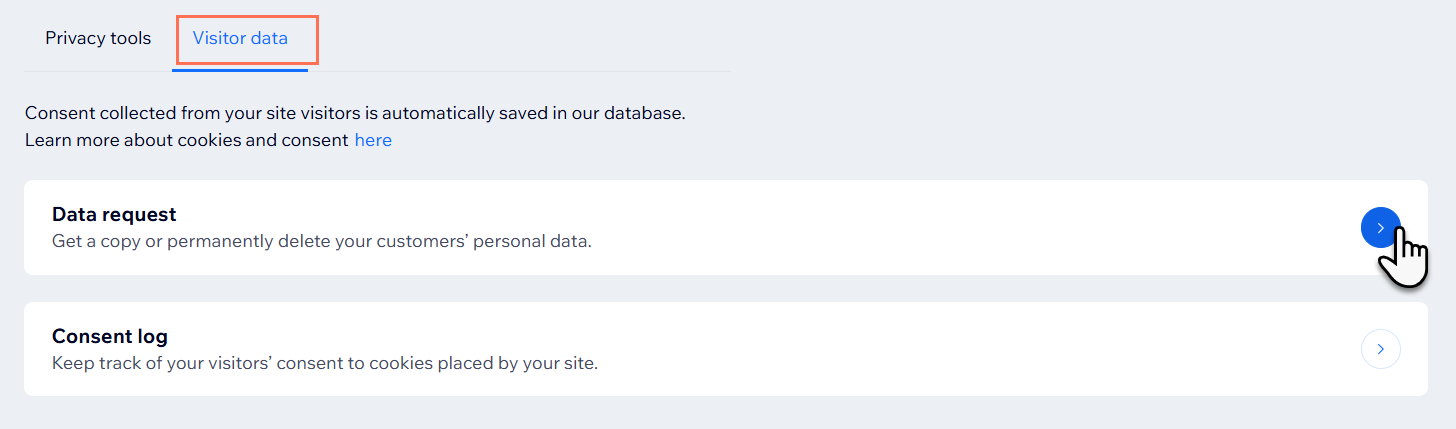
- Go to Compliance, Privacy & Cookies in your site's dashboard.
- Click the Visitor data tab.
- Click Data request.
- Click + New Request and select an option:
Export data
Delete data
FAQs
Click a question below to learn more about HIPAA compliance.
What happens to my PHI protection if I cancel my site plan?
Which apps from the Wix App Market are HIPAA-compliant?
Does HIPAA compliance from Wix also meet international information security standards?
Can I add site collaborators to a HIPAA-compliant site?
How does HIPAA compliance effect my available communication channels?
What happens if I transfer site ownership of my HIPAA-compliant site?
Is analytic data still available if I activate PHI protection for my Wix site?
My site is HIPAA-compliant. Should I add notes to bookings?
Can I activate PHI protection from my mobile device?
I have old Wix Forms installed on my site. Are my form collections handled to HIPAA standards?
Can I deactivate PHI protection on my Wix site?
