


Automatic Pay Links in Booking Emails and SMS Messages
3 min
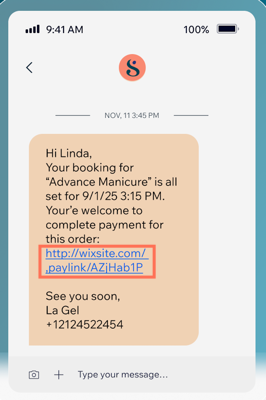
Pay links let your clients pay for booking sessions quickly and securely. When you enable automatic pay links, they are included in your booking email and SMS messages, saving you time on payment follow-ups and giving clients an easy way to pay.
For example, if a client books a service with a deposit, you can send them a payment link in a reminder message. When they receive it, they just click the link to pay the remaining balance.
Important:
- If you edited a booking email automation, revert it to default before enabling pay links, then reapply your edits.
- Your site must be published and have an online payment method connected for pay links to work.
How do I enable automatic pay links for my email and SMS notifications?
Can I customize the pay link message sent to clients?
What happens if I edited a booking's automation?
 next to your edited automation and select Duplicate.
 next to the original automation and select Revert to default.
Can I track which bookings have been paid using the pay link?
Can I create custom pay links?
Why don't my clients see pay links in their booking emails?
What payment methods can clients use with the automatic pay links?
