


Wix Forms: Choosing Who Gets Notified About Form Submissions
In this article
- Types of notifications
- Choosing who gets notified about form submissions
- FAQs
Control who gets notified after a visitor fills out a form. Site collaborators can receive and respond to form submissions directly from Wix Inbox, the mobile apps, and from their personal emails. You can also notify external emails not connected with your site.
Note:
Site collaborators must be assigned Wix Inbox permissions. Go to
Roles & Permissions in your dashboard to add or remove
Wix Inbox permissions.
Types of notifications
By default, when someone submits a form, an email is automatically sent to the site owner notifying them about the submission. This email notification is built using Wix Automations.
Additionally, you can set up Wix Automations to send a notification to your Wix Inbox when a submission comes through.
Click below to learn about the 2 options.
Email notifications


Wix Inbox notifications

Choosing who gets notified about form submissions
Select recipients for form submission notifications. Choose if you want to send the notifications to yourself or your collaborators.
Before you begin, set up an automation sending an automated email after each form submission.
To choose who gets notified:
- Go to Automations in your site's dashboard.
- Hover over the relevant automation and click the More Actions icon
 .
. - Click Edit.
- Select the Send an email action.
- Click Show additional settings on the left panel.
- Under Recipients, click Edit.
- Choose a recipient group (for example, collaborator roles).
Note: To send emails to people who are not collaborators, you must first add them as contacts on your site. - Click Apply.
Want to reply to form submissions from your email inbox?
In
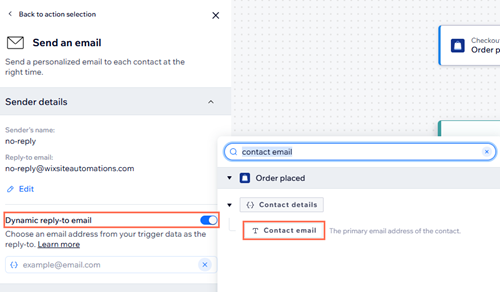
Sender details, enable the
Dynamic reply-to email toggle, then click the field that appears and select
Contact email. This sets the reply-to address to the one provided in the form. So when you or your team reply to the notification email, the response goes directly to the person who submitted the form, allowing you to continue the conversation without logging in to Wix.
FAQs
Click a question below to learn more about choosing who gets notified about form submissions.
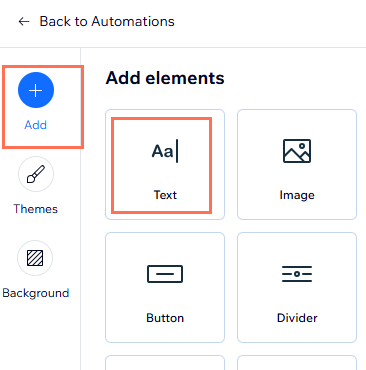
How do I add personalized content to my form submission notification emails?
Why am I not receiving email notifications about form submissions?
What is fallback text in a notification email?
How do I add donation, payment, file upload, product, or signature fields to my notification email?
Can I attach a PDF of the form submission using Automations?
Why am I not receiving full message content in my notification emails from forms or chat?
Do I need to add someone as a collaborator for them to receive form notifications?
Is there a workaround to receive form or chat message content in my notification emails?
How are dates formatted in form submission notifications?
