


Changing Your Free Wix URL
In this article
- Changing your site URL prefix
- Changing your site address
- FAQs
When you publish your site for the first time, your site address is in the form of a free Wix URL:
siteprefix.wixsite.com/siteaddress.
You can personalize your free Wix URL by changing your site URL prefix or site address:
- Site URL prefix: By default this is generated from your name in your Wix account. You can edit your site URL in your Account Settings.
- Site address: This is the name of your website. You choose your site name when saving your site for the first time. You can edit it at any time from your site dashboard.
Tip:
You can create a custom web address by purchasing a
Premium or
Studio site plan and
connecting a custom domain. Your
domain name is an important part of your unique brand that gives your site a more professional look and can make it easier to find.
Changing your site URL prefix
You can change your site prefix at any time from your account settings. This updates the first part of your free site URL (
siteprefix.wixsite.com/siteaddress).
To change your site URL prefix:
- Go to Account Settings in your Wix account.
- Click the Site URL prefix field.
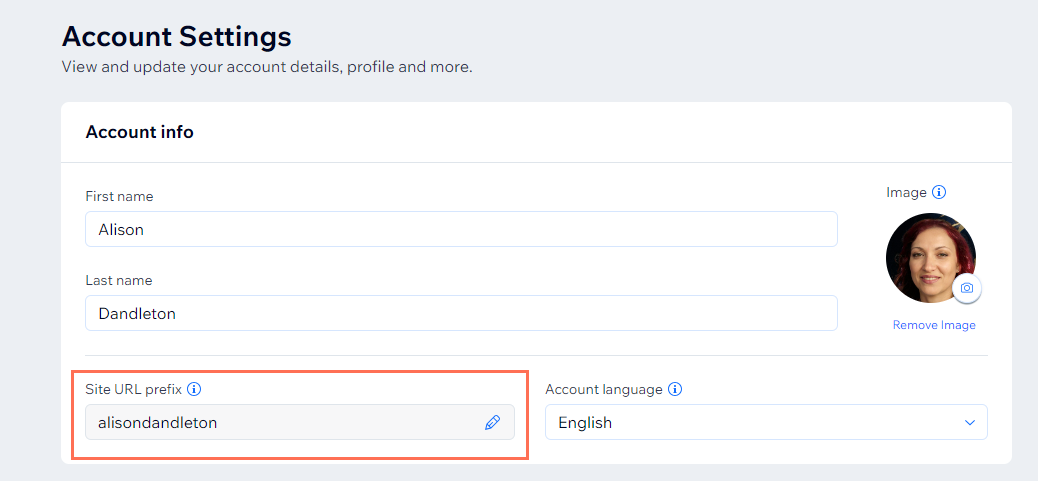
- Edit your Site URL prefix.
- Click Save.
Changing your site address
You can change your site address directly from your site dashboard. This updates the last part of your free site URL (siteprefix.wixsite.com/
siteaddress).
To change your site address:
- Go to your site's dashboard.
- Click the Site Actions icon
 at the top.
 - Click Rename Site.
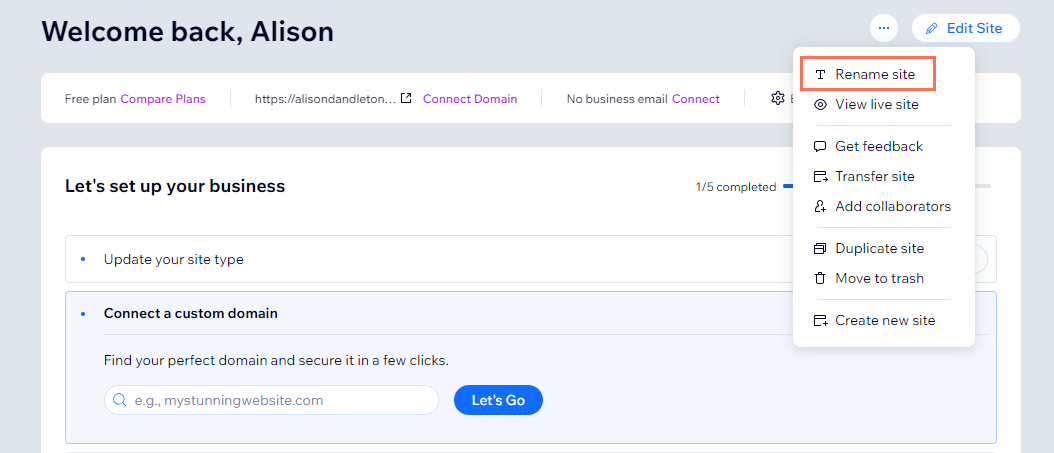
- Enter your new site address in the Site Address (URL) field.
- Click Save.
FAQs
Click a question below to learn more about your free Wix URL.
Can I connect a custom domain that I already own to my Wix site?
Will my domain become a custom domain if I upgrade to a Premium or Studio site plan?
If I purchase a Premium or Studio site plan, does it upgrade all of the sites in my Wix account?
What is the Wix free domain voucher and how can I get one?
Is it possible to remove 'www' from my domain name?
What happens to my free Wix URL if I transfer the site to another account?


