


Wix Bookings: Sending WhatsApp Notifications to Clients
In this article
- Types of WhatsApp notifications
- Enabling WhatsApp notifications
- Including pay links in WhatsApp notifications
- Sending messaging notifications from your booking calendar
- FAQs
WhatsApp notifications are a great way to enhance customer service and ensure your clients never miss a session.
With Wix Bookings, you can choose which WhatsApp notifications to send to clients, such as confirmations, session reminders, and updates. You can enable these notifications in your site's dashboard and even include automatic pay links to remind clients to pay for unpaid bookings.
Important:
- You need to upgrade your site to a plan that supports booking platform features in order to send WhatsApp notifications.
- WhatsApp notifications must comply with the WhatsApp terms of use.
Types of WhatsApp notifications
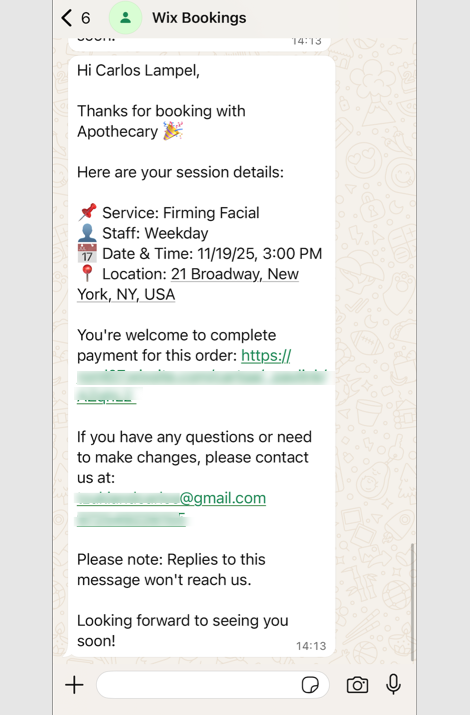
Wix Bookings offers pre-installed WhatsApp notifications to keep your clients up to date about their bookings. By default, these notifications are deactivated, but you can activate them at any time from your booking settings.
Certain WhatsApp notifications are sent automatically when a client opts in, while others you send directly from your booking calendar, and some can be both depending on the situation. Learn more about
Wix pre-installed automations.
Important:
Clients must provide a valid phone number with a country code to receive WhatsApp notifications.
Here are the notifications you can activate:
Pre-installed notifications
Pre-installed notifications sent from your booking calendar
Enabling WhatsApp notifications
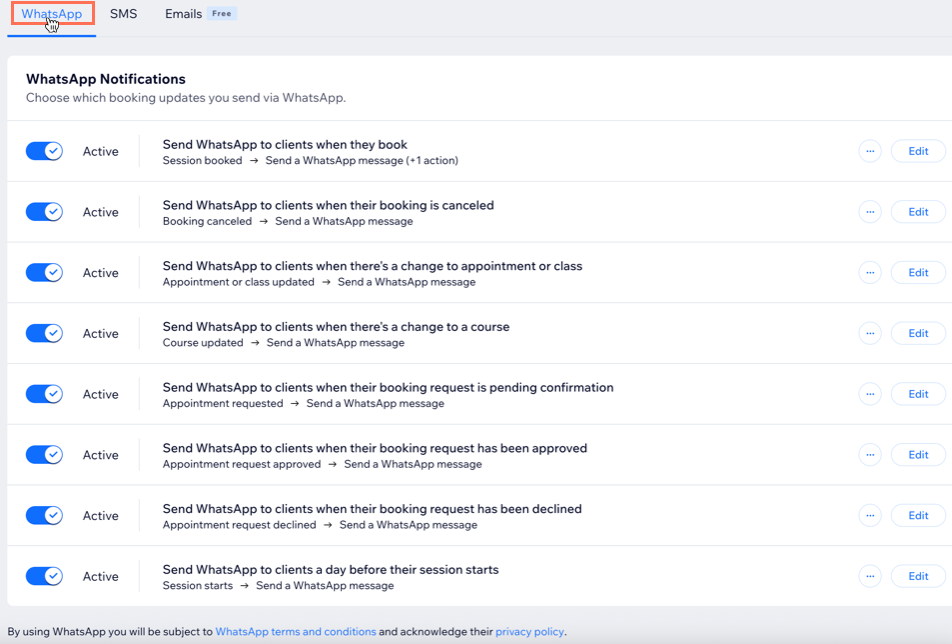
Manage your automated WhatsApp notifications in your site's dashboard. This helps keep your clients up-to-date on the status of their bookings. WhatsApp notifications go to the booking contact's phone number.
Important:
- Clients must provide a valid phone number with a country code to receive WhatsApp notifications.
- WhatsApp notifications must comply with the Wix WhatsApp terms of use.
- You cannot customize the WhatsApp text or 'sent from' number.
- You need enough WhatsApp quota to send notifications.
To enable WhatsApp notifications:
- Go to Booking Settings in your site's dashboard.
- Click Notifications you send.
- Click the WhatsApp tab.
- Enable the toggle next to each WhatsApp notification you want to activate.
- (Optional) Click View to preview the message your clients receive.
Including pay links in WhatsApp notifications
Make it easy for clients to pay for their bookings by including pay links directly in WhatsApp notifications. When you enable this option, clients receive a unique pay link for any unpaid sessions, streamlining the payment process and helping you get paid faster.
To include pay links:
- Go to Booking Settings in your site's dashboard.
- Click Notifications you send.
- Click More Actions at the top right.
- Click Send automatic pay links.
- Enable the toggle.
- Click Save.
Sending messaging notifications from your booking calendar
Keep your clients informed about their bookings with WhatsApp notifications. To send them, you need to enable the relevant toggle in your booking settings. Then, in your booking calendar, select when to send a WhatsApp notification after an action is completed. Clients will only receive a WhatsApp if their phone number includes a valid country code and they've opted in to receive WhatsApp notifications.
Messaging quota:
WhatsApp and SMS notifications share the same messaging quota. If you enable both a WhatsApp confirmation and an SMS confirmation for the same booking, it uses 2 messages from your quota. Turn off one of the notifications if you only want to send one message type.
To send WhatsApp notifications from your booking calendar:
- Go to Booking Calendar in your site's dashboard.
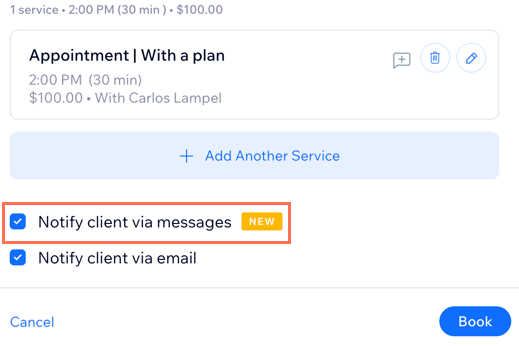
- Book, cancel, or reschedule a session.
- Select the Notify client via messaging checkbox to send your client a WhatsApp message about the update.
FAQs
Click a question below to learn more about WhatsApp notifications.
Can I require clients to add their phone number?
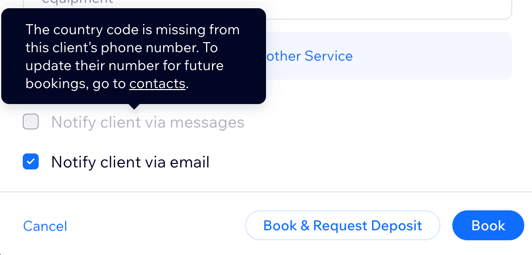
Why can't I choose the option to notify clients via message (WhatsApp or SMS)?
What number will my message reminders come from?
Can I customize my WhatsApp reminders?
Is there a limit to how many WhatsApp notifications I can send?
When will my message quota be renewed?
When a quota renews, will any unused messages roll over to the next month?
Which language is used for messaging notifications?
How far in advance are WhatsApp reminders sent, and can their timing be changed?
Can I send WhatsApp notifications to multiple participants in a class or course?
Why don't my clients see pay links in their booking WhatsApp notifications?
