


Wix Online Programs: Managing Your Sections and Steps
In this article
- Managing your program sections
- Managing your program steps
- FAQs
Once you've added your program content, you can organize it so the sections and steps are clearly defined and easy for participants to follow. Steps are nested beneath sections so you can clearly see the flow of your online programs and make edits.

Managing your program sections
Once you've created your sections, you can duplicate them, reorder them, and edit the titles and descriptions to make sure everything is clear.
Note:
Sections are only available for self-paced programs.
Dashboard
Wix app
- Go to Online Programs in your site's dashboard.
- Select the relevant program.
- Click the Content tab.
- Manage your sections using the following options:
- Edit a section:
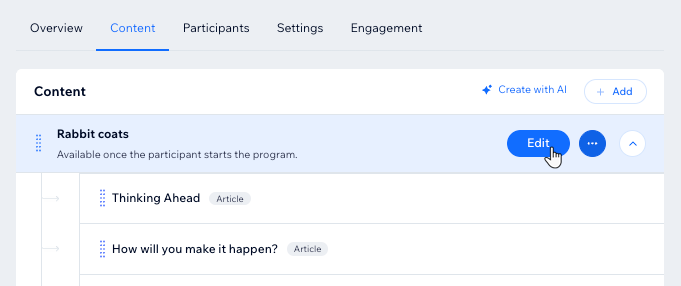
- Hover over the section and click Edit.
- Choose what you want to edit:
- Enter a new section name.
- Enable the Section Dripping toggle to allow participants to complete this section on a specific day after they join the program.
- Click Save.
- Duplicate a section:
- Hover over the section name and click the More Actions icon
 .
. - Click Duplicate.
Tip: The duplicate section appears right beneath the original section.
- Hover over the section name and click the More Actions icon
- Delete a section:
- Hover over the section name and click the More Actions icon .
- Click Delete.
- Click Delete to confirm.
- Hover over the section name and click the More Actions icon
- Reorder a section: Hold and drag a section to move it up or down on the page.
- Add a section: Click + Add section at the bottom of your program content.
- Edit a section:
Managing your program steps
While program sections help keep you and your participants organized, steps are where you provide the crucial information about how to reach the program goal. You can edit, rearrange, or delete steps as needed.
Dashboard
Wix app
- Go to Online Programs in your site's dashboard.
- Select the relevant program.
- Click the Content tab.
- Choose what you want to do next:
Manage the steps of a self-paced program
Manage the steps of a scheduled program
 .
.Tip:
Add a quiz or survey to your program to keep participants engaged. You can customize questions to assess content effectiveness.
FAQs
Click a question below to learn more about managing your program's sections and steps.
Can I add steps to published programs with participants?
What happens when I add steps for past or future days in a program?
What happens to newly added steps for participants who have completed a program?
