


Wix Editor: Working With the Editor Gridlines
In this article
- How do the gridlines work?
- Enabling or disabling the editor gridlines
- Gridlines in Columns
- FAQ
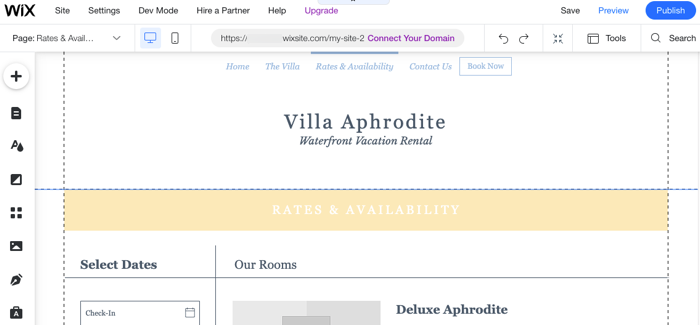
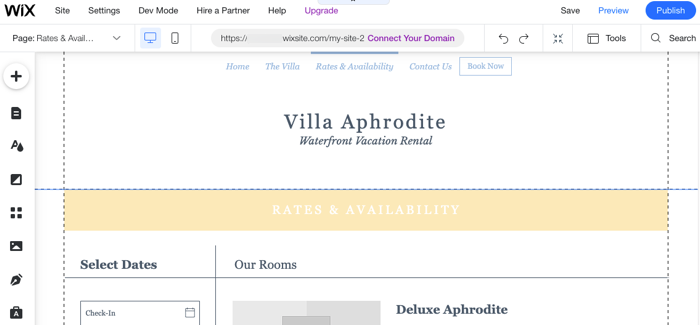
Gridlines are the dotted lines inside the editor that can help you ensure visitors can see your content on every screen size. Place all of your elements between the gridlines to prevent viewing issues on smaller devices (e.g., elements getting cropped).
The gridlines are only visible inside the editor, but you can always disable them if you prefer it.
How do the gridlines work?
Visitors don't see the gridlines on your live site. They are there as a guide to help you map and design your site better.
It's important to place all of your content
inside the vertical
gridlines to ensure it's visible across different browsers and devices. Elements that are placed outside the vertical gridlines might be cut off on tablets and smaller screens.
Full-Width elements
Tip:
The width of the page inside the gridlines is fixed at 980 pixels. The height of your page doesn't depend on the gridlines, but the content of your page.
Enabling or disabling the editor gridlines
You can enable or disable gridlines as you please, directly from the top bar of the editor. Simply select or deselect the checkbox in the
Tools drop-down menu.
To enable or disable the editor gridlines:
- Click Tools
 at the top of the editor.
 - Select or deselect the Gridlines checkbox.

Gridlines in Columns
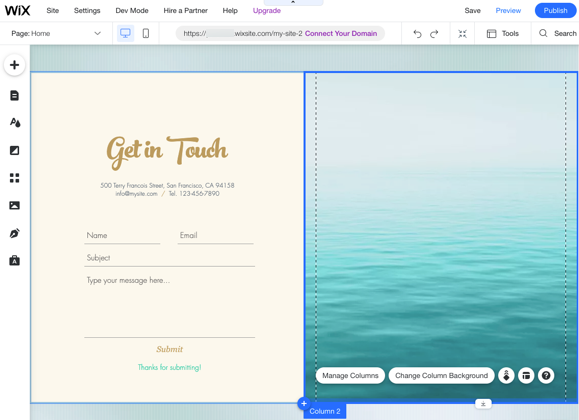
Columns have gridlines that are separate from the editor gridlines. As in the editor gridlines, you should place your content within the column's vertical gridlines to ensure that it appears correctly across devices and browsers.
The column gridlines override the editor gridlines. This means you can place elements outside the editor's vertical gridlines, as long as they are inside the column's gridlines.
How can I tell the difference between the gridlines?

FAQ
Below are some of the most frequently asked questions about the editor gridlines. Click a question to read its answer:
I can't see the gridlines in my editor. Why?
What happens if I place elements outside the gridlines?
What is the actual width between the gridlines?
