


Recovering an Expired Domain During the Redemption Period
3 min
In this article
- Checking if your domain is in the redemption period
- Recovering a Wix domain in redemption
- FAQs
When a domain expires (usually because auto-renew was turned off or a renewal payment has failed), it enters a grace period lasting about 30 days. During this time, you can renew your domain at no additional cost.
If you do not restore your domain during the grace period, it enters the redemption period. You can still recover your expired domain during the redemption period, but most domains will require a redemption fee to keep them.
At the end of the redemption period, you cannot renew your domain name and it is released. At this point, the domain can be registered by another user.
About the domain life cycle:
Domains can go through different periods from the time they're registered to when they expire. Learn more about the domain life cycle.
Checking if your domain is in the redemption period
Use our WHOIS lookup tool to check if your domain is in the redemption period. You can repurchase a subscription by contacting your domain host if you wish to recover the domain.
To check your domain:
- Go to the WHOIS lookup tool.
- Enter your domain name and click Search.
- Look for the redemption period status.
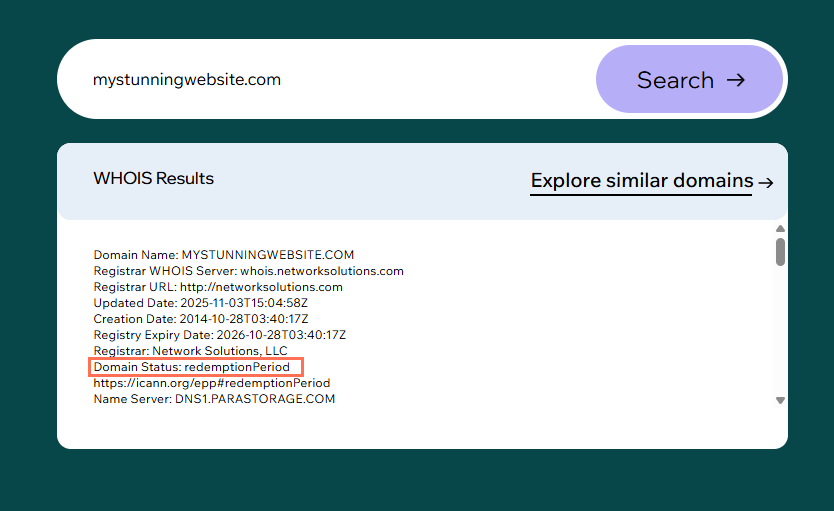
- (Optional) If your domain is in the redemption period and you wish to renew it:
- For domains registered at Wix: Follow the steps in the section below.
- For domains registered elsewhere: Contact your domain registrar.
Recovering a Wix domain in redemption
If your domain is registered with Wix and has entered the redemption period, you can recover it from the Domains page in your Wix account.
To recover a Wix domain:
- Go to Domains in your Wix account.
- Review the information in the banner below the relevant domain and click Keep Domain.

- Enter your payment information and click Submit Purchase.
Note: Recovering your domain can take up to 7 days to complete after paying the redemption fee. We'll notify you of any progress via the email associated with your Wix account.
FAQs
Click a question below to learn more about domain recovery.
Does the grace period apply for all domains?
Does the redemption period apply for all domains?
What is the cost of domain recovery?
Can I recover my domain after the redemption period?
