


Google Workspace: Purchasing and Setting up a Business Email
In this article
- Step 1 | Purchase a Google Workspace business email
- Step 2 | Set up your Google Workspace business email
- FAQs
Purchase a personalized Google Workspace
business email directly from Wix (e.g. yourname@mybusiness.org). This can make your business look more professional and trustworthy while also strengthening your brand.
Important:
The Google Workspace business email plans are not yet available in all regions.
Step 1 | Purchase a Google Workspace business email
You can choose how many emails you want to have and select a plan the meets your business needs. Wix offers 3 Google Workspace email plans for you to choose from:
Business Starter,
Business Standard and
Business Plus. Learn more about the
benefits of each option.
Before you begin:
To purchase a Google Workspace email, you must own a domain (from Wix or elsewhere) and connect it to your Wix account. Learn more about
connecting a domain to a Wix site.
To purchase a Google Workspace business email:
- Go to Business Email in your Wix account.
- Click Get a Business Email.
Note: If you have more than 1 domain, select the relevant domain from the list and click Select. - Set the quantity of business emails you want to purchase.
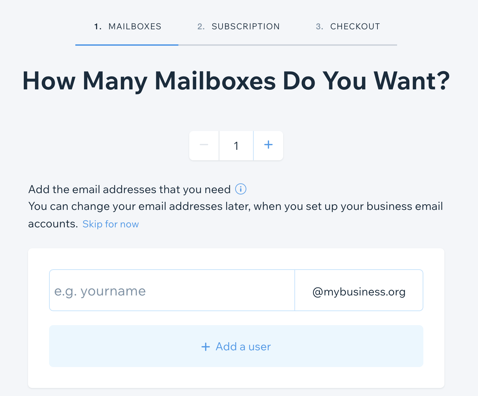
- Enter your email prefix(es).
- Click Continue.
- Select the Google Workspace plan you want.
- Choose a business email subscription: Monthly or Yearly.
- Click Continue to Checkout.
- Select your payment method and click Submit Purchase.
Important:
- After purchasing your business emails, wait a minimum of 5 minutes before beginning the setup process.
- If you have connected your domain via pointing, you must manually enter the MX records for Google Workspace with your domain provider. Learn more about Google Workspace MX record values.
Step 2 | Set up your Google Workspace business email
Once you've purchased a Google Workspace business email from Wix, set it up with a password (and any additional emails) so you can start using it.
To set up your Google Workspace business email:
- Go to Business Email in your Wix account.
- Click Setup Business Email.
- Type in your primary email address.
- Enter a password.
- Verify your password.
- (Optional) Enter the details for additional emails in the blank email fields.
- Click Next.
- Confirm your contact details.
- Click Submit.
Important:
Once you have purchased and set up your business email(s), make sure to sign into your
business email admin account to accept the Google Product Agreement
and Terms of Service. You cannot access any of your other business emails until you have accepted the agreement. You may also need to verify your domain, if prompted.
Once your business account is activated it should be fully functional within 24 hours.
FAQs
Click a question below to learn more about business email.
Can I use Google services in all countries/regions?
How much does a business email cost?
Can I purchase more than one business email?
Can I change my business email plan to a different plan?
Is there any limit on the amount of business emails I can buy?
What can I do if I am experiencing issues with the authentication process?
What happens if I try to purchase an email address I already own?
How long should I wait after purchasing a business email in order to set it up?
What happens if I don't accept the Terms of Service?
How do I reconnect my Google Workspace account?