


Wix Forms: Enabling Double Opt-In for Subscribers
In this article
- Single opt-in vs. double opt-in
- Enabling double opt-in on your site forms
- FAQs
Make sure your emails reach the right contacts by enabling double opt-in on your forms. Double opt-in means that any visitor who has subscribed to your list also needs to take the extra step of verifying their email. This confirms their subscription status.
Some businesses prefer double opt-in to make sure the emails in their subscriber list are active and correct. It's also best practice to make sure you have explicit consent from your subscribers.
Note:
Double opt-in is only available using new Wix Forms.
This article will help you understand the differences between old and new Wix Forms.
Single opt-in vs. double opt-in
Click an opt-in type below to learn about the different options and how they look.
Single opt-in

Double opt-in


Enabling double opt-in on your site forms
You can enable the double opt-in option on any site form. Head over to your form settings in the editor to get started.
Note:
If the toggle is grayed out, it means you haven't yet added a
subscriber opt-in checkbox.
New Forms
Old Forms
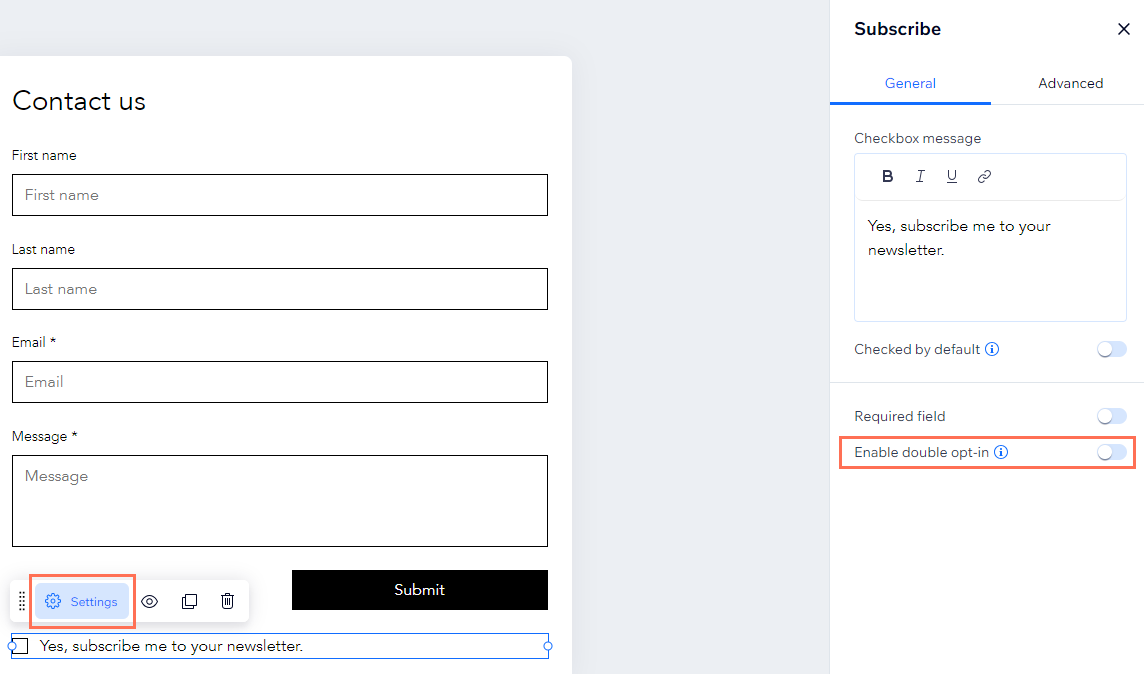
- Select your form in the editor.
- Click Edit Form.
- Select the Subscribe field.
- Click Settings.
- Click the Enable double opt-in toggle:
- Enabled: Anyone who submits the form or selects the subscriber checkbox receives an email to verify their subscription status. Once they have verified they become subscribers in your contact list.
- Disabled: Anyone who submits the form or selects the subscriber checkbox is automatically a subscriber in your contact list. They do not have to confirm their status.
FAQs
Click a question below to learn more.
I have multiple email fields on my form, which email address receives the confirmation email?
Do subscriber emails need to be verified within a specific timeframe?
Can I customize the email sent to subscribers?