


Wix Bookings: About Monthly Pricing for Courses
In this article
- Create a monthly subscription for a course
- Keep your course payments on track
- Bill clients from the month they join
- Stay on top of subscriptions and failed payments
- FAQs
Creating a course with monthly pricing lets you charge clients a fixed monthly fee for the duration of the course instead of collecting the full price upfront. When someone enrolls, they are registered for all sessions at once, and a subscription is created automatically based on the payment schedule you set.
Since payments begin from the month clients enroll, your payment schedule should align with your course schedule. For example, if your course runs from September through June, set the payment schedule to begin in September.

Important:
To accept monthly payments, connect a payment provider that
supports recurring payments.
Create a monthly subscription for a course
Monthly pricing helps you spread the cost of a course across the months it runs. Instead of asking clients to pay the full amount upfront, you charge the same fixed amount each month.
The monthly price stays the same throughout the course, regardless of how many sessions take place in a specific month. This gives you a predictable way to charge for long-running programs, such as semester-based classes. Learn how to
create a monthly pricing subscription for your course.

Keep your course payments on track
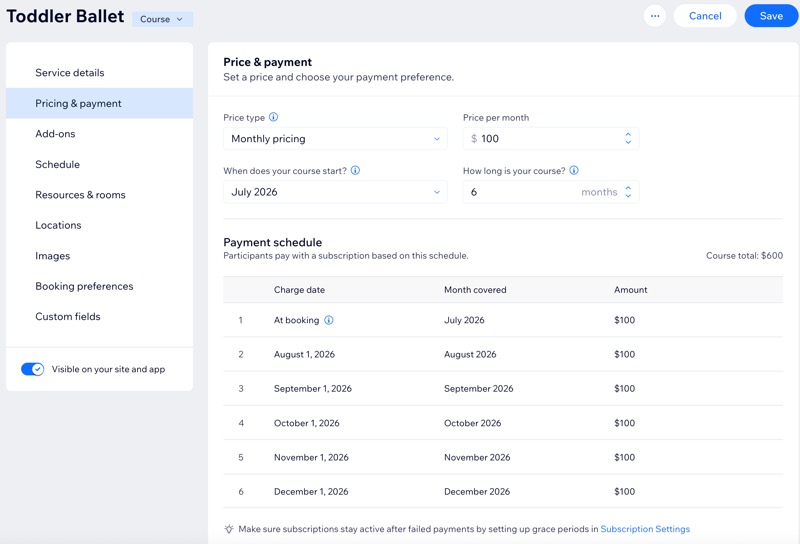
Monthly subscriptions follow the payment schedule you set, so it’s important to match it to the months your course actually runs. Make sure your payment schedule starts in the same month as your course. This helps avoid charging clients for months with no sessions, or missing payments for months they do attend.
For example, if your course runs from July through December, your payment schedule should also start in July and run for 6 months. If you want to allow clients to join after the course has started, make sure your booking policy allows participants to
join after the course begins.
Bill clients from the month they join
Note:
If you want to allow clients to join after the course has started, make sure your booking policy allows clients to
join after the course begins.
Clients are charged starting from the month they enroll. The first payment is collected at checkout, and remaining payments are charged automatically on the 1st of each following month based on your payment schedule.
For example, if your course runs from July through December at $100 per month:
- A client who enrolls in July pays $100 at checkout, then pays monthly from August through December (6 payments total).
- A client who enrolls in September pays $100 at checkout, then pays monthly from October through December (4 payments total).
Clients are billed only from the month they enroll and are not charged for months before they enroll, even if your payment schedule begins before the course starts. For example, if your course starts in September but your payment schedule begins in July, a client who enrolls in August starts paying in August and is not charged for July.
If a client joins in the middle of a month, or your course starts mid-month, they still pay the full monthly amount for that month. If you want to offer a reduced first payment, you can
create a coupon and share it with the client to use at checkout.
Stay on top of subscriptions and failed payments
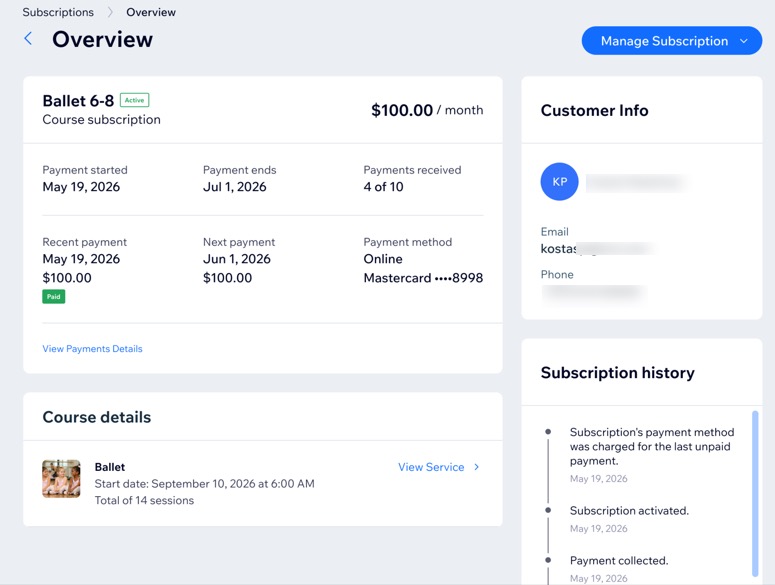
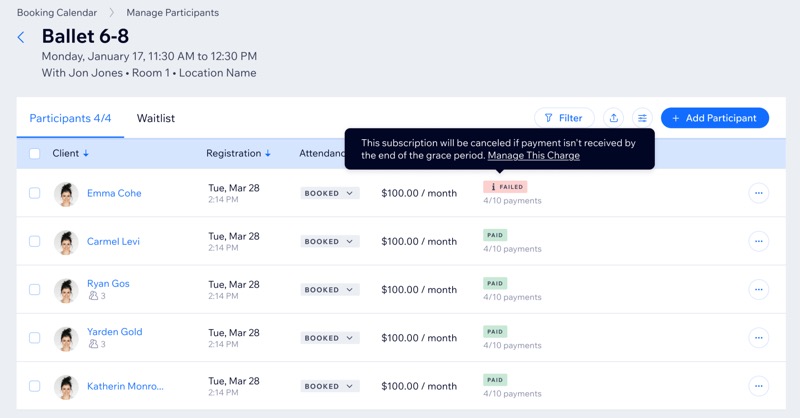
Each enrollment with monthly pricing creates a subscription that you can track in your site's dashboard. From there, you can view the subscription status and the most recent payment status.
You can also
set up a grace period before your first client enrolls so failed payments are retried automatically before the subscription is canceled.
FAQs
Click a question below to learn more about monthly subscriptions for courses.
What does a client pay when they enroll in a course?
How many payments does a client make?
Can a client join after the course has started?
Can I prorate first payment for a late joiner or a course that starts mid-month?
How is monthly pricing shown on my site?
Can I discount monthly payments?
Why is it important to set a grace period?
Can I manually add a participant to a course and have them pay by subscription?
Can clients cancel their subscription by themselves?