


Wix Bookings: Creating a Monthly Pricing Subscription for Courses
In this article
- Creating a monthly pricing subscription for a course
- FAQs
When you create a course with monthly pricing, you can charge participants a fixed fee each month instead of collecting the full course price upfront. This works well for long-running programs such as children's activity classes, semester-based courses, or annual programs.
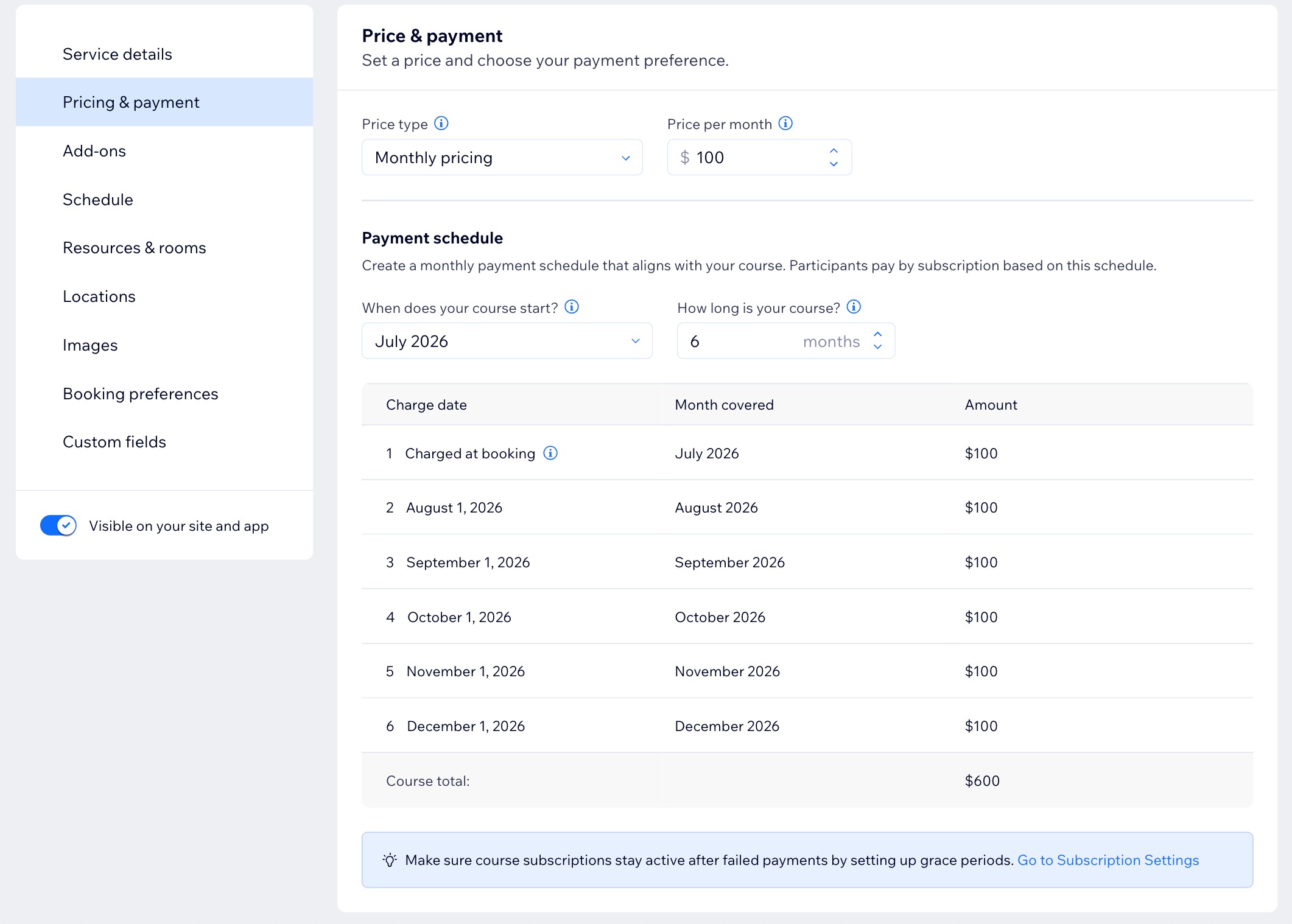
The first payment is collected at checkout, and the remaining payments are charged automatically on the 1st of each following calendar month, based on the payment schedule you set.
Important:
Make sure you add a payment provider that
supports recurring payments.
Creating a monthly pricing subscription for a course
Create a monthly pricing subscription from your site's dashboard so you can charge a fixed monthly fee for a course.
Notes:
- Make sure your payment schedule matches your course schedule. For example, if your course runs from September through June, set the payment schedule to start in September for 10 months.
- Monthly pricing follows your payment schedule, not your course dates. If the payment schedule starts before the course begins, participants who join after the schedule has started are only charged from the month they join. They are not charged for months in the payment schedule that have already passed.
To set up a monthly pricing subscription:
- Go to Booking Services in your site's dashboard.
- Click + Add a New Service in the top right.
- Scroll down to Courses and choose what you want to do:
- Click Edit below the relevant course template.
- Click + Start from Scratch to use a blank template.
- Fill out the Service details.
- Click on the Price & payment section.
- Click the Price type dropdown and select Monthly pricing.
- Enter the Price per month.
- Set up your Payment schedule:
- Click the When does your course start? dropdown and select the relevant month.
- Click the How long is your course? dropdown and select the duration of your course.
- Click Save and continue to set up your course.
Tip:
Set up a grace period before your first client enrolls. This gives failed payments more time to go through before the subscription is canceled.
FAQs
Click a question below to learn more about monthly pricing for your course.
What does a client pay when they enroll in a course?
Can a client join after the course has started?
How can I prorate first payment for a late joiner or a course that starts mid-month?
How is monthly pricing different from installments?
Do changes to the pricing setup affect existing subscriptions?
