


Wix Stores: Editing Page SEO Settings For Products
Your product page's SEO title tag and meta description are the first thing potential customers see when they find your store in search results. The default SEO settings are based on your product's details (name, description, etc.) but you can always customize them to suit your needs.
To edit your Page SEO settings:
- Go to the Products page in your site's dashboard.
- Click the product you want to customize.
- Click Edit SEO Settings on the right.
- Click the SEO basics tab in the SEO Settings panel.
- Edit any of the following:
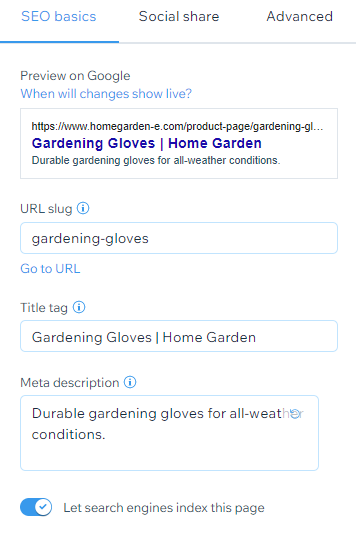
- URL Slug: This text is the last part of your page's URL. You should only change this if it's necessary to reflect the content of your page. We recommend keeping it short and easy to read.
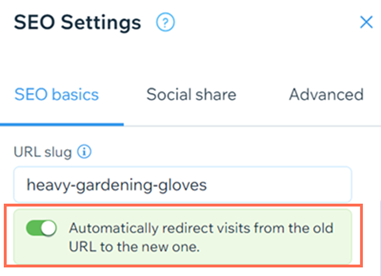
Note: You can customize your URL structure to remove the "product-page" prefix in your site's SEO Settings. - Automatically redirect visits from the old URL to the new one: When you change a product page's URL slug, you can choose to let Wix automatically redirect visitors who try to use the old URL to the new URL. Alternatively, you can disable this toggle and manually create your own redirect.
- Title tag: Add a title tag that summarizes what the product is. We recommend giving concise product names (maximum 60 characters) that help potential customers understand the product.
- Meta description: Add a short meta description of your product (maximum 156 characters) This description helps users decide if the page is relevant to them.
- URL Slug: This text is the last part of your page's URL. You should only change this if it's necessary to reflect the content of your page. We recommend keeping it short and easy to read.
- Click the Let search engines index this page toggle to set whether search engines can crawl and index your page or not:
- Enabled: Search engines will index your page. People can find your page when searching keywords and phrases in search engines.
- Disabled: Search engines will not index your page. People cannot find your page when searching keywords and phrases in search engines.
- Click Save.
Warning:
Changing your URL creates a new link for your page and therefore is considered to be a new page. In order to maintain the existing SEO for a particular page you must set up a
301 redirect.
Tip:
Learn about additional SEO options:
- SEO for Product Pages Learn more
- SEO for your site Learn more