


Wix AI Site Chat: Understanding Data Coverage
In this article
- Viewing your data coverage
- Limitations for indexing pages
- Understanding your site's coverage level
- FAQs
Important:
Wix AI Site Chat is no longer available to install on new sites.
Wix Smart Chat is replacing it as the new AI and manual chat solution.
Learn more about Wix Smart Chat.
Your AI Site Chat's data coverage gives you a clear view of what the AI knows about your site and where its knowledge comes from. In this tab you can see which site content has been indexed and where there may be issues that prevent the AI from learning about your site. Use this information to optimize your site and improve the AI's performance.
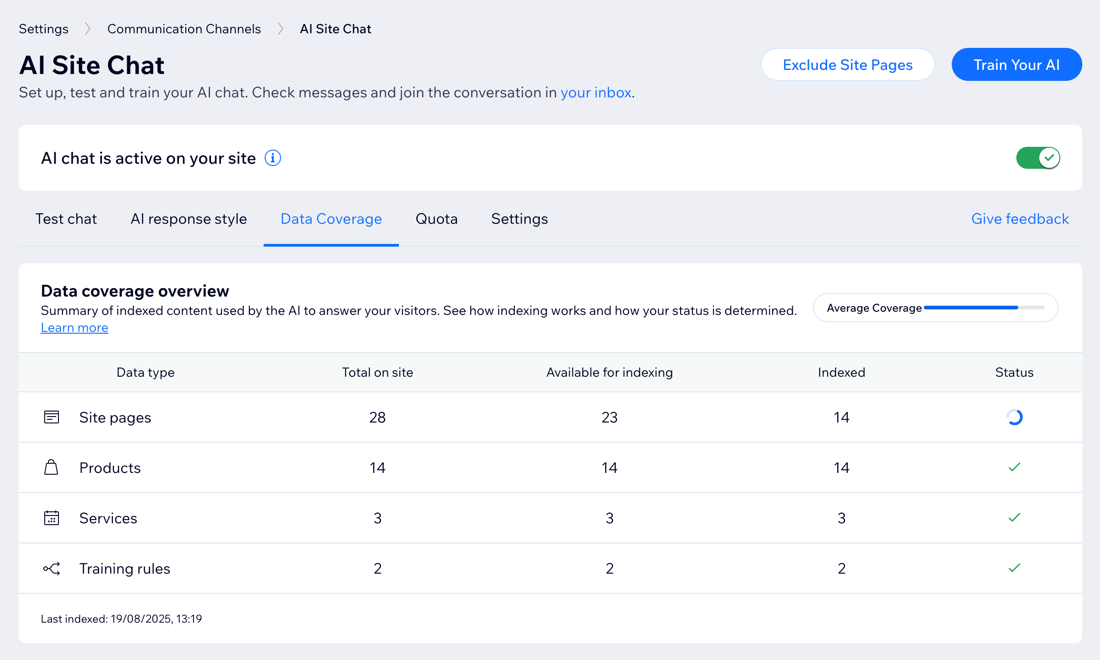
Viewing your data coverage
See how all available site content is indexed. When content is indexed, it means the AI has scanned, analyzed, and stored this information so it can use it to answer your visitors' queries.
This content may include site pages, your store products, blog posts, services, events, online programs, and training rules you've added.
To view your data coverage:
- Go to AI Site Chat in your site's dashboard.
- Click the Data Coverage tab.
- Review the content the AI has indexed from your site. For each content type, you’ll see the following information:
- Data type: The type of site content analyzed (e.g. products, site pages, blog posts).
- Total on site: The total number of items per type on your site.
- Available for indexing: How many pages or items on your site the AI can potentially learn from.
- Indexed: How many pages or items were successfully indexed by the AI.
- Status: A checkmark indicates the AI has completed scanning the pages.
Tip:
The AI is automatically trained using your site's publicly available content. However, you can
add training rules with information that isn't published on your site, such as internal policies or product details.
Limitations for indexing pages
Not all content on your site is available for your AI Site Chat to learn from. Some pages are restricted for privacy reasons, while others may be skipped due to how they’re set up or where their content comes from.
Review these limitations to understand what content cannot be used:
Content that can't be indexed
Content that may be skipped
Note:
Support for more content types and apps is coming in future updates.
Understanding your site's coverage level
At the top of the page you’ll see a status bar that shows how successfully your content was indexed out of all the items available for indexing. This helps you understand how well the AI is managing to collect information and learn from your site.
Here's what your coverage signifies:
- Good coverage: Most of your site content has been successfully indexed. The AI can give complete and accurate responses.
- Average coverage: A moderate amount of your content has been indexed. The AI can answer many questions, but some gaps in knowledge may still exist.
- Low coverage: Only a small portion of your content has been indexed. You may want to review your site for hidden, restricted, or unsupported pages.
How can I improve my coverage?
- Check if your site contains empty, hidden, or dynamic pages that could affect that amount of content successfully indexed. If possible, make more content public.
- Add more text and details to your site pages. The more text you provide, the more the AI has to learn from.
- Create knowledge rules to give the AI more information about topics that don't appear directly on your site. This expands the AI’s ability to answer more questions accurately.
FAQs
Click a question below to learn more about data coverage.
Can I prevent certain pages from being indexed?
Does the AI learn from private or internal documents?
