


Velo: Site Inspector
5 min
In this article
- Issues Tab
- Security
- Exposed Personally Identifiable Information
- Exposed Secrets
- Data Integrity Issues
- Velo Code Issues
- Site Assets Tab
- Web Methods
- HTTP Functions
- Third-party APIs
- Collections
- Scheduled Jobs
- Backend Event Handlers
Site Inspector is a Velo developer tool designed to help you improve the security of your website, and the performance, correctness, and maintainability your site's code. Site Inspector scans and analyzes your website and alerts you to any security vulnerabilities and code issues it detects. It also provides a high-level overview of your site's components and interfaces to third-party systems, helping you better understand, control, and optimize your site's processes.
To access the Site Inspector, in your Dashboard click Developer Tools > Site Inspector.
To scan your site, click the Scan or Scan Again button in the top right of the Site Inspector page.
Information is displayed in 2 tabs:
- Issues: For security vulnerabilities and code issues.
- Site Assets: For an overview of your site's components and interfaces.
Issues Tab
The Issues tab provides an overview of security vulnerabilities and Velo code issues on your site.
Security
This section provides information on security vulnerabilities detected in your site, and is split into 2 subsections:
Exposed Personally Identifiable Information
This section lists the instances where Personally Identifiable Information (PII) such as names or email addresses are exposed in your collections. It provides the following information:
- Collection name: Name of the database collection.
- Field name: Collection field containing the exposed information.
- Description: Collection permission causing the vulnerability.
- Item count: Number of collection items with potentially exposed information.
Exposed Secrets
This section lists API keys and other secrets that were detected in public code files on your site. You shouldn't use hard coded secrets in your page/public code, since anyone can access them. Move secrets to backend where you can use the Secrets Manager. In this section each row presents the secret type, the filename, line number, and a link to the page code is TBD. Currently we use Regex expressions to identify the following secret types:
- SendGrid
- Stripe
- Google+GoogleAuth
- EmailJS
- PrivateKey
- SlackToken
- SlackWebhook
- AmazonAWSAccessKeyID
- AmazonMWSAuthToken
- FacebookAccessToken
- GCPServiceAccountRegEx
To secure a secret, move secrets to backend where you can use the Secrets Manager. Learn more.
Data Integrity Issues
This section lists instances where collections aren't secured and data can be updated and/or removed by potentially unauthorized parties. It provides the following information:
- Collection name: Name of the database collection.
- Vulnerability description: Collection permission causing the vulnerability.
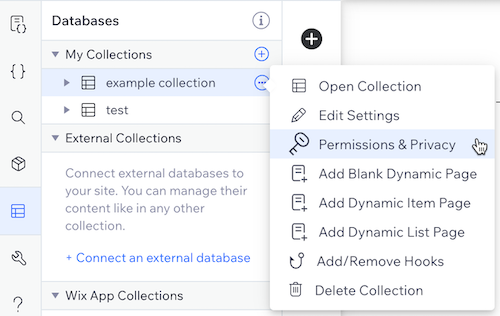
To secure a collection, go to the databases tab of the Velo sidebar, click the three dots next to your collection, select Permissions & Privacy, then adjust the settings accordingly. Learn more.
Velo Code Issues
This section lists code issues detected across all pages and backend files. It provides the following information:
- File: Name of the page or code file, and the line number of the problematic code.
- Issues: Description of the issue.
The following code issues will be flagged:
- Calling a backend function without an
awaitstatement. - Placing an
awaitstatement inside a loop. - Placing an
awaitstatement insideonReadyhandler. - Importing a backend module in a frontend page.
- Duplicate code in the same page or in another page/file in the site.
- Empty functions (functions with no code in the body).
- Referencing a missing collection.
- Multiple definitions of an event handler for an element.
- Multiple definitions of an
onReadyhandler. - Secrets written in plain code.
- Unused exports — exporting a function which is not used anywhere.
You can use the Filter by file dropdown to show only issues for a particular page or backend file.
You can also temporarily hide issues from the list by clicking the checkbox next to them and clicking Ignore Once.
Note: Clicking ignore does not hide issues permanently. They will appear again on the next scan.
Site Assets Tab
The Site Assets tab aggregates information about the Velo site components and interfaces to 3rd-party systems used in building and running the site. This high-level overview is intended to help users perform end-to-end analysis and monitoring of flows in the application, and control and optimize their system with respect to business and technical metrics.
Web Methods
This section lists the exported functions (methods) defined in your site's web modules. It provides the following information:
- Method: Name of the function.
- File: Name of the web module containing the function.
- Permissions: The web module's permissions.
- Traffic: Number of anonymous visitors and number of site members who invoked each function. Compare the configured permission from the permission column with the traffic column to identify misconfigured permissions. For example, if only site members (registered site visitors) are invoking a function and the permission is Anyone, you should consider changing the permissions to site member. The traffic only shows successfully invoked attempts, therefore if the permission is set to admin and site members attempted to invoke the function, this attempt isn’t counted.
You can use the Filter by file dropdown to show the modules defined in a specific backend file.
HTTP Functions
This section lists HTTP functions (APIs) that expose your site's data or functionality to the public. It provides the following information:
- Function: Name of the HTTP function.
- HTTP method: Type of HTTP request method, such as Get or Post.
Make sure to implement authentication & authorization to keep your site secure.
Third-party APIs
This section lists all the external APIs called from your site code. It provides the following information:
- File Name: Name of the code file from which the API is called.
- API: URL of the API.
Collections
This section lists all of your site's database collections. It provides the following information:
- Collection Name: Name of the database collection.
- Read Operations: Names of pages or backend files that contain code that reads from your collection.
- Write Operations: Names of pages or backend files that contain code that writes to your collection.
- Data Hooks: Names of data hooks associated with your collection.
- Permissions: Collection permissions.
Scheduled Jobs
This section lists all the scheduled jobs on your site. It provides the following information:
- Function Name: Name of the function run by the job.
- File Name: Name of the code file containing the job definition.
- Description: Description of the job.
- Schedule: Scheduled times to run the job.
Backend Event Handlers
This section lists all the backend events on your site. It provides the following information:
- Event handler name: Full name of the event handler function. For example,
wixMediaManager_onFileUploaded. - Package: Filename of the event's package or module.
- Event: Name of the event. For example,
FileUploaded.
Feedback Form
Your input can help us to make the Site Inspector tool even better.
If you have any suggestions for additions or improvements to the tool please let us know by clicking the Give us feedback button at the bottom right of the Site Inspector page, and filling in the feedback form.
