


HIPAA-Compliant Apps and Communication Channels
2 min
In this article
- Using HIPAA-compliant apps
- Using HIPAA-compliant communication channels
While Wix provides tools and a secure environment to help you comply with HIPAA, some features, apps, or tools on Wix may not be compatible with HIPAA and activating PHI protection could disable, restrict, or remove some functionalities of your site.
Using HIPAA-compliant apps
HIPAA-compliant Wix apps can be found in a dedicated page in the Wix App Market. Once you activate PHI protection, non-compliant Wix apps are automatically hidden from your App Market searches.
You can activate PHI protection on your site even if non-compliant Wix apps are already installed. However, this may cause certain flows or functionalities within those apps to break. For this reason, we recommend removing any non-compliant apps before activating PHI protection on your site.
You are responsible for making sure any third-party app you connect to your HIPAA site meets HIPAA requirements. Always confirm compliance directly with third-party providers before you install their apps. Wix cannot guarantee HIPAA compliance for apps or services we do not control.
To help inform your app choices, all apps which collect personally identifiable information (PII) are labeled as such within the Wix App Market.
Tip:
We may update the list of Wix's HIPAA-compliant apps over time.
Using HIPAA-compliant communication channels
When you activate PHI protection for your Wix site, only HIPAA-compliant communication tools are available to connect to your Wix Inbox Channels.
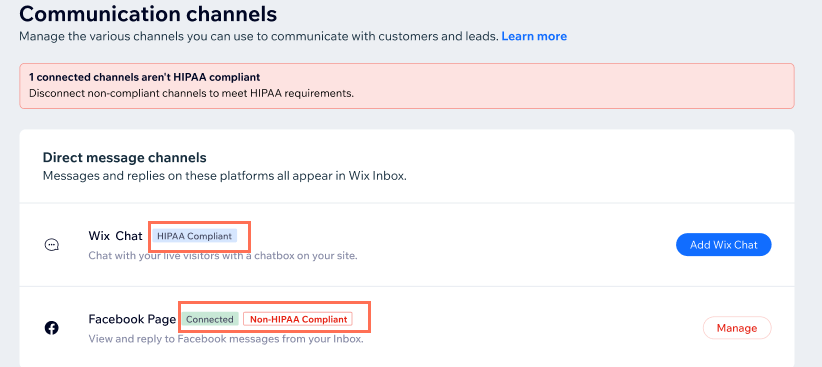
If you have non-compliant channels, such as Facebook and Instagram, already connected, you’ll be prompted to disconnect them.
Message history from non-compliant channels are still viewable, but you’ll no longer be able to initiate or respond to a conversation through Wix Inbox for these channels.
Go to your channels page on desktop to view which communications channels are HIPAA-compliant. All channels are marked as compliant or not, as appropriate.
Note:
Upon creating your site, we provide a generic email address generated by Wix (e.g. e88...619f@ascend.wix.com) to help manage communications with your site.
HIPAA users are provided with a HIPAA-compliant generic email. Once you connect your own business email (e.g. Gmail), your preset email is no longer in use.
Tip: If you've purchased a Google Workspace business email, we recommend enabling HIPAA-compliance with Google.
