


Viewing and Updating Your Wix Domain Contact Information
3 min
In this article
- Viewing and updating your domain contact information
- FAQs
You can keep your Wix domain's contact information up to date from the Domains page in your Wix account. Your changes are saved right away, but some updates need to be confirmed by email before they take effect (for example, changing your email address).
Important:
- Changing your contact information locks your domain for 60 days, in which time it is not possible to transfer your domain away from Wix. Learn more about ICANN's 60-day lock policy.
- Please see the FAQs section at the bottom of this page for important information about updating the following domains: .fr, .com.br, .com.au, .at, .it.
Viewing and updating your domain contact information
You can view and update the contact information for any domains that you have purchased or transferred to Wix.
To view and update your domain contact information:
- Go to Domains in your Wix account.
- Click the Domain Actions icon
 next to the relevant domain.
 - Click Edit contact info.
Note: If this option is missing, your domain was purchased elsewhere and you must contact your domain host to update the contact information.
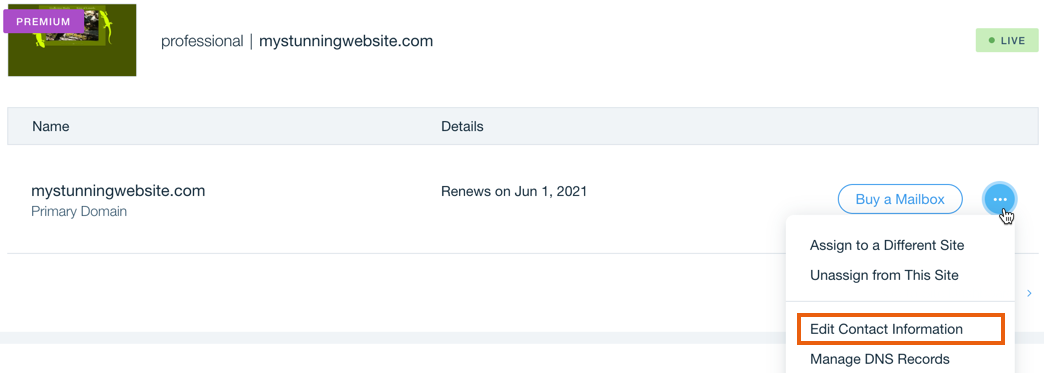
- Edit your contact information.
- (Optional) Use different contact information for your Technical or Administrative contacts:
- Deselect the Use registrant contact info checkbox below the relevant contact type.
- Enter the person's contact details.
- Click Save.
Note:
As a domain registrant owner, you are required to confirm your domain contact info within two weeks after registering the domain. If not confirmed within two weeks, the domain and any business email attached to it may go offline. In case that happens, to ensure you can still receive a confirmation email, we recommend using an email address that is not associated with your domain as your registrant contact email (e.g. gmail.com).
FAQs
Some domains have restrictions or additional requirements to consider. Click a question below to learn more about updating contact information for your domain.
Do I need access to my old email when updating my email address?
How do I update contact info for my .at domain?
How do I update contact info for my .com.au domain?
How do I update contact info for my .com.br domain?
How do I update contact info for my .it domain?
How do I make new changes to the contact info for my .fr domain?
