


header-logo
Getting started with WixLearn how to build your website and business using Wix.
Creating a websiteDesign and manage your site with smart functionalities.
Account & billingManage subscriptions, plans and invoices.
Using the Wix mobile appsRun your business and connect with members.
Connecting a domainLearn to purchase, connect or transfer a domain to your site.
Managing your businessGet tools to grow your business and web presence.
Promoting your siteBoost your visibility with SEO and marketing tools.
Studio, Partners & EnterpriseGet advanced features to help you work more efficiently.
Need more help?Find solutions, learn about known issues or contact us.
placeholder-preview-image
Wix LearnImprove your skills with our courses and tutorials.
Wix BlogGet tips for web design, marketing and more.
SEO Learning HubLearn to increase organic site traffic from search engines.
Website developmentBuild a custom site using our full-stack platform.
Hire a ProfessionalGet matched with a specialist to help you reach your goals.
placeholder-preview-image
In this article
  • Confirming your email address
  • FAQs

Confirming Your Email With Wix

2 min
In this article
  • Confirming your email address
  • FAQs
Keep your contact details up to date by confirming your email address. Making sure your email address is correct helps avoid login issues and ensures that we're sending important updates and notifications to the right person.
Just signed up?
When you create a Wix account as a new user, you'll receive an email confirmation request automatically.

Confirming your email address

Send a confirmation email to your email address from the Account Settings page.

To confirm your email address:

  1. Go to Account Settings in your Wix account.
  2. Click Confirm your email in the Login info section.
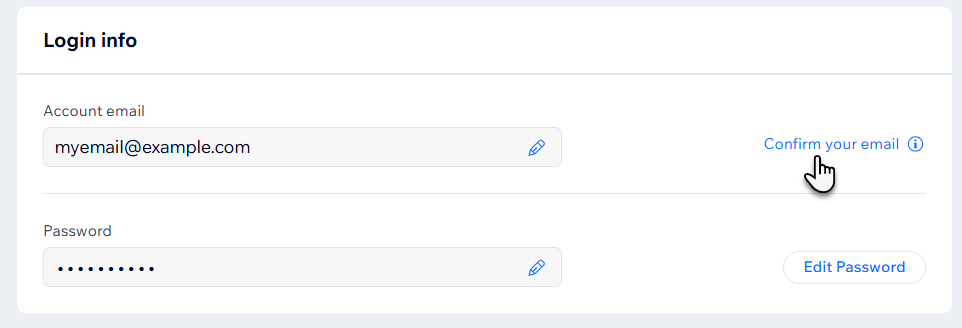
A screenshot of the Confirm your email button in the Login info section of a Wix Account Settings page.
  1. Open the confirmation email we send you titled Confirm your email address.
    Note: This email is sent from wix-team@notifications.wix.com
  2. Click Confirm Email.

FAQs

Click a question below to learn more about confirming your Wix account email address.

Helpmate

Hello

Need a bit more guidance?
Summary of this article
Related articles
Changing Your Wix Account Details

About Your Site URL Prefix

Changing the Email Address of Your Wix Account
Unlock personalized helpLog in to get the most out of Helpmate.
