


Multi-currency: Understanding Payment Details
In this article
- Getting paid in your main currency
- Refunds and chargebacks
- How fees work with Multi-currency payments
- FAQs
With Multi-currency enabled, your customers can shop and pay in the currency that works best for them. All balances, reports, and payouts for multi-currency payments with Wix Payments appear in your site’s main currency, making it easy to track sales.
Before you begin:
- Multi-currency features and payment details described here apply only to Wix Payments. If you have PayPal or Stripe connected as a third-party provider, check your provider’s terms for multi-currency payments for more details.
- For multi-currency transactions, a processing fee, a currency conversion fee, and, if applicable, a cross-border fee apply. For a breakdown of fees by country and payment method, see Wix Payments fees by country.
- Exchange rates, provided by XE, are determined at the time of each payment, refund, or chargeback. For Subscriptions, the rate remains fixed from the initial purchase and does not update with currency fluctuations.
Getting paid in your main currency
Customers view prices and pay in the supported currency they select from the currency converter. When your customer pays using one of your connected payment methods with Wix Payments, the amount is automatically converted to your site’s main currency to determine your payout. You receive your payout in your main currency, regardless of your customer’s selected currency.
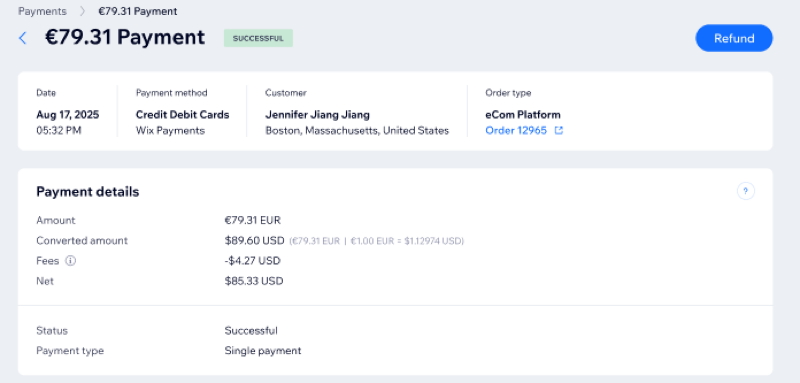
The payment details page displays:
- The amount your customer paid (in your customer’s currency)
- The converted amount (in your main currency), along with the applied exchange rate
- The total fees applied to the transaction, which include a cross-border fee, currency conversion fee and a processing fee (which depends on the payment method)
Refunds and chargebacks
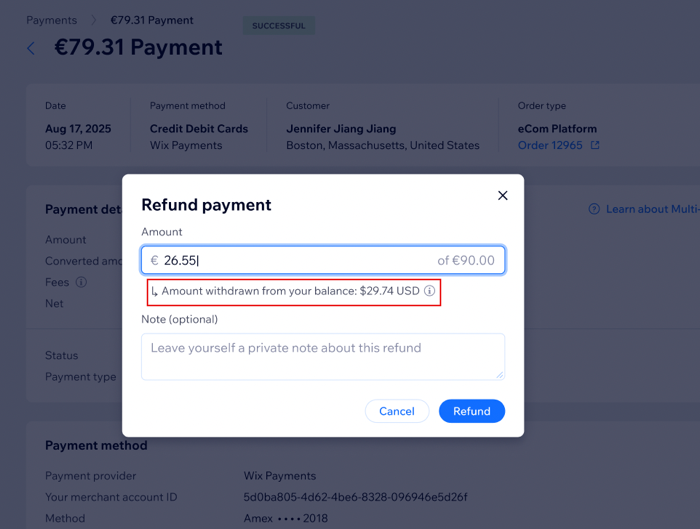
If you issue a refund or a chargeback is processed, your customer receives the money back in the same currency they used for their original payment. Your Wix Payments balance is deducted in your main currency, using the current exchange rate at the time of refund or chargeback. The exchange rate used for a refund or chargeback may be different from the exchange rate at the time of the original transaction.
What happens if I don’t have enough balance to cover a refund?
If your balance in your main currency isn’t enough to cover a refund, you’ll see a prompt to add funds to your account. You need to add enough funds before the refund can be processed.
How fees work with Multi-currency payments
When you accept multi-currency payments with Wix Payments, standard processing fees, currency conversion fees, and cross border fees (if applicable) apply for each transaction. All of these are grouped together as “Fees” in your Payment Details.
You can see the
total fee amount deducted for each transaction in the
Fees field, but the individual components are not itemized separately. The total will include:
- Processing fee: The standard fee based on the payment method (e.g., in the US 2.9% + 0.30 USD for Debit and Credit Cards excl. American Express).
- Currency conversion fee: A fee for converting your customer’s payment from one currency to another (e.g., in the US it is 1%).
- Cross-border fee (if applicable): An additional fee charged when the customer’s card was issued in a different country than your business location. (e.g., in the US it is 1.5%).
FAQs
Click a question below to learn more about Multi-currency payments.
Where can I see the full payment details for transactions made with third-party providers?
Does the customer always get refunded in their original currency?
Will currency conversion affect my payouts?
Can I see which exchange rate was used for a transaction?