


Wix Contacts: Exporting Your Contacts
In this article
- Exporting your contacts from Wix
- Exporting contacts from an external mail host
- FAQs
Export your contacts to back up your contact list or to copy contacts to a different platform. You can export up to 50,000 site contacts at once to a CSV file. Choose to export all your contacts or selected contacts or contact groups. You can also export contacts from an external mail provider like Gmail or Outlook before importing the file into your Wix site's contact list.
Exporting your contacts from Wix
Export contacts from your Wix site contact list. Make sure you are the site owner, as only the site owner can export contacts.
To export your contacts:
- Go to Contacts in your site's dashboard.
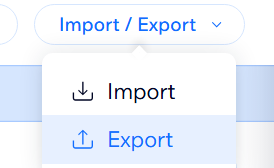
- Click the Import / Export drop-down at the top of the contacts list.
- Click Export.
If you want to export specific contacts, select the checkboxes next to the relevant contact(s) in your contact list before completing Step 2.
- Choose the contacts to export:
- Selected Contacts: Exports only the contacts selected from the contact list.
- By Label: Click the drop-down menu to select a contact group, or select All Contacts.
- Select the relevant file format:
- Regular CSV file
- Google CSV file
- Outlook CSV file
- Click Export.
- Save the file to your computer.
Notes about exporting in Google CSV file format:
- The following Wix Contacts fields are not supported by Google: email subscription status, SMS subscription status, language, and created date. These fields will be imported as Google custom fields.
- Currently labels are not exported in this format.
- Google is limited to 5 email, phone, and address per contact so Wix exports the CSV accordingly.
- Wix can export up to 16 custom fields (per Google's limitation). If there are more than 16 custom fields, the oldest fields are taken first.
Exporting contacts from an external mail host
You can also export your contacts from external mail hosts like Gmail or Outlook. Once you have exported from the provider, you can import the CSV file to your site's contact list.
To export contacts from an external mail host:
- Choose the relevant external host and follow the instructions on their website:
Gmail
Outlook
Other mail hosts
2.
Import the new file to your contact list.
FAQs
Click a question below to learn more about exporting your contacts.
How many contacts can I export at once?
Can I export only specific contacts?
What file formats can I export contacts in?
Once I export contacts from an external mail host, how do I prepare the CSV file to import to Wix?
