


Wix Forms: Viewing and Managing a Submissions Table
9 min
In this article
- Viewing a submissions table
- Managing data in a submissions table
- FAQs
When visitors submit one of your forms, their entries are automatically stored in a submissions table. Use the submissions table to simplify your data management – you can filter the submissions, categorize them, import and export data and more.
How do I know if I'm using old Wix Forms or new Wix Forms?
This article will help you understand the differences between old and new Wix Forms.
Viewing a submissions table
Each form has its own unique submissions table. You can view submission time, the first and last name of the person who submitted the form, as well as their email and message.
New Forms
Old Forms
- Go to Forms & Submissions in your site's dashboard.
- Click the More Actions icon
 next to a form.
 - Select View submissions.

To access a submissions table from your editor:
- Click a form in your editor.
- Click Edit Form to open the form builder.
- Click the Submissions tab at the top.
Managing data in a submissions table
Manage your submissions table to focus on the info that is most important to you. You can filter the submissions to create your own view, then export it as a CSV file.
Note:
When exporting submission data, all dates and times are exported in UTC (Coordinated Universal Time) time zone.
New Forms
Old Forms
- Go to Forms & Submissions in your site's dashboard.
- Hover over the relevant form and click the More Actions icon .
- Select View submissions.
- Choose how to manage your submission data:
Filter submission data
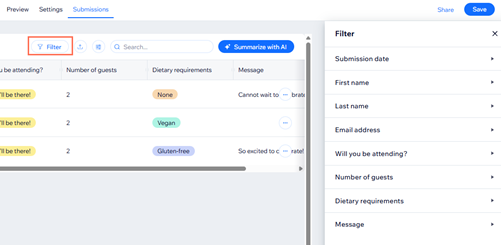
Edit submission data

Export data from the table

Download PDF
Mark a submission as spam

Mark a submission as trash

Tip:
Click Summarize with AI to view an overall picture of your form submissions. You can also ask questions about the data collected by the form, such as how many submissions came in from a specific city.
FAQs
Click a question below to learn more about your submissions table as well as old Wix Forms vs. new Wix Forms.
How do I know if my form is built using old forms or new forms?
How do I get the new version of Wix Forms on my site?
 on the left side of the editor.
Why can't I see updated submissions data?
How are dates formatted in form submission notifications?
