header-logo
Getting started with WixLearn how to build your website and business using Wix.
Creating a websiteDesign and manage your site with smart functionalities.
Account & billingManage subscriptions, plans and invoices.
Using the Wix mobile appsRun your business and connect with members.
Connecting a domainLearn to purchase, connect or transfer a domain to your site.
Managing your businessGet tools to grow your business and web presence.
Promoting your siteBoost your visibility with SEO and marketing tools.
Studio, Partners & EnterpriseGet advanced features to help you work more efficiently.
Need more help?Find solutions, learn about known issues or contact us.
placeholder-preview-image
Wix LearnImprove your skills with our courses and tutorials.
Wix BlogGet tips for web design, marketing and more.
SEO Learning HubLearn to increase organic site traffic from search engines.
Website developmentBuild a custom site using our full-stack platform.
Hire a ProfessionalGet matched with a specialist to help you reach your goals.
placeholder-preview-image

Wix Blog: Assigning a Category to a Post

1 min
Use categories to organize your blog content and help reader find the posts they're interested in. You can assign up to 10 categories to any blog post.  
Note:
A maximum of 50 categories can be created / seen in your dashboard. 

To assign a category to a post:

  1. Create a blog post.  
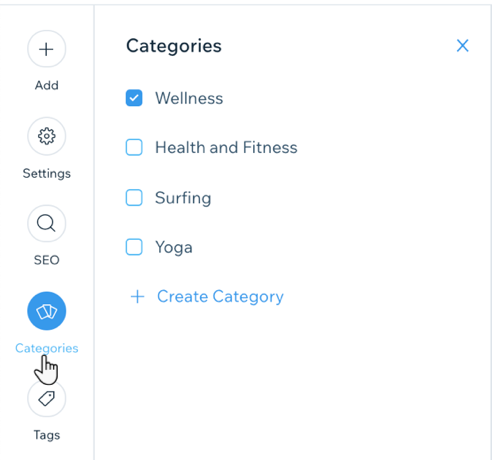
  2. In your Post Composer, click the Categories tab in the panel on the left. 
  3. Click to select the categories you want to assign. (Up to 10 categories).
    Tip: Click Create Category to create a new category. 
  4. Click Publish

Helpmate

Hello

Need a bit more guidance?
Summary of this article
Related articles
Wix Blog: Changing the Layouts of Your All Posts Feed and Category Feed

Wix Blog: Creating and Managing Blog Categories
Unlock personalized helpLog in to get the most out of Helpmate.