The
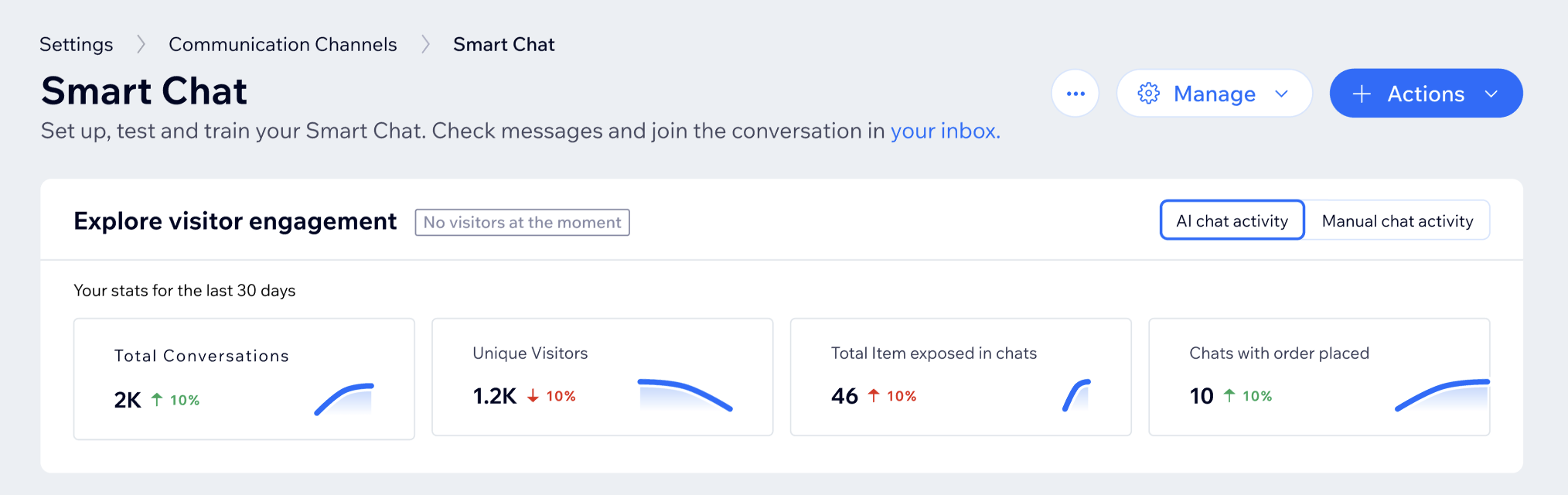
Explore visitor engagement section in Wix Smart Chat shows how people have interacted with your chat over the last 30 days. Use it to see how many conversations your AI handles, how often your team replies manually, and how chats contribute to orders.
Viewing stats on AI chats
Use the data on visitor engagement to get a quick snapshot of your AI chat performance.
To view your visitor engagement stats:
- Go to Smart Chat in your site's dashboard.
- Select AI chat activity.
- Click a metric below to learn more.
Total conversations shows how many chats your AI handled in the last 30 days. It's a quick way to see overall AI chat volume and demand. A higher number of total conversations means the AI is handling more conversations.
Notes:
- Every chat where the AI took part is included. This means that even if humans intervened at some point, the chat is still counted.
- Each chat counts once, even if it has many messages.
Unique visitors shows how many different people chatted with your AI in the last 30 days. It helps you understand the reach of your AI, not just how busy it is. A higher number of unique visitors means more people are using your AI at least once.
If Total Conversations is rising faster than Unique Visitors, it means the same visitors are returning to the chat and having more conversations.
Note: If the same visitor opens many chats, they're still counted once.
Total items exposed in chats (AI)
Total items exposed in chats tells you how many item suggestions (e.g. products, services) your AI has shown in chats. It reflects how actively your AI is promoting your items.
A higher number of total items means your AI is recommending more items overall. You can compare this with
Orders from chat suggestions to see how often items sent by the AI lead to sales.
Note: Every time the AI shows an item in the chat, it's counted. So if the same item appears in several message or chats, each appearance is counted.
Orders from chat suggestions
Orders from chat suggestions tells you how many AI chats led to a sale of at least one item that was shown in that chat. It gives a simple view of how often AI recommendations help drive purchases.
A higher number means more AI chats are turning into/converting to sales. Compare this with the
Total conversations metric to understand what share of AI chats result in an order.
Notes:
- If the visitor buys any items recommended by the AI within 7 days, that chat is counted.
- Each qualifying chat is counted once, even if several items were bought.
Viewing stats on manual chats
Use the data on visitor engagement to get a quick snapshot of chats handled manually.
- Go to Smart Chat in your site's dashboard.
- Select Manual chat activity.
- Click a metric below to learn more.
Total conversations (Manual)
Total conversations tells you how many chats appeared
in your Inbox in the last 30 days. It shows you how many conversations were handled manually, based on/using your chat settings and schedules.
A higher number of total conversations means more visitors are reaching out, or being routed to, your team. You can compare this metric with the Total conversations in AI chat activity to see how the load is split between AI and your team members.
Note: Every chat that is handled manually is counted once. It can also include chats that involved AI, as long as some of the chat was handled manually.
Replied conversations (Manual)
Replied conversations tells you how many chats actually got at least one reply from a human/team member/site collaborator. It helps you understand how many visitors received human attention.
A high number of replied conversations, that's close to the number of total conversations, means most chats have been answered. A big gap between the two metrics may mean visitors are waiting or leaving before they get a reply.
Notes:
- If a conversation includes at least one manual reply, it’s counted.
- Each conversation is counted once, no matter how many replies it has.
Typical response time (Manual)
Typical response time tells you how long visitors usually wait between any message they send and a manual reply. It demonstrates your usual speed in answering messages during ongoing conversations.
A lower time means your team is answering ongoing chats more quickly. If it's going up, your team may be overloaded with messages or responding less promptly.
Note: The median value (i.e. middle) is used to calculate the response time, so extreme response times (e.g. very slow or very fast replies) don't distort the result.
Typical first response time (Manual)
Typical first response tells you how long site visitors usually wait for the first manual reply after they start a conversation. It reflects the visitor's initial wait time, which strongly affects their satisfaction and experience on your site.
A lower first response time means site visitors are getting attention quickly when they first reach out. If the
typical first response time is much higher than the
typical response time, it means that the process of starting new chats may be slower than handling ongoing ones.
Note: The median value (i.e. middle) is used to calculate the response time, so extreme first response times (e.g. very slow or very fast replies) don't distort the result.
FAQs
Click a question below to learn more.
Why is a metric showing zero or not showing any data?
Metrics will show zero if there was no activity in the last 30 days. This may happen if you disabled the Smart Chat, but if you recently disabled it and there's still data from the last 30 days, this data will still appear.
If a metric is 0 even though you know there was recent activity, this may be due to a technical issue.
What do the green and red arrows mean?
The green and red arrows indicate the metric's change compared to the previous 30 days, so you can quickly see if metrics are going increasing or decreasing over time.
Can the same conversation appear in both AI chat activity and Manual chat activity?
Yes. If a conversation includes both AI replies and manual replies from you or your team, it is reflected in both views. For example, a chat that starts with the AI and is later picked up in your Inbox counts toward AI metrics (because the AI was involved) and manual metrics (because a human replied).
Why do AI and manual total conversations show different numbers?
AI chat activity and Manual chat activity measure different parts of your conversations:
- AI chat activity focuses on chats where the AI took part.
- Manual chat activity focuses on chats handled in your Inbox by you or your team.
Because some chats are fully handled by the AI and others are fully or partly handled manually, the totals in each view do not have to match.