


Wix Invoices: Handling EU E‑Invoicing and PEPPOL
2 min
In this article
- Exporting your invoices from Wix for EU e‑invoicing
- FAQs
Important:
This article does not provide tax or legal advice. Always confirm your obligations with your accountant or local tax authority.
From 2026, many EU countries are phasing in e‑invoicing rules for business‑to‑business (B2B) sales, while business‑to‑consumer (B2C) sales are often covered by separate e‑reporting requirements. Some countries use the PEPPOL network for these flows, but others use their own national systems and formats.
To make this process more convenient, Wix Invoices lets you export your invoice data in bulk. You then import it into your own accounting or e‑invoicing tools, or into your national portal, and submit it according to your country’s rules.
Exporting your invoices from Wix for EU e‑invoicing
You can export specific invoices or all of them from Wix Invoices, then complete the e‑invoicing process in your own system or country portal.
To export your invoices from Wix:
- Go to Invoices in your site's dashboard.
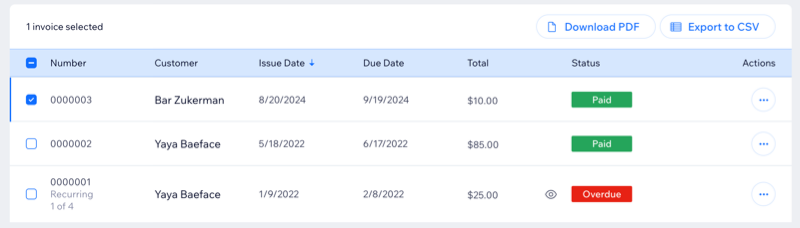
- Select the checkbox next to each invoice you want to download or export.
Tip: Select the top checkbox to select all invoices. - Click Export to CSV to download a file with 1 line per invoice.
- (Optional) Click Download PDF if you also want local PDF copies of the invoices.
What should I do with the CSV file after exporting it?
After you export the CSV file, use your accounting or e‑invoicing system, or your national portal, to import the data. Match the Wix fields (such as invoice number, dates, customer details, VAT amounts and totals) to the fields in your country’s e‑invoice format, and follow that system’s process to submit or sync invoices with PEPPOL or your tax authority platform.
FAQs
Click a question below to learn more.
Will Wix Invoices be compliant with the 2026 EU e‑invoicing mandate?
Can Wix send my invoices directly to PEPPOL or my country’s e‑invoicing system?
