Wix Capital: Understanding How Remittance Works
In this article
- Collecting remittance based on how you receive funds
- Remittance terminology
- Checking the balance remitted
- Troubleshooting remittance errors
- FAQs
Before you begin:
Wix Capital is currently only available to eligible merchants in the US. It is not available in Utah, Connecticut, Texas, or Virginia.
Remittance is the process where Wix collects the cash advance and related fixed fee from daily Wix Payments sales.
Over time, you remit the total cash advance and a fixed fee through a percentage of your daily Wix Payments sales (determined within your Wix Merchant Cash Advance Agreement). Remittance is deducted from sales only. The remittance is deducted from your daily Wix Payment sales until you’ve reached the total to remit.
Collecting remittance based on how you receive funds
Wix collects and calculates your daily remittance differently depending on how you receive your funds from sales.
For Wix Capital users with Wix Checking
For Wix Capital users with payouts through Wix Payments:
Tip:
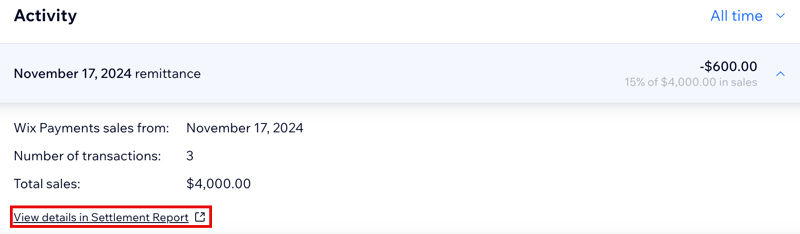
You can always see which sales are included in your remittance by clicking
View details in Settlement Report for a specific day’s remittance.
Remittance terminology
Understanding the remittance terminology used in Wix Capital can help you navigate the process more effectively. Here are some key terms:
| Terminology | Description |
|---|---|
Remittance
|
The process where Wix collects the cash advance and related fixed fee from daily Wix Payments sales.
|
Remittance rate
|
This is a percentage of your daily Wix Payments sales that will be collected automatically until you’ve reached the total cash advance amount and fixed fee.
|
Fixed fee
|
The fixed fee is calculated as a specific percentage of the cash advance you requested. You’ll remit it over time along with the total cash advance amount.
|
Total to remit
|
This is made up of the total cash advance amount and fixed fee.
|
Estimated remittance period
|
This is the length of time that Wix Payments estimates it will take to collect back the cash advance and related fixed fee. It’s based on your past year’s sales and it may take more or less time than this to fully remit the total cash advance amount and fixed fee.
|
Checking the balance remitted
Remittance starts automatically and is hassle-free. If you receive payouts through Wix Payments, collection begins 3-5 business days after approval. If you use Wix Checking, remittance begins just 1 business day after your cash advance is approved.
Tip:
The daily remittance calculation is based on your site's time zone even if this is different from the time zone on your computer.
To check the amount remitted:
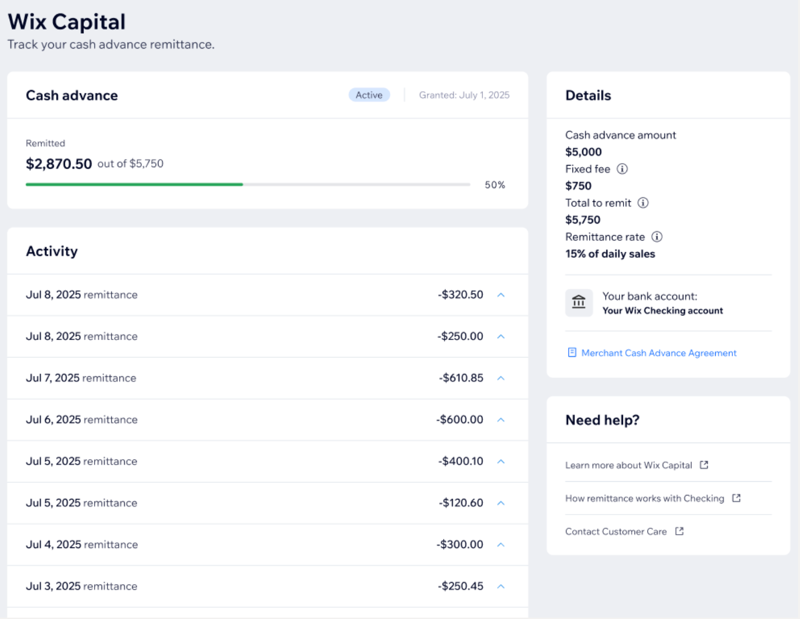
- Go to Capital on your site dashboard.
- View your progress in the Cash advance section.
- (Optional) View the Details section on the right side to see more information about your cash advance, such as the cash advance amount, fixed fee, total to remit, and your remittance rate.
Troubleshooting remittance errors
If you experience a problem with your daily remittance, you may see one of the following error messages in your Capital dashboard.
Debit for remittance didn’t go through
Remittance didn’t go through due to insufficient balance
FAQs
Click a question below to find out more information.
When will remittance begin?
Where is the remittance taken from?
Which Wix Payments sales are included in daily remittance?
Why do I see different daily sales in the Cash Advance Activity table compared to my orders page and payments page?