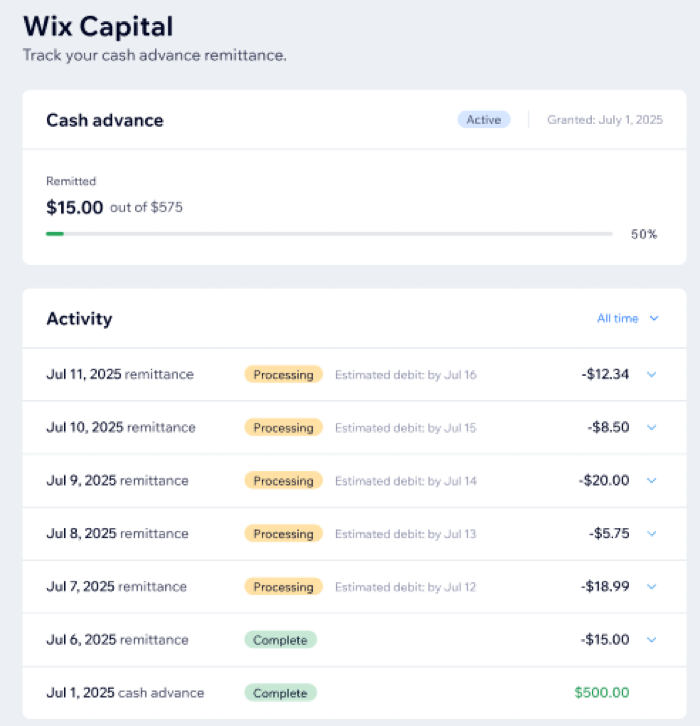
Remittance is the process where Wix collects the cash advance and related fixed fee from your daily sales processed through Wix Payments, Square, and PayPal.
Each day you process sales, a set percentage that is outlined in your agreement is taken from your connected business checking account. If you do not have sales on a given day, remittance is not collected unless there is a missed collection from a previous day.
Checking your remittance progress
You can review your remittance collection history, each attempted amount, and all statuses directly in your dashboard.
To check your remittance progress:
- Go to Capital in your site dashboard.
- Check your Cash advance section to see daily status and collected amounts.
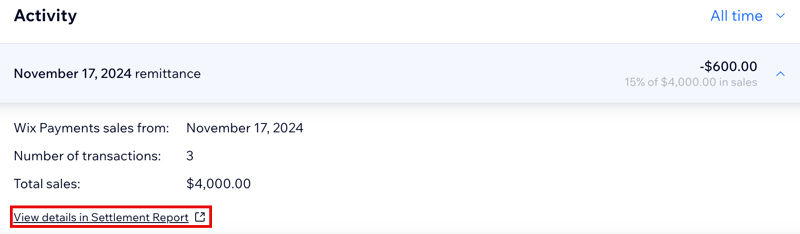
- For more information on each entry, click Show cash advance details.
Statuses in your dashboard
You can track your cash advance and daily collections at every step in your Wix Capital dashboard. Click below to see what each status means and view where to find it.
Cash advance delivery statuses
Check when your cash advance is on its way or already in your account. These statuses give you clear updates on your funding process.
- Processing: Your cash advance is on the way. It usually arrives in your bank account within 3–5 business days.
- Complete: Cash advance has arrived in your bank account.
- Failed: Cash advance couldn’t be sent (e.g., bank account blocked or not connected). If you see this status, contact Customer Care to fix the issue so that you can receive your cash advance.
Check the progress of your daily collections with these remittance status updates. The dashboard shows you exactly where your remittance stands, so you’re always in control.
- Processing: After you receive sales for a given day, your collection begins processing the next business day. This stage usually takes around 5 business days and has two parts:
- Calculation: The amount is calculated for the previous business day’s sales. For Saturday and holiday sales, the calculation happens 2 business days later.
- Debit initiation: Your bank account will be debited. Depending on your bank’s processing speed, this can take up to 5 business days to appear.
- Complete: Collection was successfully debited for a given day's remittance and any past days' failed or insufficient funds collections.
- Failed: Debit attempt couldn't be completed due to a technical issue with your bank account. Wix will try again automatically.
- Insufficient funds: Debit attempt couldn't be completed due to low balance in your bank account. Wix will regularly check your balance and retry when funds are available.
Stay informed about your overall cash advance activity. These statuses help you know if your advance is active, canceled, or fully collected.
- Active: Collection is in progress for your cash advance. It will be collected from your daily sales.
- Canceled: Due to an error with your bank account, Wix wasn’t able to send you your funds, so the cash advance request was canceled.
- Fully remitted: Cash advance has been fully collected according to your agreement. Collection will no longer be taken from your daily sales.
Troubleshooting remittance issues
You may encounter issues after receiving your cash advance and while collections are in progress. Click a scenario below to learn what it means and what to do next.
Failed collection attempt
Your collection couldn’t be completed due to a technical issue with your bank account. Wix will automatically try again. If failures continue, check your account details or contact Customer Care.
There wasn’t enough money in your account to cover the daily collection. Wix will check your balance and try again automatically. Make sure your account has enough funds for upcoming collections.
Collection is taking longer than expected
Most collections complete within five business days after sales are received. Sometimes there are delays due to bank processing or holidays. If you still see “Processing” after a week, contact Customer Care.
Bank account disconnected during remittance
If your bank account becomes disconnected after you’ve received your cash advance, connect a valid business checking account in your Capital dashboard to resume collections.
FAQs
Click a question below to find out more information.
When will remittance begin?
Remittance will be collected from your daily sales 5 days after you've been approved for your cash advance.
Where is the remittance taken from?
Remittance is taken as a percentage of your daily sales; you see the deduction in the details of your payouts and settlement report.
Why do I see different daily sales in the Cash Advance Activity table compared to my orders page and payments page?
Remittance for a specific day is calculated based on the previous day’s gross Wix Payments sales, without considering refunds and chargebacks.
You can view the related transactions in the details of each remittance amount by clicking View details in Settlement Report.