


Troubleshooting Your Structured Data Markup
- Step 1 | Check the format of your markup
- Step 2 | Check for HTML tags inside your JSON-LD
- Step 3 | Check your punctuation
- Step 4 | Check your fields for spaces
- Structured data markup is an advanced topic. Wix Customer Care cannot help you with any changes to your site's markup or submissions of it.
- Need help from an expert? You can hire an SEO professional from the Wix Marketplace.
Search engines like Google can also use markup to create rich results like article previews, product previews, and FAQs for your page's search results. Learn more about adding structured data markup.
Broken markup can also affect AI. Tools that use Natural Language Web (NLWeb) to query your site may return incomplete results. AI engines can also cite the wrong facts if your markup is broken.
Step 1 | Check the format of your markup
1<script type="application/ld+json">
2{
3    "@context":"https://schema.org",
4    "@type":"Website",
5    "name":"Wix.com",
6    "alternateName":"Wix",
7    "url":"https://wwww.wix.com"
8}
9</script>- Begins with the HTML tag <script type="application/ld+json"> and ends with </script>
- Uses only one script tag and includes only one main markup type
- Has less than 7,000 characters
Step 2 | Check for HTML tags inside your JSON-LD
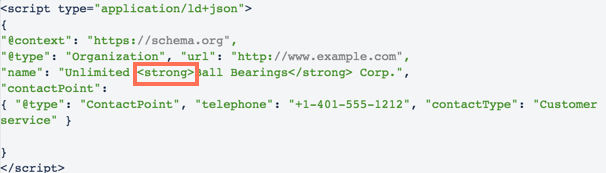
The only HTML tags you can have in your markup are the script tags at the beginning and end of the code. If you enter HTML tags inside the JSON-LD part, your markup will fail validation. For example, this code is not valid because it includes a <strong> tag in the script:
Step 3 | Check your punctuation
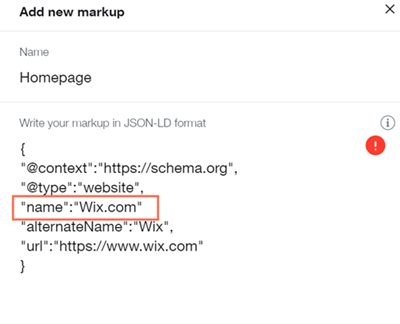
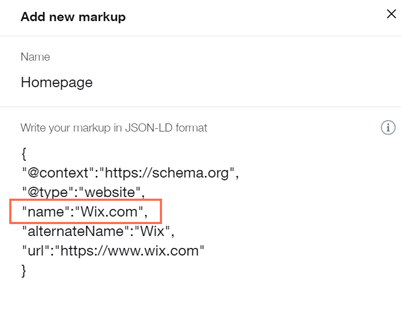
Within your markup, each JSON-LD element must be wrapped in curly brackets { }. Each element in the JSON-LD must also separated from the next one with a comma. However, the last element shouldn't have a comma after it.
Step 4 | Check your fields for spaces
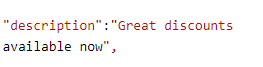
All fields have the format: "key":"content" and each field must be on a single line. Pressing 'Enter' to create a line break will make a field fail validation.
For example, the field in the example below will pass validation because it's on a single line:

Google guidelines require the information in the markup to be part of your page. If some of the information included in your markup doesn't appear in the page, it might not show as a rich result.
If you want to validate your markup for eligibility for rich results or you're having issues with your markup, you can check it by pasting it into the Google Rich Results Tool.
