


Switching to the New Wix Site Search
Wix released a new version of the Wix Site Search app that offers a better search experience for your site. The new search provides improved search functionality, more customization options and enhanced accessibility, allowing your site visitors to search with ease.
If your site has the old site search experience installed, you can switch to the new version in just a few quick steps.
Switching to the new Wix Site Search
To switch to the new Wix Site Search in the Wix Editor, you need to delete the old version of the app from your site and add the app again from the Wix App Market. To switch to the new Wix Site Search in the Studio Editor, you can update the app directly from your editor.
Wix Editor
Studio Editor
- Go to your editor.
- Click Add Apps
 on the left side of the editor.
 - Click Manage Apps.
- Click the More app actions icon
 next to Wix Site Search.
 - Click Delete app.
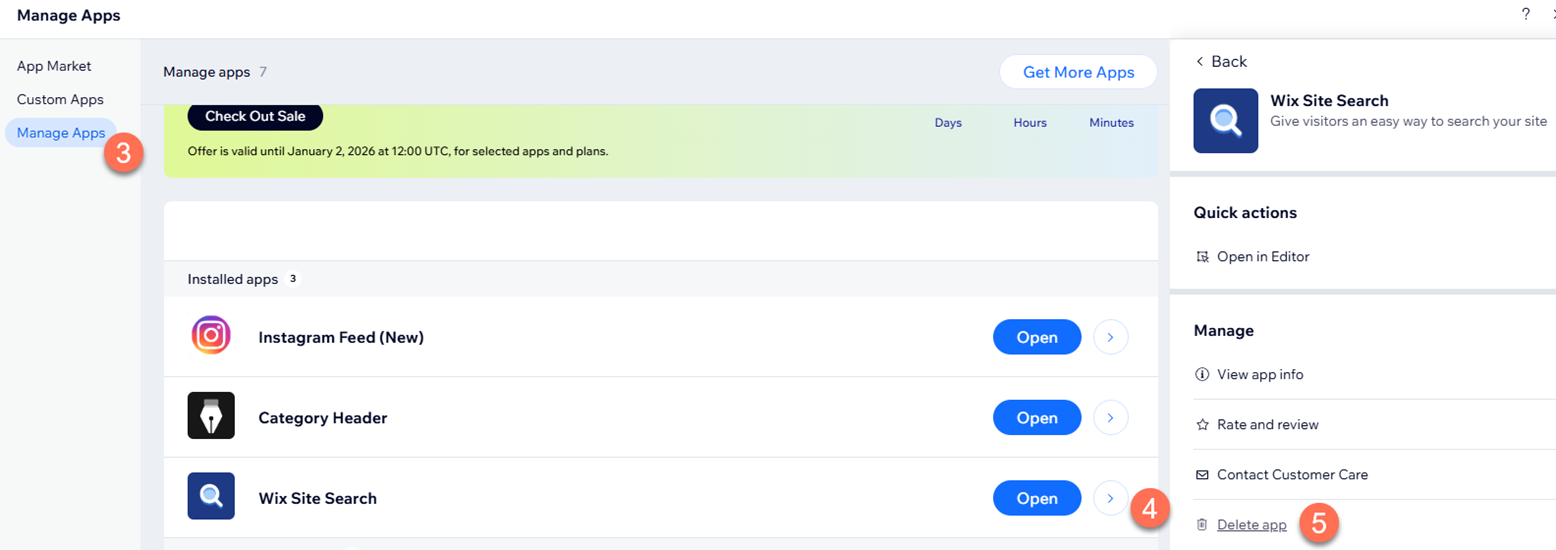
- Provide your reason for deleting the app and click Delete App.
- Click Add Apps on the left side of the editor.
- Search for the Wix Site Search app in the search bar then select the app.
- Click Add to Site.