


Choosing a Primary Category for Your Product
2 min
The primary category you assign to your products plays an important role in both search engine optimization (SEO) and site navigation.
For example, if you sell clothing, and a particular product belongs to the subcategory 'Jackets', setting this as its primary category makes it easy for customers and search engines to find it.
How do primary categories work?
To begin with, every product's primary category is the All Products category, but you can select a different primary category to better describe and organize your items. A product's primary category has an influence on the following:
Primary categories and SEO:
Selecting a primary category helps create a clear and organized way of grouping and labeling your site’s content, making it easier for search engines to understand your site's hierarchy.
In other words, selecting a different primary category tells search engines where the product fits on your site, which can lead to better indexing and ranking.
Breadcrumbs and SEO:
Breadcrumbs are navigation links that show a product's location on your site’s hierarchy.
When a product’s primary category is All Products, breadcrumbs are displayed as:
Home > All Products > [the product's name].
By selecting a more specific primary category, the breadcrumb updates to reflect its path within your navigation and subcategories: 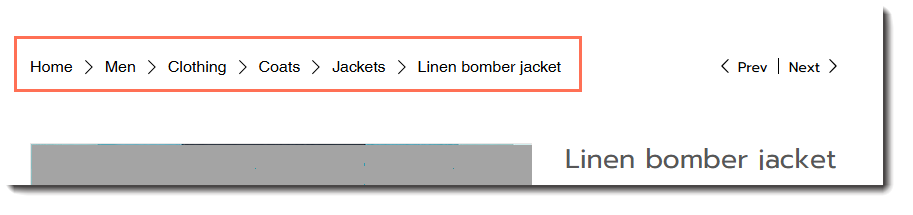
This makes your site appear more professional and well-structured to both users and search engines. It also makes it easier for customers to focus on the types of products they're looking for.
Selecting a primary category
To give your products better visibility and organization, set a primary category from the categories the product belongs to.
To select a primary category:
- Go to Products in your site's dashboard.
- Select the relevant product.
- Click the More Actions icon
 next to the relevant subcategory on the right.
 - Select Set as primary category.
FAQs
What happens to products if I don't choose a primary category?
Can a product be in more than one category and have more than one primary category?
Can I change the primary category later?
Does setting a primary category affect my product URL?
