


Wix Harmony Editor: Creating a Site with AI
- Step 1 | Create a new site
- Step 2 | Generate the site's design
- Step 3 | Generate your site pages
- FAQs
Step 1 | Create a new site
Create a new Wix Harmony site and describe your business in the chat to get a personalized dashboard. You can do this by logging in to your Wix account, or creating a new account.
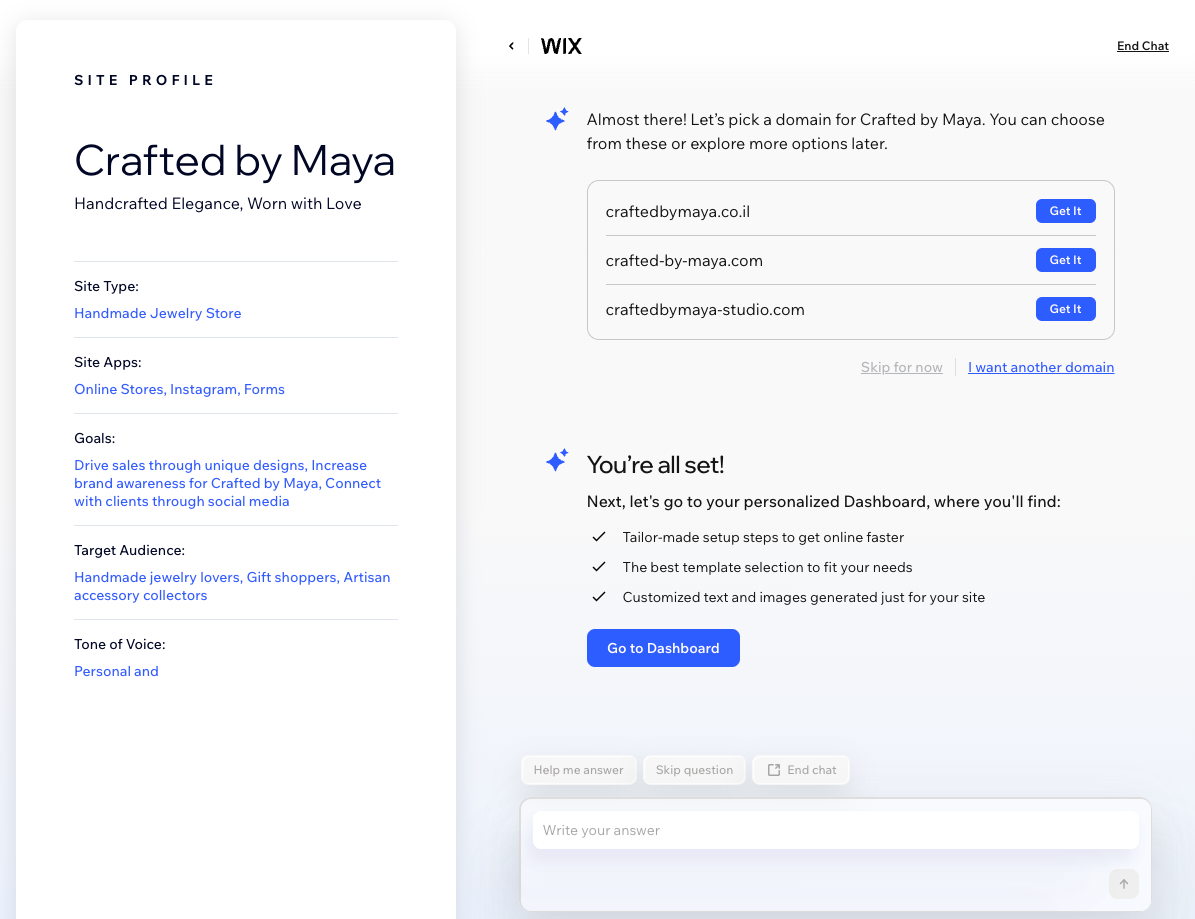
To chat to Aria and create a dashboard:
Create or log in to your Wix account.
Click Create New Site.
Select Wix Harmony Editor.
Click Let's Go to start chatting.
Reply to Aria's questions and add as much info as needed.
Tip: As you respond, Aria fills out your Site Profile on the left side of the page.Select the checkboxes next to the suggested apps that you want to add. Then, click Continue.
Pick a domain for your site, or click Skip for now.
Click Go to Dashboard.
Step 2 | Generate the site's design
Instead of customizing a template, let Aria design a unique site that is tailored to your description and style choices. Review the prompt that Aria created using your info, add details and generate your personalized design.
To create a new site:
Click Design Site at the top right of the Home page.

Review the suggested description and edit it or add more info as needed.
Tip: Include details about your business, preferred colors, style, or anything important to you.Click Generate Site.

Step 3 | Generate your site pages
Once you send your prompt, Aria will get to work building your site. It will generate your site's pages, layouts, colors, and fill your site with starter content and images.
FAQs
