


header-logo
Getting started with WixBuild your website and business with Wix. Try using our AI tools to create your website, customize templates, or hire professionals to build or enhance your online presence.
Creating a websiteRead how to use the Wix Editor and manage content on your site. Discover how to protect your visitors' privacy and make your site accessible.
Account & billingReview your account settings, manage your subscriptions and plans and understand your invoices.
Using the Wix mobile appsUse our mobile apps to run your business efficiently on the go and set up a dedicated app for your site members to stay in touch.
Connecting a domainFollow our step-by step guides to learn how to purchase, connect or transfer a domain for your site, and find out how to keep your site’s data secure.
Managing your businessGet tools to grow your business and web presence. Find the right tools for your specific needs, set up online payments and keep track of your site's analytics.
Promoting your siteLearn to make your site more visible promoting it on search engines, sending emails and running paid ads. Improve your online presence with practical tips.
Studio, Partners & EnterpriseGet the most out of your Studio or Enterprise account with advanced features that'll help you work more efficiently.
Need more help?Find solutions for site performance and technical issues, learn about issues we’re working to fix or contact us for help.
placeholder-preview-image
Wix LearnImprove your skills with our courses and tutorials.
Wix BlogGet tips for web design, marketing and more.
SEO Learning HubLearn to increase organic site traffic from search engines.
Website developmentBuild a custom site using our full-stack platform.
Hire a ProfessionalGet matched with a specialist to help you reach your goals.
placeholder-preview-image
In this article
  • Translating your Wix Forms:
  • Translating your Order Forms

Wix Forms: Translating Your Forms with Wix Multilingual

In this article
  • Translating your Wix Forms:
  • Translating your Order Forms
Add a form to your site in multiple languages so your site visitors can fill out and submit the form in their chosen language. You can edit your form's translation either from your editor, or if your site is built on Wix Studio, via the Translation Manager in your site's dashboard.
Notes:
  • Make sure you have Wix Multilingual installed on your site.
  • Some parts of Wix forms, the months in the date field or error messages for example, can’t be manually edited. These elements automatically follow your site’s language settings. To update them, change your site’s default language in the Multilingual settings or General Info.
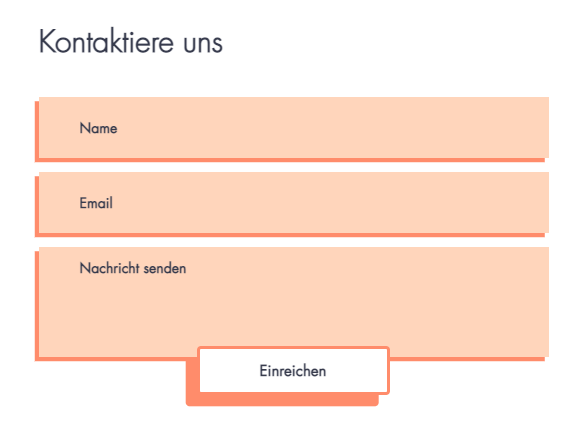
A screenshot of a translated form.

Translating your Wix Forms:

Translate your form to create a powerful impact and connect with site visitors across diverse languages and countries.

To translate your forms:

  1. Go to Translation Manager in your site's dashboard.
  2. Click Forms on the left to see the forms available for translation.
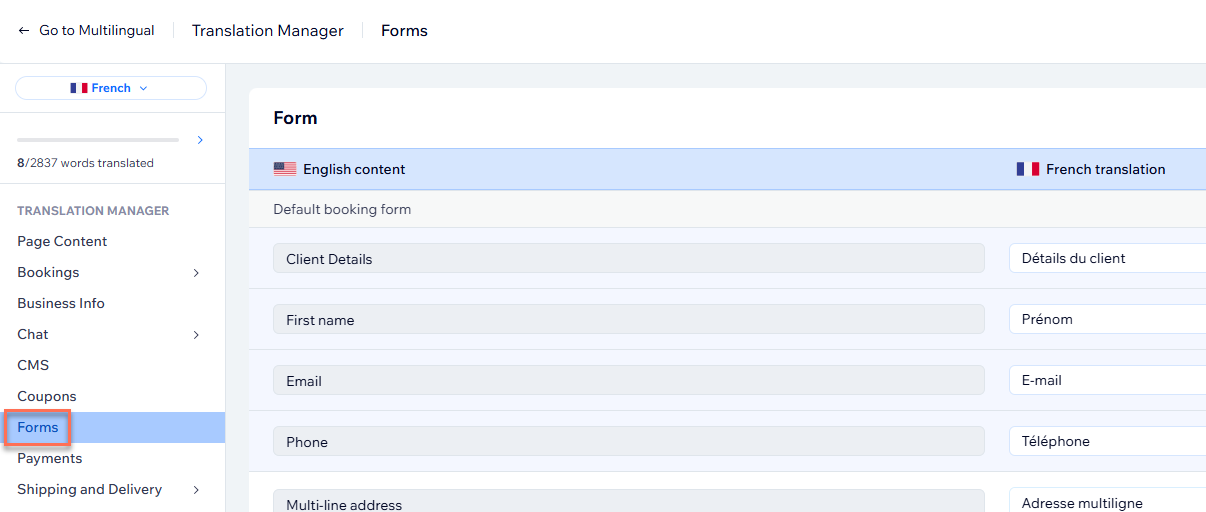
translation manager for wix multilingual with forms highlighted on the left
  1. Choose the relevant option:
    • If you auto-translated your site: Review the automated translations and edit if necessary. Learn more about auto-translating your site.
    • If you didn't use auto-translation: Translate the fields manually. You can also click Auto-translate below a field to auto-translate that specific field.
  2. Click Save and Publish.
Important note for order forms:
Order forms are currently not available to translate in the Translation Manager. To translate an order form, go to your editor.

Translating your Order Forms

Translate your Wix order form to unlock its full potential and order opportunities from customers worldwide.

To translate your Order Forms:

  1. Go to the main language version in your editor:
    1. Click the Switch Language drop-down menu at the top of the editor.
    2. Select the language you want to manage.
  2. Click the order form on the page.
  3. Select a field or any text box on your form and click Edit Translation to translate it.
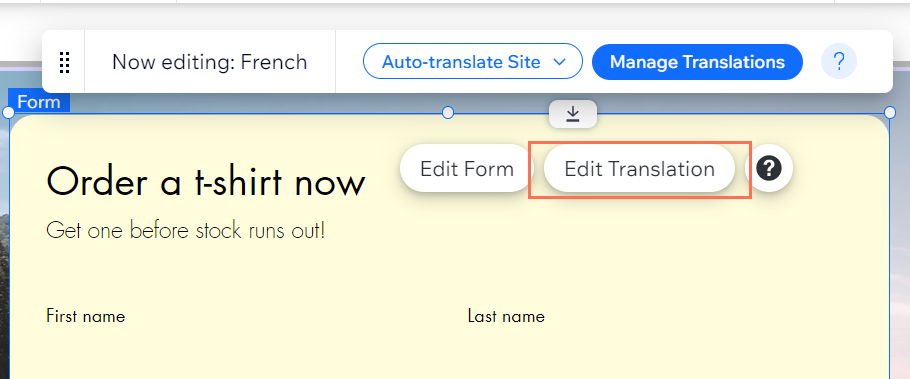
Screenshot of Wix Editor with Order Form selected after changing languages using Multilingual, edit translation highlighted.

Helpmate

Hello

Need a bit more guidance?
Unlock personalized helpLog in to get the most out of Helpmate.
