
Wixel: Managing the Wixel Agent
5 min
Set up the Wixel Agent to work the way you like. Connect the apps you want it to work with, chat with it on WhatsApp, and choose how Wixel works when using it. You can also adjust which notifications you get and the language it uses.
Managing the Wixel Agent
Manage everything about how the Wixel Agent works for you from one place.
To manage the Wixel Agent:
Desktop browser
Wixel app
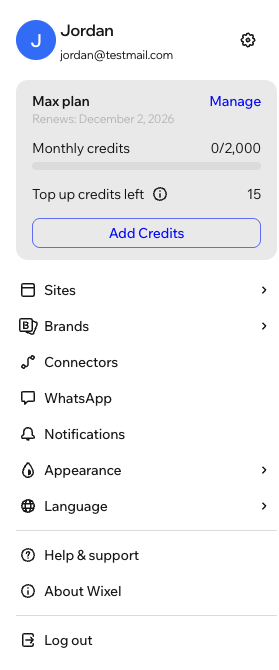
Click your account at the bottom.
Choose what you want to do:
Connect apps
Chat with the Wixel Agent on WhatsApp
Manage your notifications
Change the language
FAQs
Click a question below to learn more about managing the Wixel Agent.
How do I disconnect an app from the Wixel Agent?
 and tap your account at the bottom. Tap Connectors, tap the relevant app under Connected, and tap Disconnect.
How do I disconnect WhatsApp from the Wixel Agent?