


Wix Restaurants: Marking Menu Items as Market Price
Choose Market Price for menu items that do not have a fixed cost, such as fresh seafood or daily specials. Instead of showing a set amount or $0.00, your menu shows Market Price in the price spot for that item.
You can set Market Price for individual menu items from your dashboard. The Market Price label also appears on your generated PDF menu.
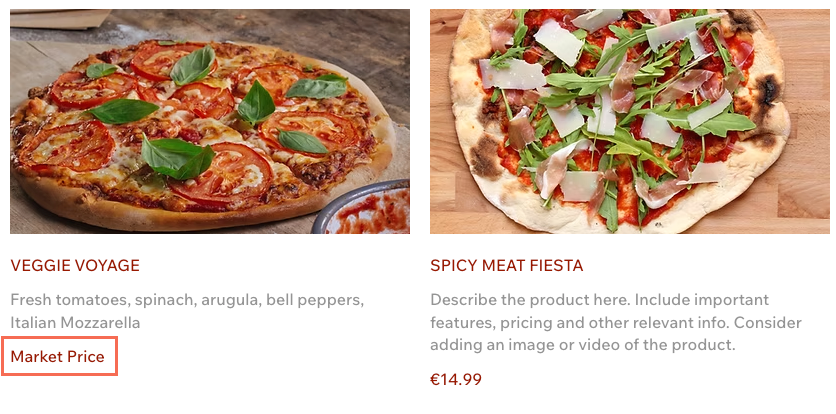
Market Price items do not appear on the Online Ordering page. Customers can see the item on your Menu page, but they cannot order it online.
Marking a menu item as Market Price
Set Market Price from the item's Info tab when you want to display a variable-cost item without showing a numeric amount. When switching an item to Market Price, any numeric price you have previously entered is automatically removed.
Go to Restaurant Menus in your site's dashboard.
Click Manage next to the relevant menu.
Choose what you want to do:
Add item: Click Add menu item under the relevant section. Choose from the list of existing items, or add a brand new one by clicking + Add New Item.
Edit item: Hover over an existing item and click Edit.
Click the Info tab.
Under Pricing, select Market Price.
Click Save at the bottom.
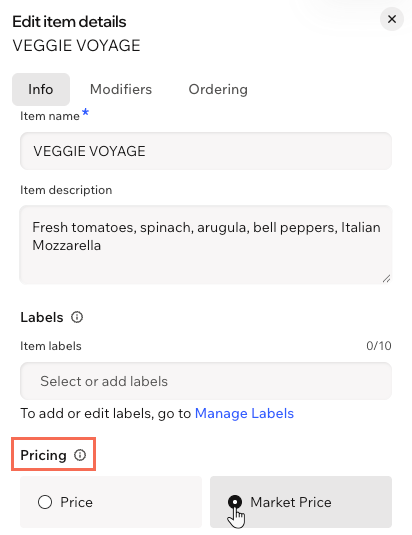
The Market Price wording is fixed and cannot be customized.
FAQs
Click a question below to learn more.