


Wix Mobile Apps: Managing Your Sites on the Spaces App
In this article
- Organizing your site list
- Searching for a site
- FAQs
Access and manage your sites on the 'My Sites' screen in the Spaces by Wix app. From there, organize your site list according to your preferences and customize notifications to get the latest updates.
You can also explore new businesses and communities to expand your network with like-minded individuals.
Important:
This article is for people who are members of your site and using the Spaces app. If you want to manage your sites in your Wix account, you can do it from the Wix app.
Organizing your site list
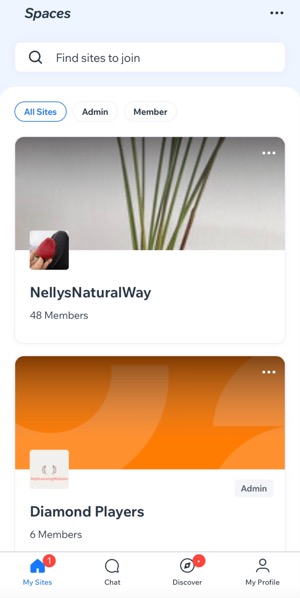
Organize your home screen by pinning your favorite sites to the top, hiding sites that you don't visit very often, and leaving sites that you no longer want to be a part of.
To organize your site list:
- Open the Spaces by Wix app.
- Tap the More Actions icon
 at the top right of your site list.
 - Tap Manage My Sites.
- Tap the More Actions icon next to the relevant site.
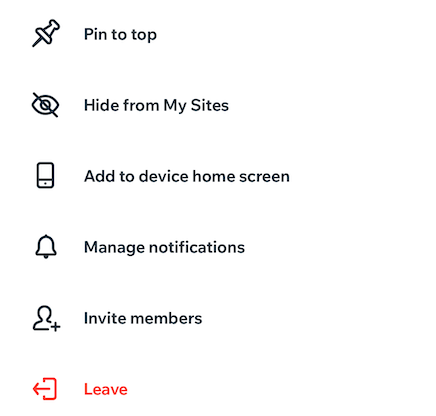
- Select what you want to do from the available options:
- Pin to top: Stick your favorite site to the top of the home screen in the app.
- Hide from My Sites: Remove a site from your home screen while still being its admin/member.
- Add to device home screen: Create a shortcut from the home screen of your mobile device.
- Manage notifications: Choose the updates you want to receive and how you want to receive them (e.g. Push notifications or Email).
- Invite members: Invite people to join your favorite site on the app.
- Leave: Leave a site you are a member of or no longer want to follow.
Searching for a site
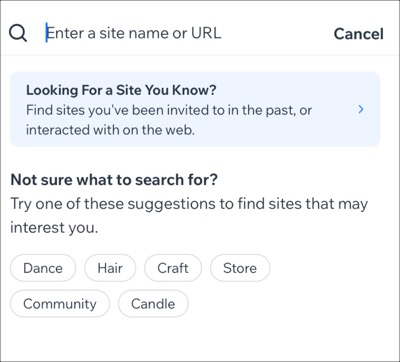
Use the search bar at the top to find a site you're a member of or interested in. Search by name, URL, sites you've interacted with or been invited to in the past.
To search for a site:
- Open the Spaces by Wix app.
- Tap the search bar at the top of the home screen.
- Choose what you want to do:
Enter site name or search by URL

Look for a site you know

Not sure what to search for?

FAQs
Click a question to learn more about accessing your site as an admin in the Spaces app.
Can I manage the sites I'm an admin of using the Spaces app?

What options are available through the Admin Actions?

Can I experience my site as a member?
