# Wix Blog:在部落格貼文中新增 HTML 程式碼
Source: https://support.wix.com/zh-hant/article/wix-blog%EF%BC%9A%E5%B0%87-html-%E7%A8%8B%E5%BC%8F%E7%A2%BC%E6%96%B0%E5%A2%9E%E8%87%B3%E9%83%A8%E8%90%BD%E6%A0%BC%E6%96%87%E7%AB%A0 (updated 2026-09-25)
Related: Wix developer documentation, https://dev.wix.com/docs/llms.txt; Help Center index, https://support.wix.com/en/llms.txt
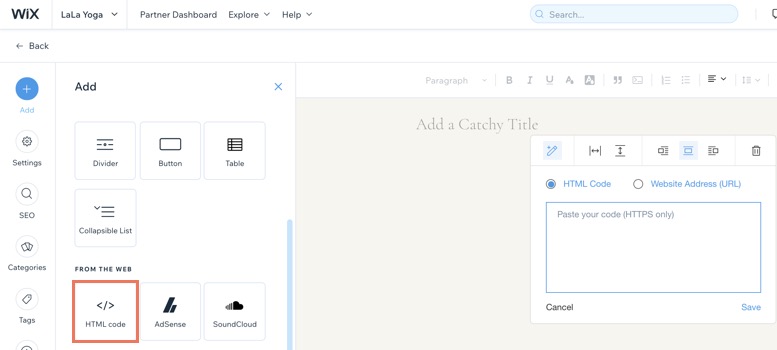
使用 HTML,在部落格貼文中嵌入 iframe(外部程式碼或組件),或顯示外部網站。
> **重要:** 使用 HTML 元件前,請務必閱讀相關[限制](https://support.wix.com/zh-hant/article/wix-editor-embedding-a-site-or-a-widget)。
### 在部落格貼文中新增 HTML 程式碼:
1. 前往網站管理介面的「[部落格](https://www.wix.com/my-account/site-selector/?buttonText=Manage%20My%20Blog&title=Select%20a%20Site&autoSelectOnSingleSite=true&actionUrl=https://www.wix.com/dashboard/%7B%7BmetaSiteId%7D%7D/blog)」。
2. 點擊相關部落格貼文上的「**編輯**」,或點擊「**建立新文章**」撰寫新文章。
3. 點擊左側的「**新增**」。
4. 點擊「**HTML 程式碼**」。
5. 執行下列其中一項:
* **新增 HTML 程式碼:**使用 HTML 程式碼新增外部網站的功能。
1. 點擊「**HTML 程式碼**」。
2. 輸入 HTML 程式碼。
3. 點擊「**儲存**」。
* **嵌入外部網站:**在貼文內的視窗中顯示外部網站。
1. 點擊「**網站位址(網址)**」。
2. 輸入網址。
3. 點擊「**儲存**」。
6. (選填)使用寬度、高度和對齊方式等選項自訂元件。
**了解如何從下列第三方網站擷取 HTML 程式碼:**
* [SoundCloud](https://help.soundcloud.com/hc/en-us/articles/115003568008-Embedding-a-track-or-playlist-)-內嵌音樂曲目
* [Google Maps](https://support.google.com/maps/answer/3544418?hl=en)-內嵌地圖
* [Instagram](https://www.instagram.com/developer/embedding/)-內嵌圖片
* [Vine](http://www.laptopmag.com/articles/how-to-embed-vine-video-on-website-blog)-內嵌文章
* [Twitter](https://support.twitter.com/articles/20170071)-內嵌時間線
* [Pinterest](https://developers.pinterest.com/tools/widget-builder/)-內嵌 Pinterest 功能
* [Facebook](https://developers.facebook.com/docs/plugins/embedded-posts)-內嵌文章
* [VK](https://vk.com/pages?oid=-17680044&p=VK%5FAPI%5FDocumentation)-內嵌 VK 功能