


Wix Smart Chat: Using AI Credits
3 min
In this article
- Moving from your Smart Chat plan to AI credits
- Checking your AI credits quota
- Choosing what happens when the quota is reached
- FAQs
Wix Smart Chat (formerly AI Site Chat) now uses AI credits instead of a separate Smart Chat subscription. Your available credits depend on your Wix plan, and the same credits can also be used across other Wix AI tools.
In Smart Chat, AI credits are used when the AI chat is online and answers visitors. This helps you offer 24/7 support, suggest products and services, and automate responses.
Want to know how AI credits work?
Moving from your Smart Chat plan to AI credits
Starting June 10, monthly Smart Chat subscriptions will no longer renew. If you currently pay monthly for a Smart Chat plan, it will automatically move to the AI credits included in your current Wix site plan. This means you no longer need a separate Wix Smart Chat subscription after the change takes effect.
If you have a yearly Smart Chat subscription, the details of this change may differ from monthly subscriptions, and any relevant updates will get emailed to you separately.
How many credits you get depends on your current Wix plan:
- Wix Premium plan: Wix Smart Chat will use the AI credits included in your current Wix site plan.
- Free plan: Wix Smart Chat will use the AI credits included in the free Wix site plan. If you rely heavily on Smart Chat or expect to exceed the free credit limit, you can upgrade your plan at any time.
Not sure how many AI credits your plan includes?
Checking your AI credits quota
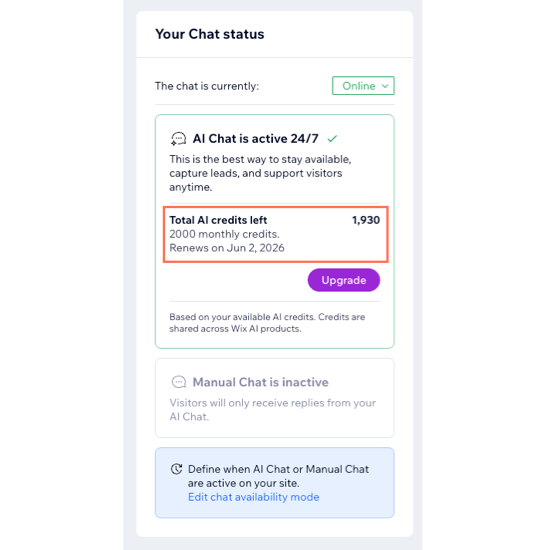
You can check your available AI credits quota from your Wix Smart Chat dashboard. If your account has not moved to AI credits yet, you may still see your quota shown as conversations.
Choosing what happens when the quota is reached
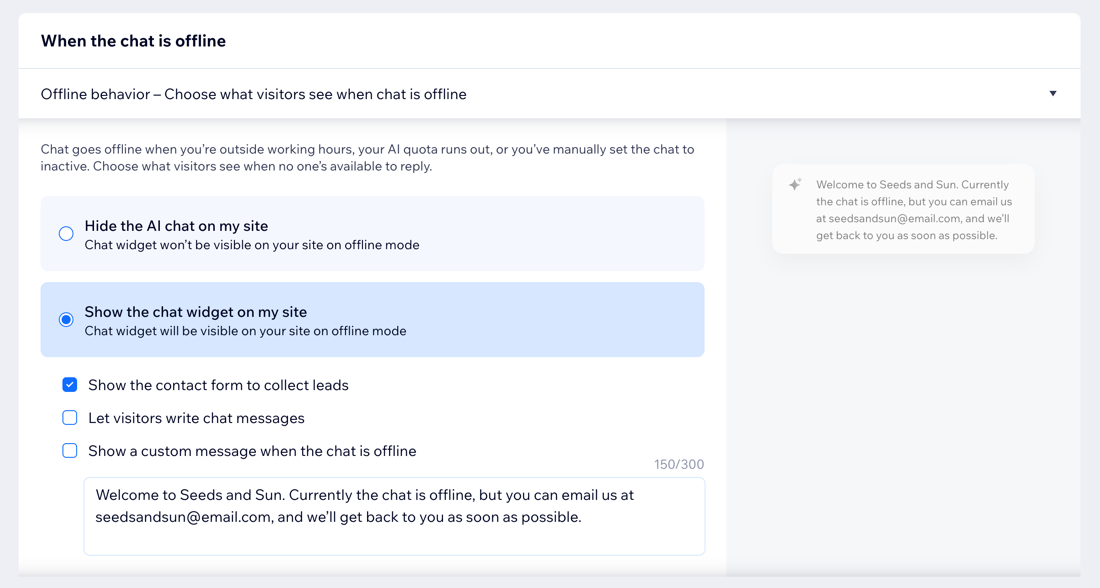
When you use up your AI credits, the Smart Chat switches to offline mode. You can decide what happens next so visitors still know what to do when the chat is unavailable. Learn how to customize the chat's offline settings.
Tip:
If you want to keep your chat online even after running out of AI credits, you can change the chat availability mode to 'Manual Chat 24/7' and continue answering all incoming messages manually.
FAQs
Click a question below to learn more.
Do I need to do anything to move to AI credits?
Why do I still see a conversation quota in my Smart Chat dashboard?
What’s the difference between the Smart Chat plans and AI credits?
What happens when my app subscription ends?
Can I test the Smart Chat without using AI credits?
