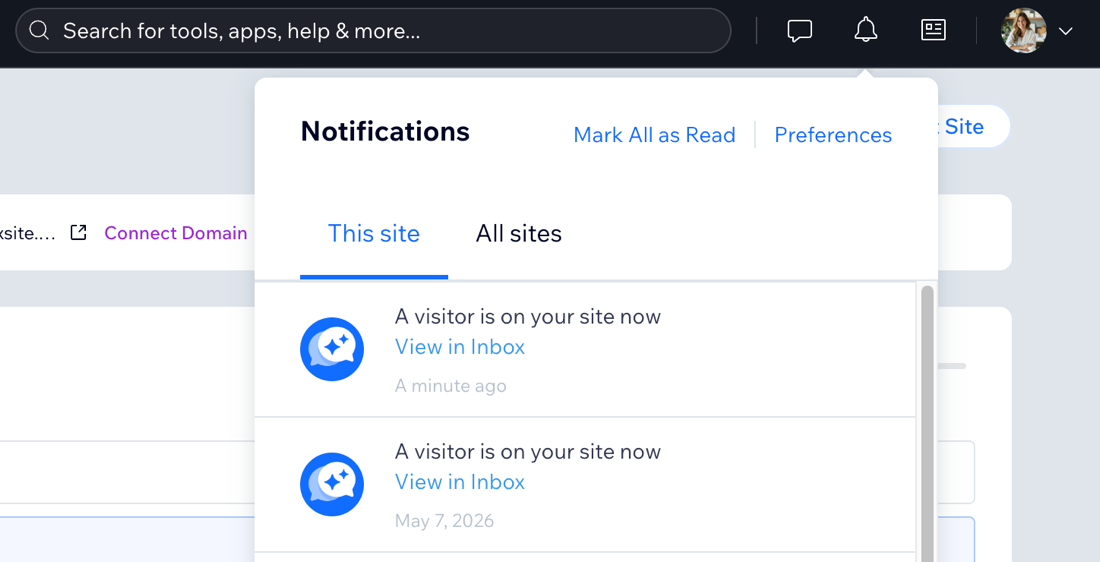
Get notified whenever a new visitor lands on your site and reach out to them directly from your site's dashboard. This is a great way to engage potential customers in real time and turn them into meaningful business leads.
You can also open the notification to chat with the visitor in
Wix Inbox and view their site activity in one place.
Viewing and chatting with live site visitors
See who's browsing your site in real time and chat with live visitors directly from your site's dashboard using Wix Inbox.
To view and chat with your visitors:
- Go to your site's dashboard.
- Click the relevant notification (e.g. "A visitor is on your site now").
- In Wix Inbox, choose what you want to do:
- Type your message in the text box.
- Click Send at the bottom right.
View the visitor's site activity
At the top of the inbox message you can see all available information about the site visitor including:
- The site page they're viewing
- The type of device they're using
Note: Hover over the site page to view the device type. - How long they've been on your site
- The number of times they've visited your site
Note: Hover over the site time to see visit number. - Their location

Managing new visitor notifications
By default, Wix Smart Chat sends a push notification to your mobile device and a notification in your dashboard each time a new visitor arrives to your site.
You can choose where you want to receive new visitor notifications - your dashboard, the Wix app, or both. You can also stop notifications entirely by deactivating the 'New visitor on site' automation.
To manage new visitor notifications:
Choose where to manage notifications:
Select which notifications you want to receive for Wix Inbox. You, and all site collaborators with access to Wix Inbox, can adjust these settings individually.
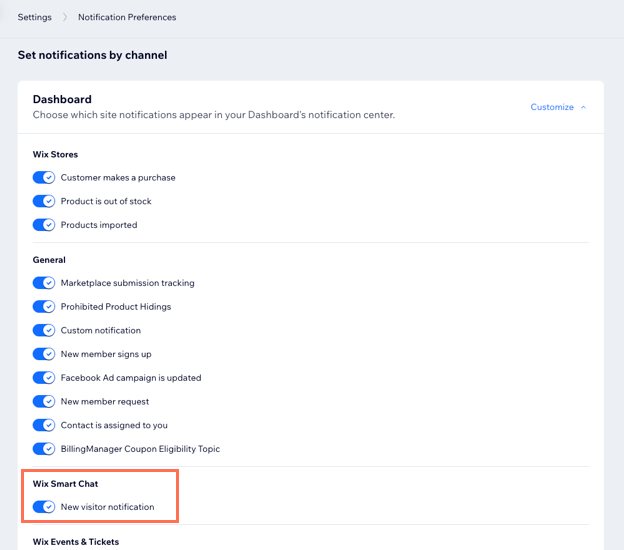
- Go to Notification Preferences in your dashboard.
- Click the Dashboard dropdown.
- Scroll down to Wix Smart Chat.
- Click the toggle next to New visitor notification to enable or disable the notification.
Mobile push notifications
Using the Wix app, you can get a notification to your mobile device for every new visitor who is on your site, allowing you to monitor and respond on the go.
App notifications are enabled by default, but you can temporarily or permanently disable this notification if you like.
- Go to your site in the Wix app.
- Tap Inbox
 at the bottom.
 - Tap the More Actions icon
 at the top right.
 - Tap Inbox Settings.
- Tap Notifications Settings.
- Tap the toggle for Allow All Push Notifications to enable or disable them.
- Enabled: You'll receive push notifications on your mobile device.
- Disabled: Select for how long you want to disable notifications for: 8 hours, 1 week, 1 month, 1 year, or permanently.
- Scroll down to Wix Smart Chat and tap the toggle next to New visitor notification to enable or disable it.
Automations (Deactivate all notifications)
Deactivating the 'new visitor on site' automation stops new visitor notifications across web and mobile. You can reactivate the automation any time.
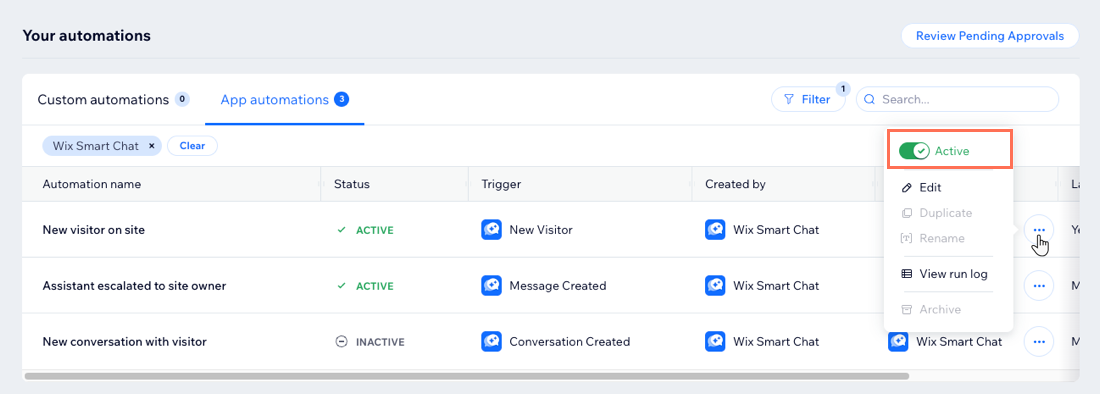
- Go to Automations in your site's dashboard.
- Click the App automations tab.
- Scroll down and find the automation New visitor on site.
Tip: Narrow down the list to only Wix Smart Chat automations by clicking Filter and selecting Wix Smart Chat under the Created by dropdown. - Click the More Actions icon
 and enable or disable the Active toggle.
FAQs
Click a question below to learn more.
I disabled notifications on mobile but I'm still getting them on web. Is that normal?
Yes. The web and mobile notification toggles work independently, so disabling one does not change the other. To stop both, disable both toggles or deactivate the automation.
Why am I not receiving new visitor notifications?
Follow these troubleshooting steps to check everything is set up correctly so you can receive new visitor notifications:
- Make sure Wix Smart Chat is set to the relevant chat availability mode that includes the Manual Chat. This feature does not work when the chat availability mode is set to AI Chat 24/7.
- Check that the New visitor on site automation is active and that the New visitor notification toggle is enabled for the platform you want to use.
- (For the mobile devices) Make sure push notifications are enabled for the Wix app on your device.
Do my site collaborators also receive these notifications?
Yes. Anyone with access to Wix Smart Chat can receive new visitor notifications. This includes collaborators, not only you as the site owner.
What other notification types can I manage?