Site Members: Adding a Custom Member Page
2 min
This article refers to the new version of the Members Area app which is not available to all users yet. If you're using the previous version, read the information here. Click here to check which version you're using.
Create your own private pages with exclusive content for members. You can design the page as you like with the elements and content you need. These pages are automatically added to the login bar menu for easy access.
Wix Editor
Studio Editor
Wix Harmony Editor
- Go to your editor.
- Click Pages & Menu
 on the left side of the editor.
 - Click Members Area.
- Click + Manage Member Pages at the bottom.
- Click +Add Page next to Custom Member Page.
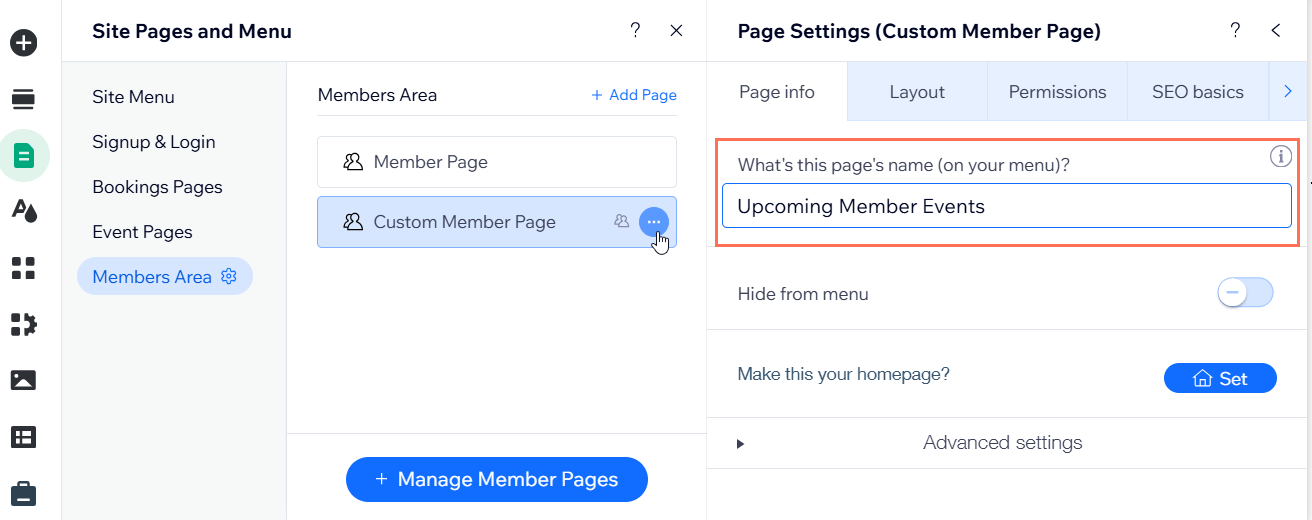
- Give the new page a name:
- Hover over the new page and click the More Actions icon
 .
. - Click Settings.
- Enter the new name under What's this page's name (on your menu)?.
- Hover over the new page and click the More Actions icon