Claiming App Vouchers for Business Premium Plans
3 min
In this article
- About this offer
- Promotion terms and conditions
- Claiming and adding apps to your site
Claim a free one-year upgrade for a range of third-party apps with the purchase of a participating yearly Premium plan. These apps help you manage and grow your business, helping with sales, shipping, traffic analysis and more.
Note:
This promotion is not available for all Premium plans.
About this offer
The apps you can upgrade may differ, depending on the Premium plan you purchased. You can find detailed information about which apps you'll receive with which plans on the Upgrade page.
Click below to learn about each app:
Shippo - Scalable Shipping
Modalyst - Dropshipping
Events Calendar
Get Found Today
Smart Search by Searchanise
Promotion terms and conditions
- This promotion is not available to all users.
- You must redeem this promotion within 60 days from the purchase date of the Premium plan.
- This promotion lets you upgrade the participating apps for free for a period of one year. The app purchase page may display the monthly pricing, but you will receive a full year free.
- The promotion is valid for the above mentioned apps only.
- The promotion is provided per account. You may use it on any site in your account (it does not have to be the site you just upgraded).
Claiming and adding apps to your site
After purchasing / upgrading to a Premium plan, you'll receive an email with the third-party apps you can claim for free. Head over to your site's dashboard to add the app that meets your business needs.
Already using one of these apps?
This promotion allows you to upgrade the app, even if you're already using it (for free) on your site. Follow the steps below – you'll see the discount on the purchase page.
To claim an app and add/upgrade it:
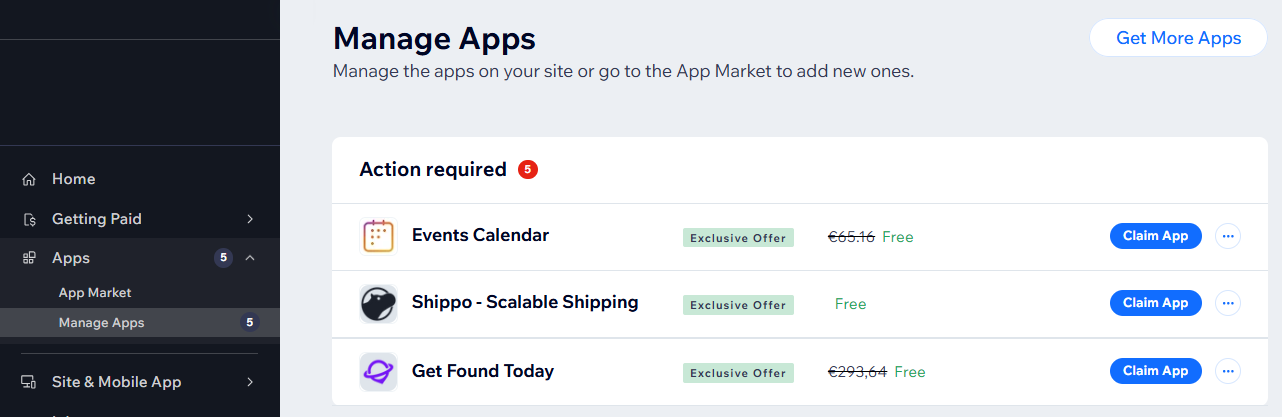
- Go to Manage Apps in your site's dashboard.
- Click Claim App next to the relevant app.
- Click Add to Site on the app market page.
- Click Agree & Add.
- Follow the steps to upgrade the app.
- Click Submit Purchase on the checkout screen after reviewing the details.
Note: Make sure your discount is applied on the checkout screen. The total amount displayed should be $0.00.