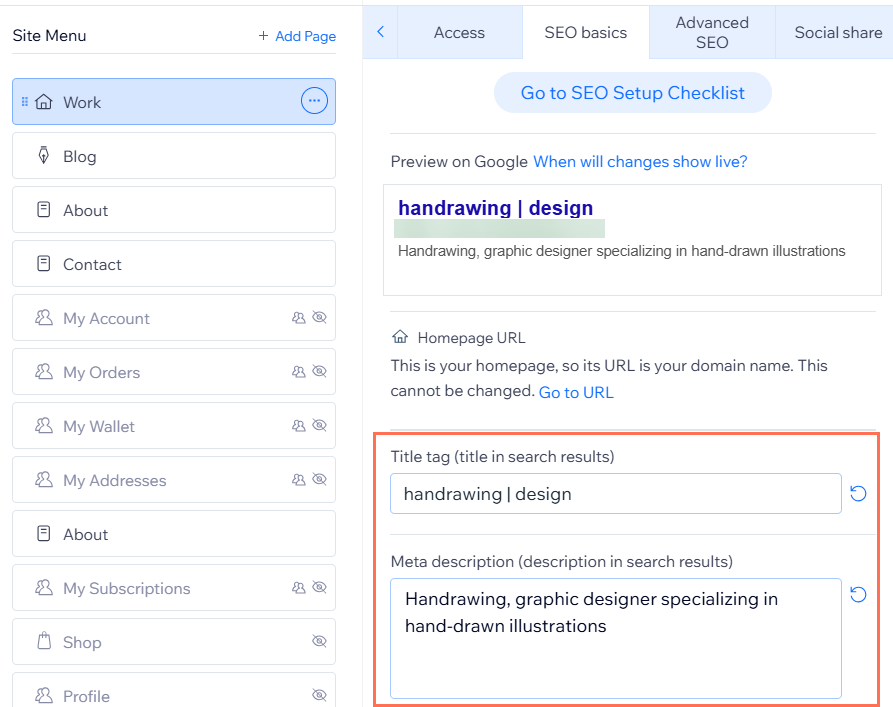
Meta tags are snippets of text that describe your page’s content. Meta tags are not visible on the page itself. They appear in the page's code and tell search engines how to display the page in search results.
Search engines usually use your page's title tag and meta description for its search result. Optimizing these two meta tags can help search engines display the most accurate information for your pages.
Understanding title tags
Your page's title tag is the title that search engines usually display for your page in search results. For example, your title tag may appear below your page's URL in Google search results.
A clear title tag in search results helps potential site visitors decide whether or not to visit your site. Your page's title tag should be clear and concise with a focus on your page’s target keywords. It's also a good idea to include the name of your business or site in the title tag.
Here are some more tips for writing effective title tags:
Make each page's title tag unique. This helps your site visitors and search engines differentiate between the pages of your site.
Make the length of your title tag less than 60 characters. Search engines often trim title tags that are longer than this.
Use the pipe sign | to distinguish different parts of your title.
If you own a local business, we recommend using the following format: Keyword | Location | Brand Name. Including the location can help search engines know to display your site to searchers in your area. An example of this is: "Nature Photography | Seattle | Daniel Forest".
If you do not have a local business, use the following format: Keyword | Brand Name.
An example of this is: "Nature Photography | Daniel Forest".
You can also add symbols and emojis to your page's title tag.
Understanding meta descriptions
Your page's meta description is the description that search engines usually display for your page in search results. For example, it's the description that displays below your page's title tag in Google search results.
Your page's meta description gives your potential site visitors a summary of what your page is about before they visit it. You should make each page's meta description unique to help your site visitors decide if your page contains what they're looking for.
Here are some more tips for writing effective meta descriptions:
Make your meta description between 50-160 characters long so that it displays correctly in search results. For example, Google usually trims meta descriptions at around 160 characters.
Use your target keywords in the meta description. For example, here is a meta description for a nature photography business: "Explore Daniel Forest’s breathtaking shots of Seattle’s mountain views and winter wildlife".
Add a call to action to your description. For example, "Learn how to take your own beautiful photographs of the world around you".
You can also add symbols and emojis to your page's meta description.
AI bots rely on an accurate meta description when summarizing your page, so describe it clearly instead of stuffing keywords.
Adding title tags and meta descriptions to your pages
You can add a title tag and meta description to a page in your site's SEO panel
.
To add a title tag and meta description:
- Go to your editor.
- Click Pages & Menu
 on the left side of the editor.
- Click the More Actions icon
 next to the relevant page.
- Click SEO basics.
- Enter your title tag under Title tag (title in search results).
- Enter your meta description under Meta description (description in search results).
- Click Publish at the top right of the editor.
FAQs
Click a question below to learn more about adding SEO title tags and meta descriptions to your pages.
Is there another way I can improve my site’s titles and descriptions for SEO?
You can use the Wix SEO Setup Checklist to review your site’s content and get guidance on creating titles and descriptions that are unique and relevant. This helps search engines understand your site and can increase your chances of being found online.
How can I get ideas for my title tags and meta descriptions?
You can use the
AI Text Creator to automatically generate suggestions for your title tags and meta descriptions.
Why does Google sometimes show a different meta description than the one I wrote?
Search engines like Google sometimes create their own meta descriptions for your page. This can happen when search engines think that some other content on your page is a better match to the searcher's keywords. It can also happen if they decide that your meta description does not accurately describe your page.
Can I add title tags and meta descriptions to pages other than my homepage?
Yes, you can add title tags and meta descriptions to product and category pages in Wix Stores, blog posts and categories, Wix Bookings services, Online Programs service pages, and Wix Events pages. This improves your site’s SEO across different parts of your website.