


CMS: Connecting HTML Widgets to the CMS
In this article
- Connecting an HTML widget to a dataset
- FAQs
Connect HTML widgets (iFrames) to a
dataset to display external websites (URLs) for each item in your CMS collection.
This is useful for displaying dynamic content like different event pages, partner websites, or portfolios where the website address changes for each item in your collection.
Note:
Currently, you can only connect the element to a collection field that contains a URL. It is not possible to connect raw HTML code (e.g. <iframe src..>) from the CMS. You can
vote for this feature here.
Connecting an HTML widget to a dataset
Select an embed code element in your editor and connect it to a dataset. Then choose whether to display HTML code or a website address (URL) from your collection fields.
Select the HTML widget in your editor and connect it to a dataset that connects to your CMS collection. Then choose the URL or Text field that contains the website address you want to display.
Wix Editor
Studio Editor
- Go to the relevant page in your editor.
- Add the embed a site element to your page:
- Click Add Elements
 on the left side of the editor.
 - Click Embed Code.
- Click the Embed a site element to add it to your page.
- Click Add Elements
- Click the Connect to CMS icon
 .
. - Click the Choose a dataset drop-down and select an existing dataset that connects to your collection. Alternatively, select Add a Dataset, then choose the collection you want to connect, give the dataset a name and click Create.
- Click the HTML connects to drop-down and select the relevant field from your collection:
Tip: Select + Add to create and connect a new 'URL' or 'Text' collection field.- URL: (Recommended) Select the 'URL' field containing the HTTPS address you want to display.
- Text: Select a 'Text' field containing a valid HTTPS URL.
Note: This field must contain a URL only. Raw HTML code is not supported.
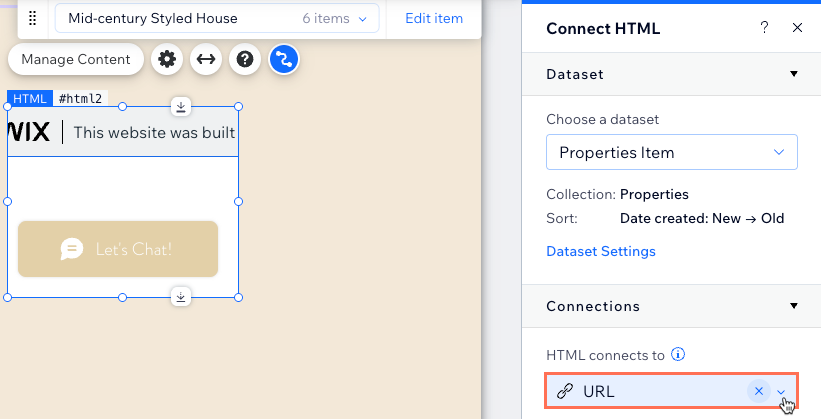
- (If needed) Click and drag the borders of the element to resize it.
- Click Preview to test your connections.
- Click Publish if you are ready to make the changes go live.
FAQs
Click below for answers to common questions about connecting embed code widgets.
Can I connect raw HTML code from my collection?
Can I connect an HTTP URL?
Why does my embedded site show a refused to connect error?
Why isn't my content displaying?
Is the embedded content secure?
Can I filter the content displayed?
What is a dataset?
