


About Promo Cards
3 min
In this article
- Highlight offers and important content
- Display promo cards where they matter most
- Keep your promo cards organized
- Tips for creating effective promo cards
- Create your own promo cards
Promo cards, also known as promo tiles or content cards, are promotional tiles you can add to your Category page or grid gallery. You can use them to highlight sales, feature special offers, or present helpful content such as shopping guides.
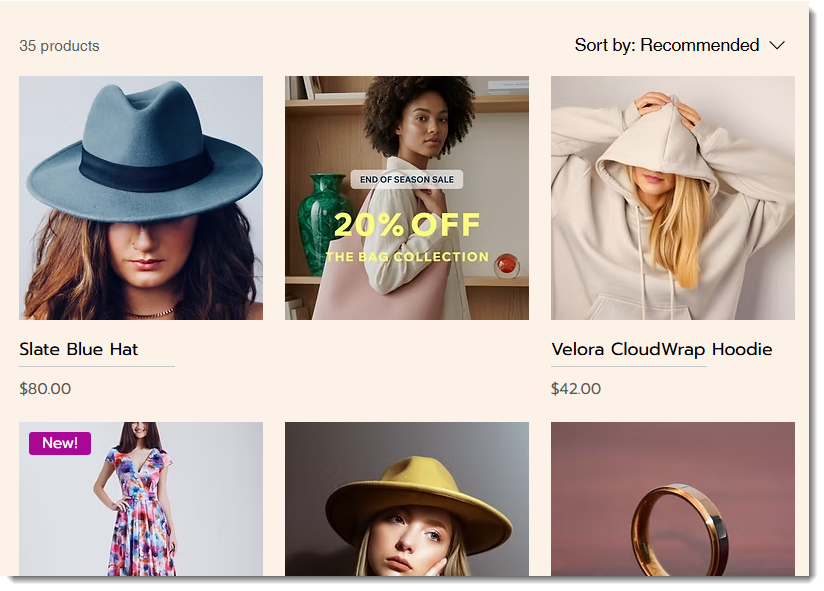
Highlight offers and important content
Promo cards appear inline with your products, so you can add images or GIFs throughout the product grid. This helps draw attention to content you want shoppers to focus on.
Use promo cards anytime you want to promote a sale, highlight a product collection, or showcase buying guides, such as how to choose the right-sized rug for your space or what to look for when selecting a car seat.
Display promo cards where they matter most
Promo cards are currently available in the Category page and grid galleries. You can assign each promo card to one or more product categories, so the content appears in the most relevant spots.
Keep your promo cards organized
If you have a lot of promo cards and want to reuse them, tags can help you keep them organized. For example, you can add a 'Valentine’s' tag to any promo cards related to the holiday. Later, you can use that tag to filter your promo cards and quickly find the ones you need.
Tips for creating effective promo cards
Creating a well-designed promo card can be challenging because there are multiple factors that affect each other. For example, the aspect ratio you choose for your card needs to take into account the product image aspect ratio and whether you select the Crop or Fit setting..
Use the tips below to create promo cards that look clear and help highlight the right content in your store.
- Image aspect ratio: Make sure your promo cards have the same aspect ratio as the product image settings in the element where they'll be displayed. For example, if your images are displayed with a 1:1 image ratio (i.e. they are square) in the category page, you should also create square promo cards. Learn more about aspect ratio.
- Image resolution: For best quality, make sure to create high-resolution images. For example, an image with a 1:1 ratio should be at least 3000 x 3000 pixels.
- Use a large enough font size: Test your cards on different devices and check that your text is always large enough to be easily read.
- Avoid image edges: To make sure your cards look good across devices, keep text away from the image edges.
Highlighting key content
Promo cards can help you highlight important content and guide shoppers through your store. Use them to promote timely offers, draw attention to specific categories, and share helpful content that supports purchase decisions.
- Seasonal promotions: Use promo cards to promote seasonal events such as Valentine’s Day or Black Friday. Add tags to organize seasonal cards, then deactivate them when the season ends and reactivate them next year.
- Category-specific offers: Assign promo cards to specific categories to promote relevant offers. For example, you can display a 'Free shipping on rugs' promo card only in the 'Rugs' category.
- Editorial content: Use promo cards to link to buying guides, lookbooks, or how-to content to help shoppers make purchase decisions.
Create your own promo cards
Ready to get started? Create and manage promo cards in your dashboard, and choose the categories where they appear. Learn how to create promo cards.
